When deciding between Midjourney and Stable Diffusion for building an AI art portfolio, the choice depends on your priorities: speed and ease of use versus precision and control. Midjourney generates visually appealing results quickly, making it ideal for brainstorming and initial concepts. You can even experiment with trending AI art prompts to see which style fits your vision. Stable Diffusion, however, offers unmatched control for consistency and detailed edits, making it better suited for long-term, professional portfolios. Both tools can complement each other in a hybrid workflow, combining Midjourney’s rapid ideation with Stable Diffusion’s precision to create polished, cohesive series. This guide breaks down their strengths across key portfolio themes and shows how to select the right tool for your project.
What Portfolio-Ready AI Art Actually Looks Like
Not every AI-generated image is fit for a portfolio. Building a portfolio takes more than just creating isolated pieces - it demands a cohesive collection that reflects a unified vision. This means the work must showcase a consistent style, reproducible results, and a level of quality that can impress clients or hiring managers.
Key Traits of Portfolio-Ready Work
AI art that earns a place in a portfolio shares some standout qualities, regardless of the tool used to create it:
- Series cohesion: Images in a set should share a common visual style, including consistent lighting, color schemes, and mood.
- Reproducibility: The ability to recreate or expand on the aesthetic for future projects is crucial.
- Surgical editability: Individual elements should be adjustable without needing to reprocess the entire image.
- Production-ready resolution: Outputs must be high-resolution and clean enough for use in print, presentations, or handoffs to design teams.
For example, Stable Diffusion with LoRA training achieves 95%+ facial consistency for characters [3], while Midjourney’s --cref parameter delivers 70–80% consistency [3]. While this difference might not matter for a single image, it becomes critical when creating a cohesive 20-piece character series. Additionally, Midjourney scores 98/100 for aesthetic quality in AI visibility metrics compared to Stable Diffusion’s 85/100 [1]. On the other hand, Stable Diffusion excels in granular control, scoring 95/100 versus Midjourney’s 65/100 [1]. These metrics highlight how each tool caters to different needs when crafting portfolio-ready work.
These traits are foundational for creating polished portfolios, influencing the artistic approach across various disciplines.
Common Portfolio Themes Across Disciplines
By focusing on these traits, creators can better assess how tools like Midjourney and Stable Diffusion perform in key portfolio categories. Most professional AI art portfolios align with one of these four themes, each placing unique demands on the tools:
- Portraits and characters: Requires detailed skin textures, nuanced lighting, and consistent facial features across a series.
- Environments and worldbuilding: Focuses on crafting cinematic backdrops, spatial coherence, and atmospheric depth.
- Commercial and branding visuals: Demands precise product placement, adherence to brand colors, and layout accuracy.
- Abstract and conceptual work: Emphasizes interpretive designs, surreal compositions, and artistic expression. Creators often use surreal AI art ideas to push the boundaries of these conceptual pieces.
Each theme highlights different strengths of the tools, which is why many creators use a combination of both Midjourney and Stable Diffusion to meet the varied demands of their portfolios.
sbb-itb-997826f
Where Midjourney Shines for Portfolio Projects
Midjourney is known for producing visually stunning results quickly, with an aesthetic quality rating of 98/100 [1]. It generates cinematic images from even the vaguest prompts, all without requiring local GPUs or complicated setups. This combination of speed and quality makes it especially useful in the early and mid-stages of portfolio creation, where rapid ideation and visual impact are crucial. Here’s how Midjourney stands out in key portfolio categories.
"Midjourney is where most people start, and there's a good reason for that. Out of the box, it produces the most visually polished results. You type in a prompt, and what comes back looks like it belongs in a portfolio." - Sage Astra Orion, Creative Professional [7]
Portraits and Characters
Character consistency is a cornerstone of a strong portfolio, and Midjourney delivers intentional results with features like sophisticated skin textures, dramatic lighting, and strong composition. The --cref (character reference) parameter helps maintain recognizable facial features across multiple images, creating continuity in short series or concept decks. While its character consistency rates around 6/10 [3], it works best for establishing a character’s visual essence early on. For larger collections requiring tighter control, transitioning to a more precise workflow after initial ideation is recommended.
Environments and Worldbuilding
Midjourney is highly effective at creating cinematic environments, whether you’re envisioning fantasy landscapes, futuristic interiors, or architectural designs. Its ability to handle lighting and depth results in well-composed frames ideal for portfolio projects. Using the --ar 16:9 parameter generates widescreen visuals that are presentation-ready, making it easier to maintain a cohesive visual style across portfolio sections like case studies or mood boards. While element placement may not always be exact, the overall atmosphere and narrative cohesion it provides are invaluable.
Commercial and Branding Visuals
For commercial work like editorials, campaigns, or branding projects, Midjourney can quickly generate cinematic visuals. The --style raw parameter helps create outputs that are less "AI-stylized", giving them a cleaner and more polished look suitable for professional use. However, it does have limitations with precise elements like typography, exact color matching, or logo placement. In these cases, Midjourney shines in establishing the initial visual direction, which can then be refined with tools better suited for detail-oriented tasks. This approach ensures your portfolio maintains a polished and cohesive commercial aesthetic.
Abstract and Conceptual Work
When it comes to abstract and conceptual projects, Midjourney’s interpretive approach to prompts is a major asset. It excels at producing surreal, emotionally evocative imagery, ideal for editorial illustrations, mood boards, and conceptual decks. Adjusting the --stylize parameter to around 750 often results in striking, portfolio-ready visuals with minimal effort. This allows creators to focus more on curating standout pieces rather than spending hours fine-tuning prompts, making it a powerful tool for work that prioritizes mood and emotion over literal accuracy.
Where Stable Diffusion Shines for Portfolio Projects
If Midjourney is all about quick and creative results, Stable Diffusion is more like a precision toolset. Think of it as an open workshop where you can swap out models, integrate additional tools, and build workflows that can be repeated. While it does take more time to learn, the control it offers makes it a go-to choice for portfolio projects that demand consistent and polished visuals. This level of customization is especially useful when creating professional portfolios that rely on reproducibility and precision.
"Stable Diffusion is where workflow turns from prompting into actual image engineering." – AI Photo Generator [2]
Portraits and Characters
Stable Diffusion shines when it comes to creating consistent characters. Using LoRA (Low-Rank Adaptation) training, you can lock down a character’s unique features - like their face, build, and overall style - across multiple images. LoRA-trained characters have shown over 95% facial consistency, compared to the 70–80% similarity often seen with Midjourney's --cref parameter [3]. To train effectively, you’ll need 15–30 high-quality, curated images, and the resulting LoRA files are compact, typically between 20MB and 200MB [4].
Here’s a real-world example: In early 2026, the creator behind the fashion AI influencer account @AivaStyle used an RTX 4070 GPU to develop a Stable Diffusion LoRA after experimenting with character designs in Midjourney. This LoRA provided the consistency needed to land brand deals worth up to $2,500 each, growing the account to 152,000 Instagram followers and generating $18,000 in monthly revenue [3].
Environments and Worldbuilding
For larger projects like worldbuilding, Stable Diffusion’s ControlNet feature is a game-changer. It allows you to use reference maps - such as Canny for edge outlines, OpenPose for skeletal positioning, and Depth for 3D spatial relationships - directly in the image generation process. This ensures consistent perspectives, architectural details, and spatial layouts across a series of images. Tools like outpainting can also expand a single idea into a fully realized scene, making it easier to create cohesive environments.
Commercial and Branding Visuals
Stable Diffusion is also a strong choice for commercial projects, thanks to its precision editing tools. The inpainting feature lets you selectively modify parts of an image - like changing a product’s color, replacing a generic object with a branded one, or tweaking a label - without affecting the rest of the composition. For client-facing portfolio pieces, this level of control is invaluable. Additionally, Stable Diffusion integrates directly with Adobe Photoshop through a plugin, allowing you to work seamlessly within a single PSD file for both generation and compositing.
Abstract and Conceptual Work
For abstract or conceptual series, Stable Diffusion’s modular workflow offers unmatched control. By combining a custom checkpoint with consistent prompt parameters and a style-specific LoRA, you can create a unified series with consistent color tones, textures, and compositional elements. Node-based tools make it possible to link generation, upscaling, and post-processing into a repeatable pipeline, which is especially useful when scaling a project to include 20 or 30 pieces without losing visual coherence.
What sets Stable Diffusion apart isn’t just its ability to generate images but how reliably it can regenerate them. This makes it ideal for hybrid workflows, where combining multiple tools can elevate the quality of your portfolio even further.
Head-to-Head: Portfolio Consistency and Reusability
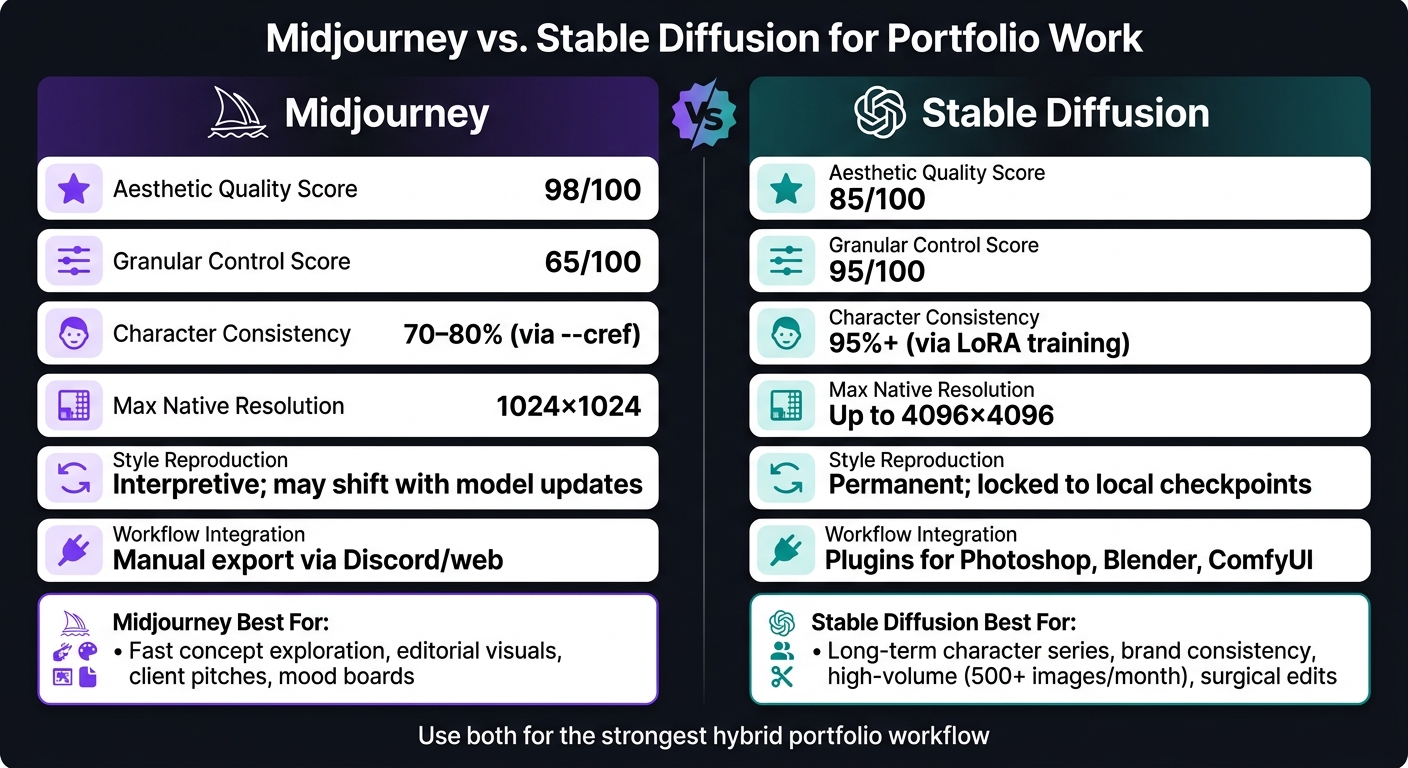
Midjourney vs Stable Diffusion: Portfolio Performance Comparison
Let’s delve deeper into how Midjourney and Stable Diffusion handle consistency and reusability in portfolio creation. These traits are vital for maintaining professional quality across series and managing assets over time, and both tools approach these challenges in distinct ways.
Consistency Across a Series
Midjourney uses the --cref and --sref parameters and a Midjourney prompts library to create a cohesive visual style, though some variations between images are inevitable due to its interpretive nature. These parameters are simple to use and great for quick brainstorming, but they may not fully lock in specific features. On the other hand, Stable Diffusion offers a more structured approach. By training a LoRA on 15–20 carefully chosen images, users can achieve over 95% consistency in features [3]. Additionally, ControlNet can ensure identical spatial layouts through pose and depth guidance, making it ideal for projects requiring precise cohesion across multiple pieces.
Recreating Looks and Styles Later
One challenge with Midjourney is that its cloud-based system can evolve, meaning the style you achieve today might shift in the future. Stable Diffusion avoids this issue by relying on local checkpoints, which preserve consistent results over time. For example, a style created in early 2026 will remain unchanged even years later. LoRA files, ranging from 20 MB to 200 MB [4], can be saved and reused, making it easy to revisit and expand upon earlier projects or adapt them for new purposes. This level of reliability is essential for portfolios that need to evolve while maintaining a consistent visual identity.
Asset Readiness and Workflow Integration
Midjourney excels at delivering polished outputs quickly via its Discord or web interface, but its closed system requires manual exporting. In contrast, Stable Diffusion integrates seamlessly into production pipelines, offering built-in upscaling and embedding workflow data directly into files. For professionals, this means faster client handoffs and simplified series expansions, saving time and effort.
| Criteria | Midjourney | Stable Diffusion |
|---|---|---|
| Series Consistency | Moderate via reference parameters [3] | 95%+ via LoRA training [3] |
| Style Reproduction | Interpretive; model updates can shift results | Permanent; locked to specific checkpoints |
| Max Native Resolution | 1024×1024 (before upscaling) [6] | Up to 4096×4096 natively [6] |
| Workflow Integration | Manual export; Discord/web only | Direct plugins for Photoshop, Blender, ComfyUI |
| Asset Reproducibility | Prompt in EXIF metadata | Full workflow JSON embedded in PNG [9] |
If speed is your priority, Midjourney is the better option for quickly generating a series using ready-to-use prompts. However, if you need long-term reliability and the ability to scale your work into complex workflows, Stable Diffusion offers the tools to meet those demands. These contrasting strengths provide a foundation for understanding how both tools can complement each other in portfolio development.
Hybrid Workflows: Using Both Tools for Stronger Results
Midjourney and Stable Diffusion each have their own strengths, but when used together, they can produce more polished and cohesive results. This hybrid workflow combines the creativity of Midjourney with the precision of Stable Diffusion, making it easier to develop a unified portfolio.
"Midjourney is an inspiration accelerator for creative teams. Stable Diffusion is an image-production system that technical teams can build." – Knightli [11]
Ideation in Midjourney, Refinement in Stable Diffusion
Start your creative process in Midjourney to quickly explore ideas, experiment with lighting, and set the mood. With the Standard Plan ($30/month), you get unlimited Relax mode generation, which is perfect for brainstorming [8]. Once you’ve landed on a strong concept, export the image and refine it in Stable Diffusion. Tools like ControlNet help preserve the composition while allowing for detailed adjustments. If specific elements, such as hands, backgrounds, or product details, need improvement, inpainting can target those areas without altering the rest of the image. This process transforms initial ideas into polished, professional assets.
To maintain consistency across a series, consider training a LoRA (Low-Rank Adaptation) model based on your best outputs. This ensures your refined concepts align seamlessly.
Style Exploration and Series Consistency
While Midjourney’s --sref parameter can keep a general aesthetic across a few images, it’s not designed for maintaining precise character details or brand elements throughout a series. After establishing the overall vibe in Midjourney, you can train a LoRA using 15–20 of your top images to lock in the style for future work [4]. This method is particularly effective for character design. Midjourney sets the tone, while Stable Diffusion, paired with ControlNet’s OpenPose, ensures that characters remain consistent across various scenes [4].
With your style secured, you can move from mood boards to fully realized, production-ready designs.
From Mood Boards to Production-Ready Assets
Midjourney is great for generating mood boards quickly, while Stable Diffusion refines those ideas into finished assets. A practical workflow involves creating 20–30 mood board concepts in Midjourney to explore directions, then selecting the top 3–5 for further development in Stable Diffusion. Node-based tools like ComfyUI can help standardize settings such as resolution and sampling, ensuring a consistent look across your final assets [4][10].
Choosing the Right Tool for Your Next Portfolio Series
The direction of your portfolio depends heavily on whether you choose Midjourney or Stable Diffusion. Each tool has its strengths, and aligning those with your project needs will shape the quality and consistency of your work.
When to Use Midjourney
Midjourney excels when you need quick, visually compelling results. It’s ideal for creating editorial portfolios, pitching concepts to clients, or producing 20–30 high-quality images in just a day or two. Its built-in aesthetic quality makes it a go-to for fast-paced projects. The Standard Plan, priced at $30 per month, provides plenty of capacity for rapid experimentation without requiring technical expertise.
However, if your project involves detailed control or demands consistency over time, you might need to look elsewhere.
When to Use Stable Diffusion
Stable Diffusion is the better option for projects requiring sustained consistency, such as character series, brand-specific styles, or offline control over assets. Its LoRA training capabilities ensure dependable character consistency [3]. Additionally, for those generating over 500 images per month, using a local GPU or renting cloud resources can be more cost-efficient compared to Midjourney’s subscription plans [5].
When to Use Both
A combination of both tools can be particularly effective during the concept-testing phase. For instance, you could spend one to two weeks using Midjourney to generate 50–100 exploratory images, helping you refine a character, style, or theme. Once you’ve identified a winning concept, these outputs can serve as training data for Stable Diffusion’s LoRA, ensuring the final series maintains a polished and consistent look.
This hybrid strategy is not just theoretical - it’s been proven. For example, the AI fashion influencer account @AivaStyle grew to 152,000 Instagram followers and $18,000 in monthly revenue by early 2026 using this exact approach. They began with two weeks of Midjourney exploration, then transitioned to Stable Diffusion with a GPU setup to produce over 200 consistent images per month [3].
"Midjourney let me test 50 different character concepts in 2 weeks. Once I found a winner, I switched to Stable Diffusion for consistency. Now I generate 200 images monthly for $0 recurring costs." – Anyro, AI Automation Architect [3]
Here’s a quick overview of portfolio goals and the most suitable tool for each:
| Portfolio Goal | Best Tool |
|---|---|
| Fast concept exploration or client pitch | Midjourney |
| Long-term character or brand series | Stable Diffusion |
| Editorial or mood-driven visuals | Midjourney |
| Surgical edits, inpainting, or exact poses | Stable Diffusion |
| Validating a concept before full production | Both (Midjourney first) |
| High-volume needs (500+ images/month) | Stable Diffusion |
Ultimately, the decision boils down to a single question: are you still exploring creative directions, or do you already have a clear vision that needs precise and consistent execution?
Prompt Packs on Art Prompt HQ That Support Portfolio Work
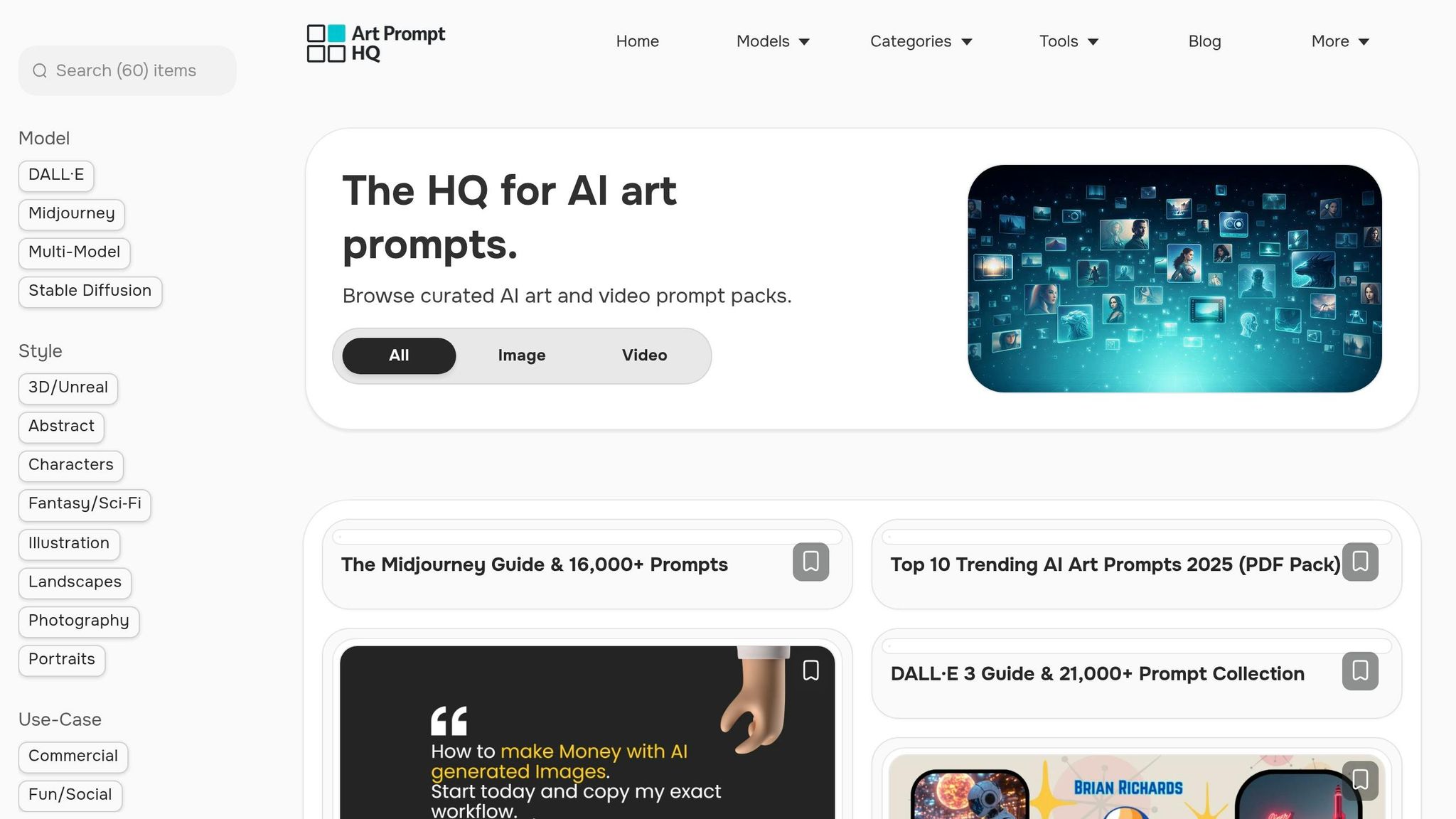
When creating a cohesive and professional series, having a reliable starting point can make all the difference. Curated prompt packs save time and effort by offering pre-tested prompts tailored to specific tools. Here's how these packs are designed to enhance the strengths of Midjourney and Stable Diffusion.
Midjourney Prompt Packs
Midjourney excels at delivering visually striking results, but achieving consistency across multiple images requires more than the model’s default capabilities. Midjourney prompt packs on Art Prompt HQ help maintain creative flow by offering structured prompts for polished hero images, editorial-style portraits, and cohesive environment series. Many of these packs include parameters like --cref (Character Reference) and --sref (Style Reference), which ensure visual consistency across a series, making them ideal for portfolio work.
Stable Diffusion Prompt Packs
Stable Diffusion operates differently, focusing on precision and control over image creation. Stable Diffusion prompt packs on Art Prompt HQ are crafted to streamline technical workflows, featuring LoRA trigger words and ControlNet-compatible setups. These packs reduce technical hurdles, making them perfect for projects requiring exact consistency, such as character-driven portfolios or brand-specific visuals. By simplifying the process, they allow creators to focus on producing high-quality, repeatable results.
Portfolio-Ready Prompt Packs
To build a portfolio with a unified, professional look - whether it’s a character deck, brand mood board, or case study visuals - portfolio-ready prompt packs are specifically designed for this purpose. These packs work seamlessly with both Midjourney and Stable Diffusion, prioritizing series cohesion, polished compositions, and outputs suitable for client presentations or design showcases. Instead of piecing together scattered prompts, these packs provide a proven system for creating consistent, high-quality work that stands out in any portfolio.
FAQs
Which tool is better for a consistent character series?
Stable Diffusion stands out when it comes to creating consistent character series, thanks to its advanced control tools and support for custom training methods like LoRA. These features enable precise replication of characters across multiple images, making it a reliable choice for projects requiring uniformity. While Midjourney often leads in producing visually stunning results, its style-focused approach can make maintaining consistency across a series more difficult. Stable Diffusion’s custom models and inpainting tools give it an edge for creating cohesive and repeatable character assets.
Can I start in Midjourney and finish in Stable Diffusion?
Midjourney excels at generating quick, high-quality concept images, making it ideal for mood boards or early-stage brainstorming. Once you’ve nailed down your ideas, Stable Diffusion steps in for more detailed adjustments and professional-level edits. With tools like LoRAs for maintaining consistency or inpainting for precise tweaks, this method blends Midjourney’s speed with Stable Diffusion’s fine-tuned control, creating a workflow that’s both efficient and versatile.
How can I maintain the same style months later?
To keep a consistent style in AI-generated portfolio projects, leverage tools like Midjourney’s --cref and --sref commands. These allow you to anchor images to specific references, ensuring uniformity. For Stable Diffusion, consider training custom LoRAs (Low-Rank Adaptations) to create reusable styles or characters. Additionally, using reference images alongside tailored prompt packs can strengthen your visual identity, making it easier to replicate the same aesthetic, even after a long break.