When designing worlds for games, films, or art, achieving consistent visuals across diverse settings like forests, cities, or alien terrains (such as a fantasy night landscape) can be challenging. Landscape and environment prompt packs simplify this by offering structured templates for creating cohesive scenes with unified lighting, composition, and atmosphere. Whether you're working in Midjourney, Stable Diffusion, or DALL·E, these packs help streamline workflows and ensure every environment feels connected. Here's how they work and why they're essential for concept artists and worldbuilders.
Why Landscape and Environment Packs Matter for Worldbuilding
Crafting a believable world requires designing numerous environments that feel seamlessly connected. Whether it's industrial space stations glowing with neon lights or enchanted forests filled with ancient ruins, every setting needs to share a consistent style. Without a clear system in place, manual adjustments can lead to mismatched styles, lighting, or moods. This is where landscape and environment prompt packs come in.
These packs act as structured templates for maintaining a unified aesthetic. They provide a systematic way to manage style, lighting, composition, and atmosphere. As Art Prompt HQ puts it:
Get 'blueprints' for specific looks... each pack is tested to produce a consistent visual style, not one‑off lucky generations [1].
The secret lies in a layered prompt structure that focuses on six key elements: foreground details (like wildflowers or rocks), mid-ground subjects (such as mountains or buildings), background horizons, atmosphere (fog or god rays), time of day (golden hour or midnight), and scale markers (tiny figures to emphasize vastness). By keeping these layers consistent across prompts, you ensure every environment feels like part of the same world - whether you're sketching out a large map or perfecting a detailed hero shot. These layers are crucial for creating a visual language that ties all scenes together.
For large-scale projects, these packs save time by removing the need to rebuild prompts from scratch for every new location. Instead, you can swap in new subjects while preserving the same camera angles, color schemes, and lighting setups. This makes them especially useful for game development and film concept art, where tight deadlines demand dozens of cohesive environments. Even under pressure, prompt packs ensure your work maintains a consistent look.
sbb-itb-997826f
What to Look For in a Landscape/Environment Prompt Pack
A well-designed landscape or environment prompt pack serves as a visual guide, helping creators maintain consistency across different scenes. The strongest packs break environments into manageable, repeatable layers while offering enough flexibility to cover various biomes, moods, and times of day - all while ensuring a cohesive style.
Layered Prompt Structure
Top-tier environment prompts are typically built around six distinct layers. The foreground adds immediate detail - think wildflowers, rocks, or water edges - that frames the scene and enhances depth. The midground is where the main subject resides, such as a mountain range, a crumbling temple, or a bustling city. The background sets the stage with distant elements like horizons, celestial bodies, or weather effects.
The atmosphere layer introduces elements like fog, god rays, or rain, which define the emotional tone of the scene. Time of day - whether it’s golden hour, twilight, or midnight - shifts lighting and color tones. Finally, scale markers like a small human figure or a lone cabin help establish the size of the environment. These markers are crucial for avoiding flat or unconvincing compositions, as AI models often struggle with relative scale without clear cues [3][5].
This structured layering ensures all generated scenes share consistent camera and lighting logic, which is essential when building interconnected locations. As GensGPT explains:
A character alone is an illustration. A character in a world is a narrative [5].
This approach not only improves the visual impact but also strengthens the storytelling potential of the world being built. A versatile pack will adapt these layers to fit a variety of thematic contexts.
Variation Options for Different Themes
Once the foundational layers are in place, the pack should provide flexibility for different themes. For instance, natural landscape packs might include deserts, forests, or tundras. Urban-focused packs could feature neon-lit cityscapes or ancient temples. Fantasy or alien-themed packs might include floating islands or glowing, bioluminescent plants, while still grounding these elements with realistic lighting and atmospheric details [3][6].
Consistency is key. Even when transitioning from a frozen tundra to a volcanic wasteland, the pack should maintain cohesive motifs, colors, and lighting. For example, if your world includes runic engravings on structures, those details should carry across diverse settings, like forest ruins or hidden caves [4][5].
High-quality packs also incorporate "State vs. Disruption" prompts. These include one set of prompts for the world's baseline conditions and another for dramatic changes, such as storms, magical phenomena, or natural disasters. This dual approach allows creators to explore dynamic shifts while staying true to the world's established logic and history [2]. This balance of structure and flexibility ensures that every environment contributes to a unified and immersive worldbuilding experience.
From Rough Maps to Hero Environments: A Practical Workflow
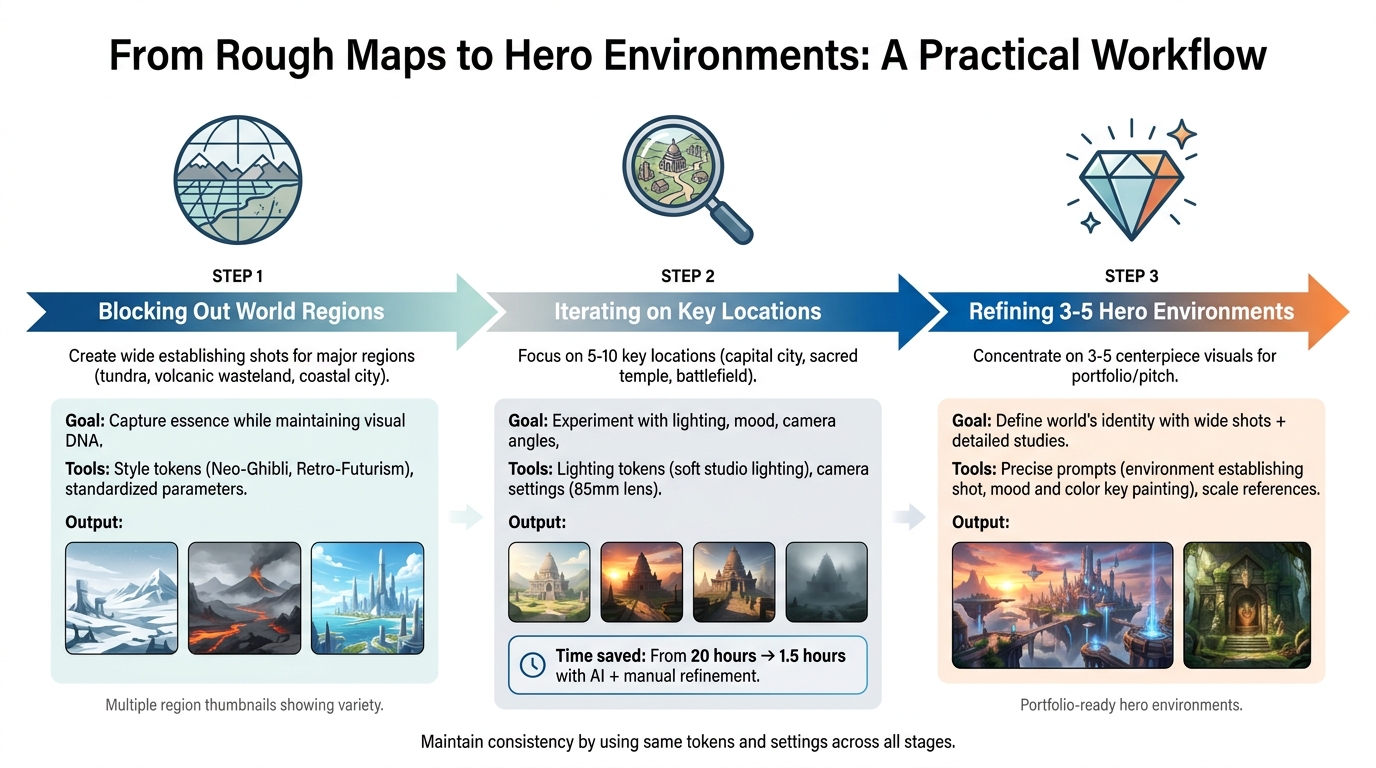
3-Step Workflow for Building Cohesive Game and Film Environments
Building a visually cohesive world doesn’t mean detailing every inch of it. Successful concept artists and worldbuilders follow a structured workflow: start with the big picture, refine key locations, and focus on a few standout hero environments that define the project’s aesthetic. Landscape and environment prompt packs serve as guides, ensuring a unified visual style as you move from broad regional maps to detailed close-ups of specific areas [1]. This step-by-step process helps you shape a world that feels consistent and immersive.
Step 1: Blocking Out World Regions
Start by creating wide, establishing shots for each major region or biome in your world. These initial drafts should focus on capturing the essence of each area - like a frozen tundra, a volcanic wasteland, or a bustling coastal city - while ensuring they all share the same visual DNA. The goal is to see how these regions fit together stylistically, avoiding the risk of them looking like mismatched pieces.
Many professional prompt packs include trending style tokens (e.g., "Neo-Ghibli" or "Retro-Futurism") and standardized parameter settings for things like aspect ratio and quality, which help maintain a consistent look across all regions [1]. For fantasy or sci-fi projects, you might turn to specialized packs like those listed in the fantasy/sci-fi settings, while urban environments can benefit from city-focused collections. Mapping templates can also assist in transitioning from rough layouts to more refined visualizations [8].
Step 2: Iterating on Key Locations
Once the broad regions are blocked out, it’s time to focus on 5–10 key locations - these could be a capital city, a sacred temple, or a pivotal battlefield. This stage involves experimenting with lighting, mood, and camera angles to find the best fit for your narrative. For example, a study in February 2026 by Jie Yun and Nayeon Kim at The Catholic University of Korea demonstrated how adjustments in material, pattern, and color could significantly enhance visual appeal when refining designs using Stable Diffusion XL [10].
Refine your prompts to include the details you need, and test multiple variations side by side. Experiment with tokens for lighting (like "soft studio lighting") or camera settings (such as "85mm lens") to see how they influence the output [9]. Gradually move from rough drafts to polished visuals, validating each iteration against your world’s established rules to avoid inconsistencies [9].
After testing various options, narrow your focus to a few standout environments that will anchor your visual narrative.
Step 3: Refining 3–5 Hero Environments
Finally, concentrate on 3–5 hero environments that will define your world’s identity. These are the centerpiece visuals for your portfolio, pitch, or trailer. Start with wide shots to establish the overall scale and mood, then dive into detailed studies of specific architectural elements, textures, and lighting [12].
Use AI-generated outputs as a foundation, isolating high-quality elements like striking buildings or effective lighting effects, and blend them into a cohesive composition [11][12]. Refine your prompts with precise language, such as "environment establishing shot" or "mood and color key painting", to guide the AI toward professional-level results [12]. Maintain consistency by using the same tokens and settings from earlier stages. Including scale references - like "tiny figures walking along massive crystalline pillars" - can enhance the sense of grandeur [12].
Once a base environment is generated, use digital painting tools to handle finer details, like intricate textures or subtle lighting adjustments, which AI may struggle to perfect [11]. This hybrid approach - combining AI outputs with manual refinements - can significantly cut production time, reducing it from around 20 hours to just 1.5 hours while still delivering high-quality visuals [11].
Natural, Urban, and Alien Worlds: Matching Packs to Your Project
Selecting the right prompt pack for your project’s environment is key to creating a visually cohesive and narratively rich experience. Whether you’re working on a survival game in a dense forest, a cyberpunk thriller, or a sprawling space opera, aligning your project’s theme with a specific pack saves time and ensures consistency. The best packs are tailored to distinct themes - natural landscapes, urban settings, alien planets, or fantasy worlds - and include tokens for lighting, composition, and mood. This approach eliminates the guesswork of single prompts and provides a reliable framework for your creative process [1].
Natural Landscape Packs
These packs are ideal for crafting scenes in forests, mountains, oceans, or deserts. They focus on authentic natural details and often include theme-specific tokens, such as plant species or realistic edge patterns. Some advanced packs even list over 50 types of trees, offering incredible detail for creating unique environments [8]. For a softer, more artistic touch, many packs incorporate options like "Neo-Ghibli" or editorial photography styles, ensuring a consistent aesthetic across multiple biomes. If your project leans toward natural realism or stylized cinematic landscapes, landscape prompt packs provide the tools to bring those visions to life.
Urban Environment Packs
Urban packs excel at capturing the complexity of cityscapes, from towering skyscrapers to intricate street-level details. They’re perfect for genres like cyberpunk, steampunk, or noir, offering tokens tailored to specific sub-genres. For instance, steampunk packs might include elements like "brass counterweights" or "geothermal vents", while cyberpunk packs focus on "sky-rails" or "volumetric neon" [4]. Many professional-grade packs are compatible with 3D tools like SketchUp or post-production software such as Photoshop, making it easier to enhance your designs. When building futuristic cities or industrial zones, look for packs that emphasize structural details like grid patterns or governance-inspired layouts to add depth and realism to your project [8].
Alien World Packs
For projects set in extraterrestrial landscapes, alien world packs offer a treasure trove of unique features. They’re designed for hard sci-fi and space opera settings, incorporating tokens for bioluminescent plants, multiple suns, crystalline formations, and atmospheric phenomena like methane rain or red-dust storms [3][7]. These packs often encourage creators to think beyond Earth’s norms, introducing non-human sensory experiences such as scent trails or heat-sensitive elements [4]. For polished, portfolio-worthy results, 3D/Unreal-style packs provide the technical precision needed to render otherworldly environments with striking detail.
Fantasy Realm Packs
Fantasy realm packs are essential for projects steeped in magic, mythology, and epic storytelling. They focus on elements like enchanted forests, floating islands, ancient ruins, and mythical creatures. Some packs even include imaginative features like dragons that guard memories instead of treasure. The best fantasy packs combine natural elements with fantastical structures, such as stone bridges connecting floating islands or waterfalls defying gravity [3]. To maintain a consistent visual identity, look for packs with recurring motifs like twin moons or perpetual twilight. For large-scale projects involving multiple kingdoms or biomes, fantasy/sci-fi settings and portfolio-ready environments offer the depth and variety needed to create a richly detailed world.
Keeping Your World Visually Consistent Across Many Scenes
Creating a believable and cohesive world means sticking to a unified visual approach that ties together every setting, whether it's a dense forest, a sprawling city, or an alien desert. Instead of treating prompts as isolated experiments, they can serve as blueprints. By embedding specific lighting, camera, and composition settings into your prompts and only swapping out the subject or environment details, you can ensure the AI generates consistent, on-brand visuals across numerous scenes without veering off course [1].
Recurring Motifs and Lighting Schemes
Lighting plays a key role in connecting different locations visually. By locking in a specific color temperature and shadow direction - like "golden hour side-lighting" or "soft studio lighting with long shadows" - you can unify the look of your scenes. For example, in November 2025, filmmaker Tim Simmons used World Labs' Marble platform to design a stable 360-degree virtual set for his micro-short film, Alarm. This "Space Station" environment allowed Simmons to maintain consistent geometry and lighting across the entire 48-second production. Reflecting on the experience, Simmons said:
Marble gave me a stable 360-degree virtual set I could wander, I kept finding angles I'd never think to prompt for without an actual space to explore [14].
To keep recurring motifs - like twin moons, intricate runes, or frosted glass - consistent across your scenes, reuse the same high-performing tokens for those elements. This method helps ensure your world's visual identity remains intact [1].
Color Palettes and Camera Language
Consistency in color and camera settings is just as important as lighting when it comes to tying your environments together. Start by defining 3–4 primary colors for your project (e.g., "neon blue and pink" for a Cyberpunk theme or "warm ochre and deep green" for a fantasy forest) and stick to them across all scenes. Similarly, standardize your camera settings by using the same focal lengths (like 35mm for wide shots or 85mm for close-ups) and depth-of-field configurations.
In August 2025, creator Alexandre Latour demonstrated this approach while working on a 1-minute music video for the album Skaalven Dovhkaar. Using the Flux Kontext model on OpenArt, Latour maintained consistency in character and environment design by separating the two and applying a persistent art style (Flux Pro). This ensured that lighting and shadows aligned perfectly across multiple frames of a Viking navigating a snowy forest [13]. Additionally, standardizing global parameters like aspect ratio (e.g., --ar 16:9), stylization levels, and quality settings can help maintain uniform textures and intensity in your AI outputs.
To achieve this kind of consistency, integrate these unified settings into your landscape environment prompt packs. Starting with a "Starter" blueprint that includes fixed lighting, camera, and composition tokens can ensure every scene feels like a natural extension of the same world. Applying these techniques carefully is the key to constructing visually cohesive worlds with your prompt packs.
Using Prompt Packs Across Different AI Models
Prompt packs aren't limited to just one AI platform. Their structure can be adjusted for use across tools like Midjourney, Stable Diffusion, DALL·E, and even video platforms such as Sora, Veo, and Runway. The trick lies in understanding each model's unique features and adapting your prompts to align with their syntax, all while keeping the visual identity of your project consistent.
Midjourney, Stable Diffusion, and DALL·E
Midjourney excels at creating artistic, painterly visuals, making it perfect for fantasy and sci-fi themes or concept art. To achieve consistency, you can use parameters like --ar 16:9 for wide landscapes or --v 6 for more stylistic control. Including detailed descriptors such as "foreground foliage, midground mountains, atmospheric fog" ensures your world-building elements remain cohesive. For example, a prompt for a fantasy kingdom might look like this:
"Layered fantasy valley, foreground ancient oaks, midground mist-shrouded castle, background jagged peaks at twilight, epic scale, earthy color palette --ar 2:1 --stylize 750"
Stable Diffusion offers flexibility through models like SDXL, making it ideal for natural or urban scenes that demand precision. Negative prompts, such as "blurry, oversaturated, text, watermarks", help eliminate common issues and maintain a polished look. Pairing this with tools like ControlNet ensures consistency in scale and pose. Using a consistent seed and palette keywords further unifies your outputs. For instance, the same fantasy valley prompt in Stable Diffusion might include additional layers and a negative string to produce recurring elements like stone ruins and twisted trees.
DALL·E 3 stands out for narrative-driven prompts, making it a strong choice for alien landscapes or environments with specific moods. Its natural language processing allows for concise yet descriptive prompts like "dawn-lit alien canyons with recurring crystal motifs." Refinement through inpainting and reusing descriptors such as "neon haze" or "vivid sky" ensures cohesive results across multiple outputs.
| Model | Best For | Key Adaptation | Consistency Method |
|---|---|---|---|
| Midjourney | Fantasy realms, concept art | Use --ar, --stylize, and layered prompts |
Fixed lighting/camera tokens, recurring motifs |
| Stable Diffusion | Natural/urban environments | Negative prompts, ControlNet, consistent seeds | Palette keywords, specialized LoRAs |
| DALL·E 3 | Alien worlds, narrative scenes | Natural language, concise prompts, inpainting | Reuse key descriptors, time-of-day variations |
Video Tools: Sora, Veo, and Runway
These principles extend beyond still images into video production. Adapting your landscape prompt packs for motion involves adding dynamic verbs and detailed camera directions.
Sora works well for natural and fantasy scenes. For example, a static prompt can evolve into "windswept dunes shifting at dusk", with 1080p aspect ratios and short clips (5–10 seconds) to maintain consistent lighting and recurring visuals.
Veo is better suited for alien worlds or urban ruins. Use camera movements like "slow pan over urban ruins", and provide reference images to reinforce your color palette. Prompt chaining can extend videos to 20–60 seconds while maintaining coherence.
Runway is ideal for urban and fantasy environments, leveraging its Gen-3 Alpha text-to-video feature. Start with hero stills generated from your image packs, then apply motion brushes for controlled dynamics. Style presets aligned with your original packs help preserve the visual identity.
The workflow is simple: create base stills with your layered prompt packs in Midjourney, Stable Diffusion, or DALL·E. Use these stills as a foundation for video tools, enriching them with motion-specific descriptors. Consistency can be measured by checking for recurring motifs (aim for 85–90% across 50 generations) and ensuring the palette remains intact in video clips. This approach allows you to seamlessly transition from static images to dynamic videos, bringing your world to life while keeping its visual essence intact.
Where to Find Landscape & Environment Prompt Packs on Art Prompt HQ
Art Prompt HQ organizes its selection of prompt packs into three main categories: Models (like Midjourney, Stable Diffusion, DALL·E, and Video tools), Styles (such as Fantasy/Sci-Fi, Photography, 3D, and Portraits), and Goals (including learning prompting, building portfolios, commercial use, and creating viral shorts). For those focused on landscape and environment worldbuilding, the Landscapes Prompts category is a great place to start. These packs are specifically tested to deliver consistent visual styles across multiple generations. If you're aiming for stylized, game-ready environments, check out the 3D/Unreal-style packs, which are tailored for Unreal Engine-compatible aesthetics. This structure makes finding the right prompt pack for your creative vision straightforward.
For professionals working on larger projects, the platform also features Master Systems - high-quality, commercial-grade packs designed for reliable and repeatable results. These systems cater to specific aesthetics such as Neo-Ghibli, Retro-Futurism, and Cyberpunk. If your focus is on fantasy and sci-fi settings, these packs can help you layer elements like foreground, midground, background, and atmospheric details, enabling you to create immersive alien worlds or magical realms.
Art Prompt HQ also provides tools like the free AI Art Style Finder, which helps you identify the right phrases to match your worldbuilding vision before committing to a full pack. Additionally, the Midjourney Prompt Tool and AI Image Prompt Refiner are available to help you refine your ideas by cleaning up prompts and adding essential parameters like aspect ratio and stylization, ensuring your final output matches your vision.
Packs double as teaching tools, showing you which tokens influence aspects like style, lighting, composition, and mood [1].
This makes them valuable for understanding and replicating professional structures. Whether you're creating a portfolio or crafting a cohesive world, these curated landscape and environment packs are a solid foundation.
For more options, including portfolio-ready environments and additional guides, explore the landscape and environment packs or check out the AI art prompt guides.
Conclusion
Creating cohesive worlds for games, comics, films, or personal projects requires a structured approach. Prompt packs that layer essential elements - like foreground, midground, background, atmosphere, time, and scale - are key to building visually consistent environments. These tools help eliminate inconsistencies, guiding you through stages such as blocking out regions, refining key locations, and finalizing polished, portfolio-ready hero environments. By incorporating recurring motifs, unified lighting, shared color palettes, and consistent camera techniques, you can ensure every biome, cityscape, or alien landscape feels interconnected.
The workflow discussed - starting with broad region blocking, moving to detailed iterations of key locations, and refining a few hero environments - offers concept and environment artists, as well as game developers, a scalable process for turning ideas into polished visuals. AI-generated outputs from these prompt packs act as a springboard to accelerate your creative vision. With some refinement, they can transform into stunning final assets. Beyond simplifying production, this process deepens your grasp of style, lighting, and composition, ensuring your world feels cohesive from every angle.
Looking to start your next worldbuilding project? Explore landscape and environment prompt packs at Art Prompt HQ, designed to match your creative needs. For more ideas, check out resources for fantasy and sci-fi settings or portfolio-ready environments. You can also visit the AI art prompt guides to sharpen your worldbuilding skills and refine your creative process.
FAQs
How do I keep every biome in one consistent style?
To create a consistent style across different biomes, pay attention to recurring elements like motifs, lighting, color schemes, and camera techniques. Layered prompts are particularly useful for maintaining uniform atmospheric conditions and ensuring stylistic harmony across the foreground, midground, background, and overall ambiance. Using curated prompt packs tailored to specific themes - whether natural landscapes or urban environments - can further enhance cohesion, making all scenes and biomes visually connected.
What should I change vs. lock in when using a prompt pack?
When working with a landscape environment prompt pack, focus on solidifying key elements like recurring motifs, lighting setups, and consistent color palettes. These aspects help tie all scenes together, making them feel like they belong to a unified world.
At the same time, you can experiment with adjustable components such as the foreground, midground, background, atmosphere, time of day, and scale. Tweaking these details adds variety while keeping the overall aesthetic intact, striking a balance between consistency and creative exploration for seamless worldbuilding.
How can I reuse a landscape environment prompt pack across Midjourney, SDXL, and DALL·E?
To make a landscape environment prompt pack work across Midjourney, SDXL, and DALL·E, you’ll need to tweak its layered structure - think foreground, midground, background, atmosphere, time, and scale - to match each model’s syntax. Each tool has its own strengths, so tailor your prompts accordingly:
- Midjourney: Leverage stylistic keywords to emphasize mood and artistic flair.
- SDXL: Focus on detailed textures and intricate elements for realism.
- DALL·E: Keep prompts concise and descriptive for clear, straightforward results.
To achieve cohesive visuals, ensure motifs, lighting, and color palettes remain consistent, even as you adapt the prompts to suit each platform’s capabilities. This approach helps unify your work across different tools.