Creating viral short-form videos is all about speed and consistency. Prompt packs are pre-designed AI instructions that help you generate scroll-stopping visuals, hooks, and sequences tailored for platforms like TikTok, Instagram Reels, and YouTube Shorts. Instead of starting from scratch, these packs streamline your workflow, allowing you to produce engaging content faster while keeping your visuals aligned with platform trends and audience preferences.
This guide explains how to use prompt packs effectively, from selecting the right ones for your niche to crafting high-retention visuals that grab attention in the first 1.5 seconds. Whether you’re making educational clips, storytelling videos, or product demos, you’ll learn how to turn a single prompt pack into a week’s worth of scroll-stopping shorts.
What Makes a Visual 'Viral-Ready' in Short-Form Content
Visuals need to grab attention immediately. TikTok users make decisions in just 0.4 seconds, while Reels users take slightly longer at 1.7 seconds [5]. This means your AI-generated visuals must do more than look appealing - they need to disrupt the viewer's scrolling, communicate instantly, and suggest motion. With 65% of viewers dropping off within the first 3 seconds if they aren’t hooked [5], mastering what makes a visual "viral-ready" can be the difference between being ignored or widely shared. Let’s dive into the key elements that elevate your AI-generated content to viral status.
Strong Pattern Interrupts
A pattern interrupt is a visual surprise that makes people stop scrolling. It could be an unexpected mix of colors, a surreal AI-generated scene (like a luminous jellyfish gliding through a subway), or bold text that challenges expectations.
"Pattern interrupts can increase watch time by up to 85%. Visual jolts, unexpected sounds, and cognitive dissonance in the opening seconds force viewers to pause their scroll" [5].
When choosing viral shorts prompt packs, focus on those that deliver high-contrast visuals, unusual compositions, or elements of surprise - anything that makes a viewer hesitate before swiping past.
Clear Subjects and Legible Text
Once you've hooked the viewer, clarity is essential. Since 80% of viewers watch short-form content on mute [2], your visuals must tell a story without sound. This means featuring a clear subject - whether it’s a person, object, or concept - centered or placed in the upper third of the frame to avoid interference from platform overlays.
Text overlays should be bold, high-contrast, and large enough to read on a phone screen, even when someone’s on the move. Viral Shorts maintain a 76% retention rate [2], and easily readable text plays a big role in keeping viewers engaged. When generating visuals, include "vertical composition" or "9:16 aspect ratio" in your prompts, and leave space for captions or hooks at the top or bottom of the frame.
Movement or Implied Motion
Static visuals often fail to hold attention. Even if you're working with AI-generated still images rather than video prompt packs, the visuals should suggest movement or change - think flowing hair, swirling particles, diagonal lines, or subjects in motion. In post-production, use techniques like jump cuts or motion effects every 2–3 seconds to keep the viewer visually engaged.
"Videos with a pattern-interrupt hook in the first 1.5 seconds see 3–5x higher completion rates than those that build up to the point" [1].
These hooks often rely on visual motion, such as a sudden zoom, a color shift, or an evolving AI-generated sequence.
In summary, viral-ready visuals combine an eye-catching opening frame, a straightforward subject with room for readable text, and dynamic energy to sustain interest until the very end. By mastering these elements, you’ll be ready to incorporate them into your workflow for maximum impact.
sbb-itb-997826f
Choosing the Right Prompt Packs for Your Niche and Platform
When creating content, aligning your prompt packs with your niche and platform is a game-changer. Whether your focus is educational material, storytelling, product demonstrations, or visually striking aesthetics, the right pack can save you time and ensure your visuals resonate with your audience and meet platform-specific expectations.
Prompt Packs by Niche
Every niche has its own storytelling style and visual requirements. For educational creators, look for packs tailored to formats like "Edutainment", micro-lessons, or cheat sheets. These packs often feature prompts for clean, text-friendly visuals - such as bold infographics, side-by-side comparisons, or quick "Did-You-Know" factoids. These are perfect for delivering value quickly while leaving space for captions to clarify complex ideas.
Storytelling creators, whether you're narrating suspenseful tales or adapting personal experiences, benefit from packs that emphasize mood and atmosphere. Prompts designed for dramatic lighting, dynamic compositions, and implied motion - like a character mid-action or a shadowy scene - can enhance your narrative without overshadowing the story.
If your niche involves product demos or business content, choose packs that offer prompts for "Product Feature Highlights" or UGC-style reviews. These packs often mimic a raw, handheld aesthetic, creating a sense of authenticity. For showcasing products, vertical compositions with space for overlay text (e.g., "This tool changed my life in 48 hours") work especially well.
For aesthetics and ASMR, packs that focus on hyperrealistic visuals or rich textures - like "3D Paint Strokes" or "Macro Fruit ASMR" - can create a sensory experience that grabs attention, even for viewers scrolling on mute.
Matching Packs to Platforms
Different platforms reward specific visual styles and trends, so tailoring your prompt packs to each one is crucial.
- TikTok prioritizes trend-driven content and relatable POV visuals, with trends often peaking within 48–72 hours. Look for packs offering flexible, hook-driven compositions that allow for quick adaptation to trends. Since TikTok rewards native effects and stickers, ensure your visuals leave room for platform-specific overlays.
- Instagram Reels leans into polished aesthetics and lifestyle content. Since watermarked videos are downranked, use packs that produce original-looking visuals. Reels trends last longer than TikTok’s, giving you time to refine your content. Focus on packs that deliver cohesive, high-contrast visuals - ideal for "Day in the Life" clips or minimalist routines.
- YouTube Shorts values searchability and retention over fleeting trends. Packs optimized for explainer visuals, "Did-You-Know" hooks, or educational content work best here. Since YouTube rewards high watch times, your visuals need to maintain viewer interest throughout the clip.
Across all platforms, aim for vertical framing (9:16 aspect ratio) and ensure your visuals include pattern-interrupt hooks within the first 1.5 to 3 seconds.
Choosing the Right AI Model
The AI model you pair with your prompt pack plays a big role in the final output. For scripting and hooks, tools like ChatGPT, Claude, and Gemini are reliable for crafting engaging text frameworks.
For visuals, the choice depends on the style you’re aiming for. Veo excels at cinematic shots and polished product visuals, while Kling is ideal for niches like cars or whimsical animal content. Sora, on the other hand, handles complex scenarios like humorous or action-packed scenes.
The balance often lies between speed and quality. AI tools help you produce content quickly - an advantage when platforms reward frequent posting. By using AI for repetitive tasks like scripting, editing, and captions, you can focus on maintaining the human touch that ensures authenticity and avoids penalties for overly automated content. As Caleb Leigh, Founder of CreatorSkills, explains:
"Virality isn't random. It's a system. AI just makes the system fast enough to actually run."
When browsing viral shorts prompt packs, check if the pack is optimized for specific AI models and includes features like visual scene descriptions, emoji-rich captions, and timing cues for voiceovers. These details ensure a seamless workflow and help you create visuals that align with your niche while maintaining a consistent brand style. With the right AI model and prompt pack, you can streamline your process and focus on delivering content that stands out.
Step-by-Step Workflow: From Prompt Pack to Finished Short
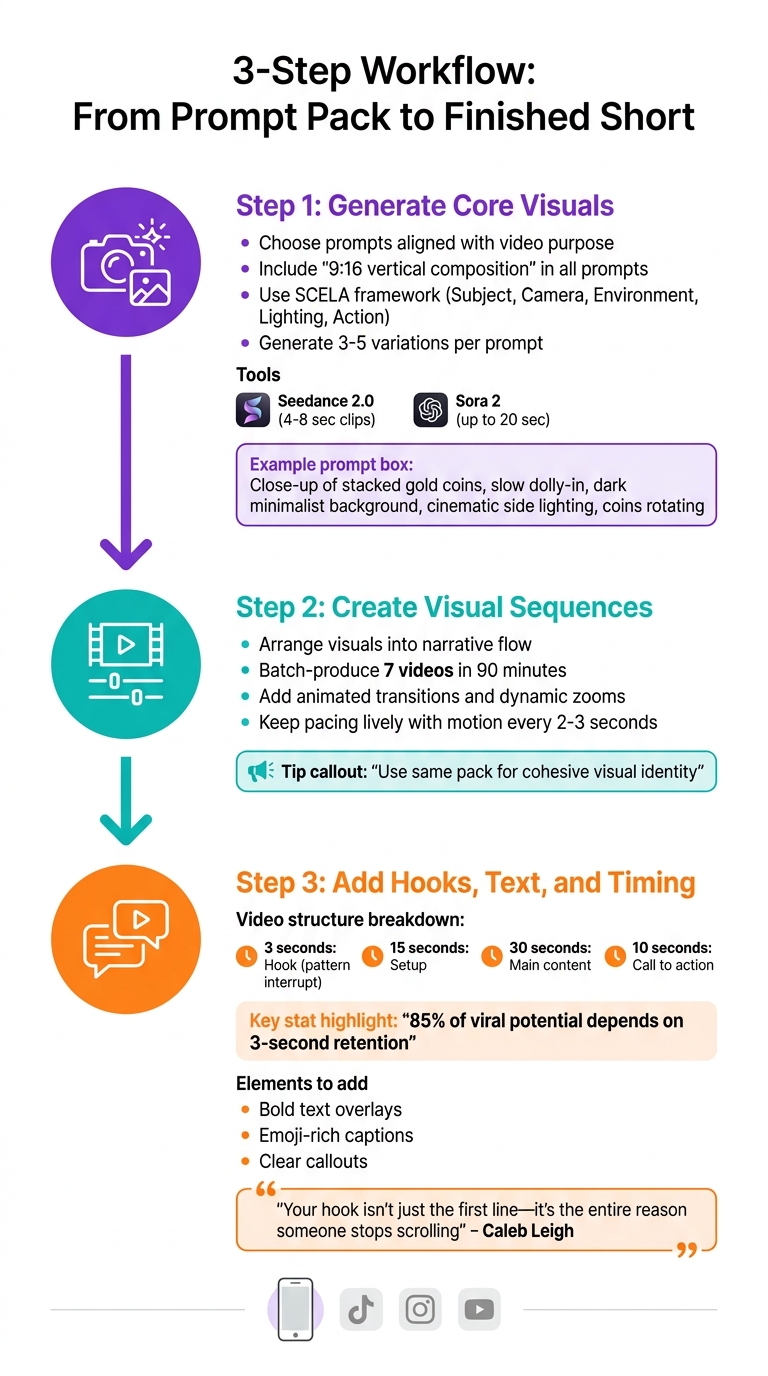
3-Step Workflow for Creating Viral AI Shorts from Prompt Packs
Transforming a prompt pack into a scroll-stopping short doesn’t have to be complicated. By following these three steps, you can craft engaging videos that grab attention and keep viewers hooked.
Step 1: Generate Core Visuals
Start by choosing prompts from your pack that align with your video’s purpose. If you’re making "Did-You-Know" style shorts, go for prompts that create clean, text-friendly visuals. For storytelling or product demos, focus on prompts that emphasize mood, movement, or implied action. Always include "9:16 vertical composition" to ensure your visuals fit TikTok, Reels, and Shorts without awkward cropping.
Use the SCELA framework - Subject, Camera, Environment, Lighting, and Action - to create detailed prompts that support your video’s hook and narrative. For instance: "Close-up of stacked gold coins, slow dolly-in, dark minimalist background, cinematic side lighting, coins rotating."
Generate 3–5 variations of each prompt to compare results. Tools like Seedance 2.0 are great for short clips (4–8 seconds), while Sora 2 works better for longer cinematic sequences (up to 20 seconds). Aim for visuals that are clear and engaging even without sound.
Step 2: Create Visual Sequences
Once you’ve generated your core visuals, arrange them into a sequence with a clear narrative flow. For example, you could show a time-lapse of a construction project, moving from an empty lot to a completed building. This progression builds curiosity and keeps viewers engaged.
Batch-produce 7 videos in 90 minutes to maintain a consistent style across your content. By using prompts from the same pack, you’ll create a cohesive visual identity that your audience will recognize instantly. Enhance your visuals with animated transitions and dynamic zooms to keep the pacing lively, showcasing your most eye-catching elements early on.
Step 3: Add Hooks, Text, and Timing
Now it’s time to layer on the elements that make your video stand out. A strong hook is critical - 85% of a video’s viral potential hinges on retention at the 3-second mark[5]. Use bold text overlays, emoji-rich captions, and clear callouts to grab attention, especially for viewers watching without sound.
Structure your short into four parts: a 3-second hook, 15-second setup, 30-second main content, and a 10-second call to action. Hooks that spark curiosity or play on loss aversion, like "Stop doing [Task]" or "Before you buy [Product], watch this", are particularly effective. As Caleb Leigh, Founder of CreatorSkills, puts it:
"Your hook isn't just the first line - it's the entire reason someone stops scrolling"[1].
When choosing viral video prompt packs, look for ones that include scene descriptions, timing tips for voiceovers, and caption templates. These extras save time and help you create content that feels authentic while staying algorithm-friendly. Check out our AI art prompt guides for more tips on refining your prompts and hooks.
Turning One Pack into a Week's Worth of Shorts
Using a single viral shorts prompt pack can simplify your content creation process while reinforcing your visual identity. By batching your production, you can transform one pack into an entire week's worth of high-quality shorts. AI tools make this even more efficient, allowing you to create content at twice the speed and cut costs by as much as 80%[3]. Think of your prompt pack as a reusable system for consistent visuals.
Batching for Efficiency
Set aside just 90 minutes each week to script and create visuals for seven upcoming shorts. With AI, scripting time drops from 30–45 minutes per video to a quick 5–10 minutes[1]. Start by generating 10–15 hook variations per video. Hooks can include curiosity-driven phrases like "There's a hidden room inside the Eiffel Tower" or bold statements such as "I doubled my income in 60 days." From there, choose the top 2–3 hooks for testing[1].
Create a style template for your videos that defines key elements like environment, lighting, and camera movement. For instance, if your pack includes cinematic B-roll prompts, your template might look like this: "slow dolly-in, dark minimalist background, cinematic side lighting, 9:16 vertical composition." Then, customize the subject for each video. For example, video one could feature "stacked gold coins rotating", while video two might show "an open book with glowing pages." As with any workflow, generate multiple variations and pick the strongest visuals[4].
A real-world example comes from Sonesta Hotels, which adopted AI-driven content creation strategies in 2025. By integrating scripting, visuals, and AI-generated voices into a single pipeline, they reduced social media video costs by 80%[3]. You can apply a similar approach: when one style or topic performs well, build on that success by creating 3–5 follow-up videos in the same style[1].
Once your batch is ready, focus on ensuring each video aligns with your brand’s visual identity.
Maintaining a Consistent Brand Look
Consistency in your visuals strengthens recognition, and prompt packs make this easier to achieve. Use the SCELA framework - Subject, Camera, Environment, Lighting, and Action - to structure prompts so every video feels like part of a cohesive series[4]. For example, if you're making educational shorts on productivity, your prompts might include "clean desk setup, overhead camera, bright natural lighting, hands organizing tools." Only the subject needs to change to keep the series feeling unified.
If you're juggling multiple niches or producing a high volume of content, tools that allow custom AI model profiles can help lock in specific styles. This prevents unwanted style shifts between sessions[6]. As Louis Vick, a Content Creator and Entrepreneur, advises:
"Consistency beats perfection. Start with 3–5 Shorts weekly to test ideas, then ramp up once you find what works"[2].
Common Mistakes with AI Visuals in Shorts (and How to Avoid Them)
Even with the help of viral shorts prompt packs, certain visual missteps can sabotage your video’s success. These errors can hurt watch time and weaken your brand's presence. Thankfully, each has a straightforward fix.
Weak Pattern Interrupts
The first 1.5 to 3 seconds of a video are critical. This is when the algorithm decides whether to keep showing your content. If your opener doesn’t grab attention immediately, viewers will scroll past, and your efforts will go unnoticed[1][9]. A common mistake is starting with a slow buildup rather than an instant hook. Videos that include a strong pattern-interrupt hook in the first 1.5 seconds often achieve 3–5× higher completion rates[1].
"If your hooks don't stop the scroll, nothing else matters"[1].
To address this, ensure your most eye-catching AI-generated element appears right at the start. Use prompt packs that focus on creating bold visual hooks, such as curiosity-inducing setups, striking claims, or “stop doing X” formats. For advanced control over pacing and scene continuity, a cinematic video toolkit can help refine these high-impact sequences. These techniques are highly effective at breaking the scrolling habit[8][1]. Once you’ve captured attention, simplify your visuals to keep the focus clear.
Overly Complex or Crowded Visuals
After grabbing attention, clarity becomes key. Many creators overuse flashy AI effects, surreal transitions, or busy backgrounds, which can overwhelm viewers and obscure the main subject[8]. This is especially problematic on mobile screens, where most shorts are consumed.
To avoid this, make your subject or product the centerpiece of your frame. Use clean lighting and ensure the visuals are easy to interpret at a glance[8]. Instead of adding distracting effects, use AI for subtle enhancements like arrows or text overlays that highlight key features[8]. Since around 69% of viewers watch videos without sound, captions and clear visuals are essential[7]. When selecting video prompt packs, choose those that emphasize uncluttered designs and readable text over excessive visual flair.
Even with engaging visuals, maintaining a consistent style across your content is crucial.
Inconsistent Style Across Shorts
Producing multiple variations without a unified visual identity - such as consistent colors, fonts, or logo placement - can make your brand appear disorganized and untrustworthy[8]. This issue becomes more apparent when batching content from a single pack, as viewers expect a cohesive look across your videos.
To maintain consistency, create a Brand Kit with your hex codes, fonts, and logo, and use a master visual template for all your shorts[8]. Stick to precise phrasing for key elements in your prompts (e.g., "emerald green leather jacket") to avoid variations that stray from your intended look. For long-term projects, you might consider training a LoRA (Low-Rank Adapter) on 15–30 images of a specific style or character to ensure the model consistently replicates your brand’s identity[10].
Practical Tip: Treat your prompt pack as a framework for maintaining visual consistency. Lock in your brand elements, simplify your designs, and prioritize a strong hook to stop the scroll. Prompt packs are tailored to help you achieve a cohesive look while streamlining your content creation process.
Where to Find Viral-Ready Prompt Packs on Art Prompt HQ
Once you've learned to sidestep common pitfalls and establish a smooth visual workflow, the next step is finding the right tools to power your short-form content strategy. Art Prompt HQ simplifies this process by curating hundreds of prompt packs organized by niche, platform, and AI model. This allows you to skip the guesswork and start creating eye-catching visuals right away.
Explore Viral Shorts Prompt Packs
The viral shorts prompt packs on Art Prompt HQ are tailored for creators focused on platforms like TikTok, Instagram Reels, and YouTube Shorts. These packs are categorized by niches such as Edutainment, Business & Sales, Comedy, Gaming, Cooking, Fitness, and Travel, and they use a hook-first approach to grab attention in the first 1–2 seconds. Research shows that videos with compelling hooks early on can achieve 3–5× more views compared to standard AI-generated visuals [4].
Each pack is designed with the SCELA framework, ensuring your clips feature dynamic camera angles, professional-quality lighting, and clear, engaging subjects. You'll also find packs fine-tuned for specific formats - like vertical 9:16 aspect ratios optimized for mobile - and content styles such as "Did-You-Know" factoids, Top-N countdowns, UGC-style reviews, and quick how-to tutorials. For creators working with AI video tools like Sora, Veo, or Runway, the video prompt packs section offers options for cinematic B-roll, product demonstrations, and extended sequences. If additional tweaks are needed, Art Prompt HQ provides tools like the SORA 2 Prompt Generator to refine and customize your prompts further.
Try Tools to Refine Your Prompts
Art Prompt HQ also offers free tools to help you polish your prompts. These include Viral Hook Generators that provide 10–15 variations of attention-grabbing openings - like curiosity-driven questions, bold statements, or unexpected twists - and script writers designed to optimize pacing and structure for TikTok, Reels, and Shorts. You can test variations of a single idea, create 3–5 different versions, and use performance analytics to identify the most effective one. For more detailed strategies on prompt optimization and batching workflows, visit the AI art prompt guides section, where you'll find tutorials and real-world case studies to enhance your process.
FAQs
How do I pick the right prompt pack for my niche?
To find the right prompt pack, think about your niche, the style of content you create, and what resonates with your audience. For instance, educational content works best with clear, easy-to-read visuals, while meme-style or aesthetic shorts thrive on bold, eye-catching designs. Choose packs that suit your objectives - whether it's cinematic B-roll to enhance storytelling or striking visuals for product demos. Make sure the prompts also meet platform-specific requirements, such as vertical framing for mobile or fast pacing for short-form content.
Which AI model should I use with these prompt packs?
The right AI model for your project depends on the kind of visuals you're aiming to create. Midjourney and Stable Diffusion excel at producing high-quality, detailed images. If you're leaning toward cinematic or abstract styles, DALL·E and Runway are strong options. For short-form video content, platforms like Sora or Veo are well-suited. Pairing the right model with prompt packs can help you achieve the style and engagement you're looking for.
How do I keep my AI Shorts on-brand and consistent?
To keep your AI Shorts aligned with your brand, choose prompt packs that match your niche and the platform you're targeting. Prioritize visuals that reflect your brand’s colors, style, and themes. By batch-producing content from a single pack, you can ensure a consistent and unified aesthetic. Incorporate branding elements like text overlays and motion effects, and fine-tune the results with human editing to add character and strengthen your brand identity throughout your content.