If you're selling on Etsy or running a print-on-demand (POD) business, AI prompt packs can help you scale your design production efficiently. These are pre-built instructions for AI tools like Midjourney or Ideogram, designed to generate consistent, print-ready designs for products like posters, T-shirts, mugs, and stickers. By using prompt packs tailored for specific niches and product types, you can create high-quality designs faster while meeting marketplace standards. This guide explains how to choose the right packs, streamline your workflow, master the grammar of AI prompting, and grow your catalog without sacrificing quality.
What Makes a Prompt Pack "Product-Ready" for Etsy and POD
Not all prompt packs are designed with commerce in mind. While some collections might create visually stunning results on-screen, they can fall short when translated into physical products like mugs or T-shirts. A product-ready pack is crafted with the technical and commercial requirements necessary to ensure the final output works seamlessly as a digital or physical product, not just as a portfolio piece.
Key Features of Product-Ready Prompt Packs
Product-ready prompt packs are built with print-safe designs as a top priority. For items like apparel and stickers, prompts often specify features like "isolated subject", "pure white background", "no shadows", or "no gradients." These details make it easier to cleanly remove backgrounds, avoiding issues like a visible rectangular halo on colored fabrics, which can signal poor print preparation [1][3]. For posters and wall art, prompts focus on centered compositions and equal margins, accommodating the 3–5 mm bleed area trimmed by print-on-demand (POD) services during production [1][7].
These packs also include precise technical guidelines, such as resolution, upscaling, and aspect ratios, ensuring outputs meet industry standards [1][5]. Aspect ratios are tailored to common products: 1:1 for stickers, 2:1 for mug wraps, and sizes like 18×24 or 24×36 for posters, preventing awkward cropping that might otherwise lead to customer dissatisfaction.
Reproducibility is another hallmark of quality product-ready packs. They often include consistent "style suffixes" - phrases like ", watercolor illustration, muted earth tones, isolated on white" - to ensure a cohesive look across all designs. This consistency helps establish a unified product line. For text-heavy items, such as quote prints or slogan mugs, these packs are optimized for tools like Ideogram v3 or Seedream 5.0 Lite, which excel at rendering clean, readable typography [1][7].
Equally important is commercial licensing. Product-ready packs come with clear commercial use rights or Private Label Rights (PLR/MRR), allowing creators to monetize their outputs without worrying about violating model terms of service, using monetization strategies for AI-generated images [9][10].
These technical and stylistic considerations are what set product-ready packs apart. Next, let’s explore how they differ from general art packs.
How Product-Ready Packs Differ from General Art Packs
While general art packs are designed for artistic experimentation, featuring complex backgrounds, dramatic lighting, and intricate designs, they often struggle to translate into printable formats. Product-ready packs, on the other hand, focus on usability and scalability. Their designs are clean, simple, and high-contrast, making them suitable for both digital displays and physical products [1][3].
"AI prompts for Etsy are not about generating random art. They're about building structured design and SEO systems that create repeatable sales." [3]
The differences extend to quality control and ease of post-processing. General art packs often require significant manual adjustments - removing artifacts, tweaking contrast, or redrawing text. In contrast, product-ready packs are tested to ensure outputs can be upscaled, exported, and uploaded to a POD platform with minimal effort [1][5]. They also take color management into account, generating in sRGB for digital use while preparing for CMYK conversion if needed, as RGB colors can appear muted in print [7].
sbb-itb-997826f
Choosing the Right Packs for Wall Art, Apparel, Stickers, and More
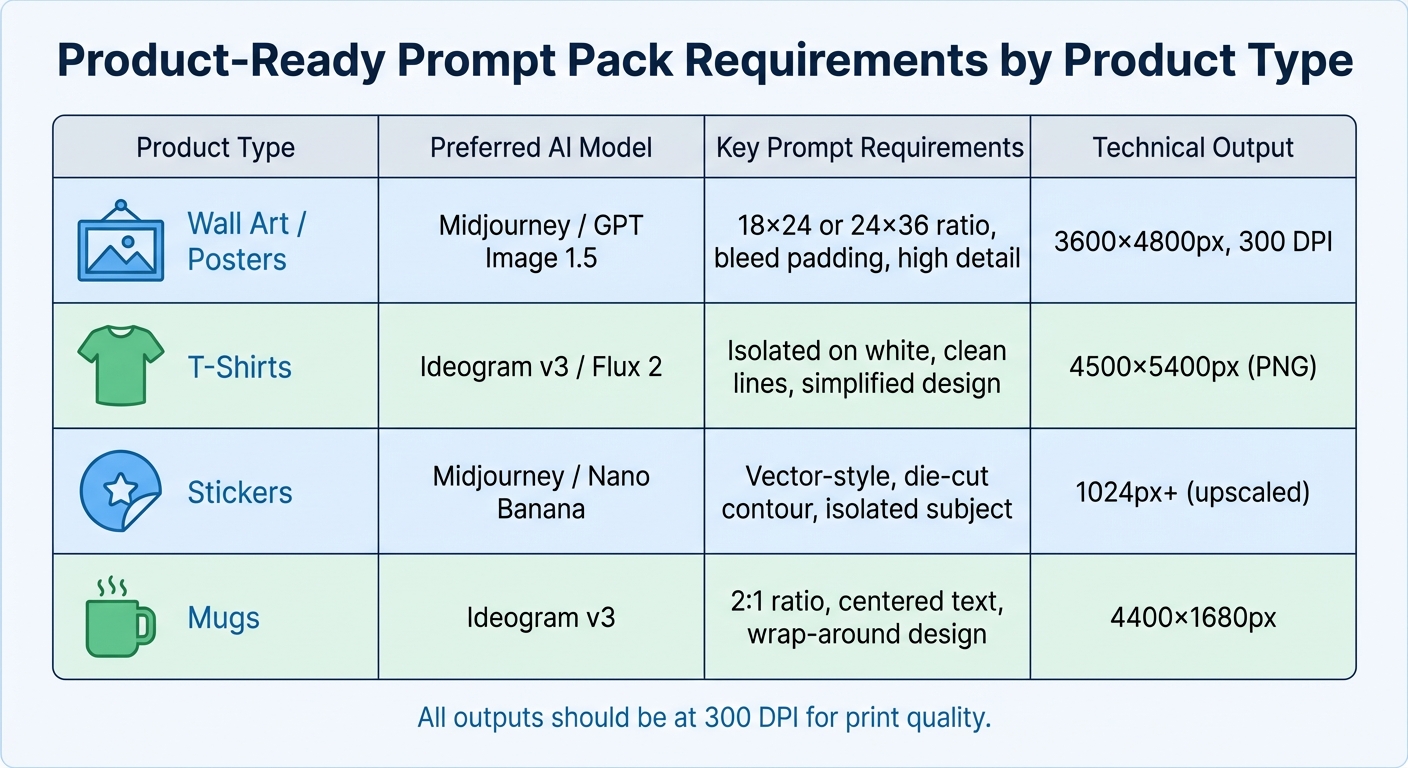
Product-Ready Prompt Pack Requirements by Product Type
Once you know what makes a prompt pack ready for production, the next step is selecting the right pack for your specific product category. A pack designed for intricate wall art won’t translate well to T-shirts, and a sticker-oriented pack won’t deliver the results you need for large posters. Each product type comes with its own technical and aesthetic demands, so picking the wrong pack can lead to wasted time and subpar outcomes.
Matching Packs to Product Categories
Wall art and posters require a high level of detail. Midjourney is an excellent option for styles like cottagecore, botanical illustrations, and dark academia. Look for packs that specify aspect ratios suitable for standard frame sizes, such as 18×24 or 24×36, and include guidance on "bleed safe areas" or "generous padding" to avoid cropping key design elements during printing [6]. These packs should also deliver 300 DPI output in sRGB color space to ensure sharp, color-accurate prints [6][1].
Apparel designs, especially for T-shirts, need a very different approach. Prompts should prioritize "simplified design", "clean lines", and "limited colors" to work well with screen printing and direct-to-garment (DTG) techniques [1]. It’s also crucial that these packs include modifiers like "isolated on white background" to simplify background removal [1][3]. For slogan tees and typographic designs, Ideogram v3 is an excellent choice, while Midjourney and Flux 2 excel at creating illustrative graphics for apparel [1].
Stickers and die-cut products benefit from high-contrast edges and clear, isolated subjects. Packs that produce "vector-style" or "die-cut contour" designs with white borders are ideal, as they make creating transparent PNGs much easier [1]. A standard 1:1 aspect ratio works well, and the output should upscale cleanly to at least 1024px for further processing.
Mugs and wrap-around products require horizontal layouts with a 2:1 aspect ratio - typically 4400×1680px - to fit cylindrical surfaces [1]. Prompts should focus on "centered elements" and "repeatable patterns" to ensure seamless wrapping without gaps or misalignment. For text-heavy designs like quote mugs, Ideogram v3 is particularly effective [1].
| Product Type | Preferred AI Model | Key Prompt Requirements | Technical Output |
|---|---|---|---|
| Wall Art / Posters | Midjourney / GPT Image 1.5 | 18×24 or 24×36 ratio, bleed padding, high detail | 3600×4800px, 300 DPI |
| T-Shirts | Ideogram v3 / Flux 2 | Isolated on white, clean lines, simplified design | 4500×5400px (PNG) |
| Stickers | Midjourney / Nano Banana | Vector-style, die-cut contour, isolated subject | 1024px+ (upscaled) |
| Mugs | Ideogram v3 | 2:1 ratio, centered text, wrap-around design | 4400×1680px |
Finding Your Audience Niche on Etsy
Technical compatibility is only part of the equation - success also depends on aligning your designs with a specific audience. On Etsy, specialization is key. Instead of casting a wide net with generic collections, focus on highly specific sub-niches like "Vintage Botanical Illustrations" or "Minimalist Line Art" [5]. Many of the top 1,000 Etsy print-on-demand sellers thrive by creating 20–50 designs weekly across multiple niches, rather than relying on random uploads to a single shop [1].
Start by using Etsy’s search autocomplete feature to identify demand. Typing broad terms like "nurse" or "mountain" into the search bar can reveal niche phrases such as "cat mom wildflower", which signal high-demand opportunities [1]. Tools like Everbee or Merch Informer can further validate these niches by providing insights into search volume and competition levels before you commit to a specific prompt pack.
Some of the most popular niches for 2025–2026 include Cottagecore/Fairycore, Dark Academia, Retro Vintage (1970s style), Minimalist Line Art, and Pet Lover apparel [1][4]. Once you’ve chosen a niche, select a prompt pack that aligns with both the aesthetic and the product type. For instance, a "Boho Nursery" pack designed for Midjourney is ideal for wall art but would need significant adjustments for T-shirts. Meanwhile, a "Vintage Botanical Illustrations" pack can easily adapt to posters, stickers, and mugs with minimal effort.
Before purchasing a prompt pack, review the top 10–20 results in your target niche to identify the preferred aesthetic. Whether it’s flat design versus watercolor or bold graphics versus delicate line art, understanding these trends will help you create designs that meet customer expectations. This research can also improve your conversion rates, which typically range between 1.5% and 3% on Etsy [5]. By taking this focused approach, you can streamline your workflow and create designs that are both market-ready and appealing to your audience.
Step-by-Step Workflow: From Prompt Pack to Etsy‑Ready Design
Once you've chosen a prompt pack that fits your product category and niche, the next challenge is turning those prompts into polished, upload-ready designs. These designs need to meet professional standards to ensure they’re print-safe and consistent. The process can be broken into three main phases: researching demand and selecting a pack, generating and refining AI art, and preparing files for print-on-demand (POD) platforms.
Researching Demand and Choosing a Prompt Pack
Start by exploring Etsy's autocomplete feature with broad terms like "coffee", "nurse", or "mountain" to uncover trending phrases such as "cat mom wildflower" [10]. Then, examine the top 10–20 "Best Seller" listings in your niche to identify popular styles, color schemes, and layouts. Pay attention to patterns: are buyers gravitating toward watercolor illustrations, bold typography, or detailed botanical designs?
To validate your findings, use tools like eRank, Everbee, or Marmalead to check search volume and competition levels [1][5]. A good niche typically has moderate competition (10–50 active sellers) and works across multiple product types like T-shirts, mugs, and tote bags. For instance, if "dark academia" wall art is trending, you can search Art Prompt HQ's commercial-ready prompt packs for options that deliver vintage, moody aesthetics suited for posters and prints.
Make sure pricing in your niche supports production costs. For example, customers should regularly pay $30–$60 for similar prints [5]. Once you’ve validated demand, select a prompt pack that aligns with your product type and desired style. With your pack in hand, you're ready to begin creating and refining your designs.
Generating and Refining AI Art
Moving from research to creation, you can streamline the art generation process by working in batches. Generate 10–15 variations at a time during the 60–120 second wait periods for AI outputs [1]. Choose your AI model based on the type of product you're creating: Midjourney works well for illustrations and art prints, Flux 2 excels at photorealistic designs, and Ideogram v3 is ideal for text-heavy items like quote mugs [1]. Each model has strengths that reduce errors and minimize manual adjustments.
Ensure your outputs meet technical standards such as resolution, aspect ratio, and bleed padding. If the initial results don’t meet product standards, refine your prompts with modifiers like "pure white background", "centered composition", or "simplified design for screen printing" [1][5]. For apparel designs, include "isolated on white background" to make background removal easier [1][5]. For wall art, use "generous padding for bleed" to prevent critical design elements from being trimmed during printing [6].
After generating your designs, use editing tools like Photoshop, Affinity Designer, or Canva to correct any AI artifacts, such as distorted faces or awkward hands. For text-heavy designs, consider generating the background art with AI but adding typography separately using vector tools like Illustrator or Affinity Designer for sharper results [6]. Tools like Recraft Remove Background can also help isolate subjects, avoiding unwanted background elements on colored surfaces [1].
Once your designs are refined, it’s time to prepare them for POD platforms.
Preparing Designs for POD Platforms
AI outputs typically range from 1024 to 2048 pixels, which is too small for large prints. Use upscaling tools like Recraft Crisp Upscale (for art) or Topaz AI (for photos) to achieve resolutions of 4000+ pixels [1][8]. For instance, a 12×16-inch print at 300 DPI requires a resolution of at least 3600×4800 pixels [1]. Export your final files as transparent PNGs or flattened 16-bit TIFFs at 300 DPI [1].
Before uploading your designs to Etsy or other POD platforms, test them using realistic mockups. Platforms like Placeit, Canva, or Artomate can create lifestyle scenes (e.g., artwork above a sofa), close-ups to highlight texture, and size guides [7][4][5]. These mockups can increase click-through rates by as much as 30% [6].
"Order one proof before you upload 20 sizes... It's the cheapest insurance policy I know" [7].
To ensure quality, order a single physical proof - especially for larger sizes - to check color accuracy and paper quality before listing your designs for sale [7][6]. Once satisfied, finalize your files as transparent PNGs or 16-bit TIFFs (300 DPI) and optimize your Etsy listings with relevant keywords for better visibility.
Quality, Originality, and Marketplace-Friendly Practices
To keep your designs both original and compliant with marketplace standards, it’s crucial to focus on quality and adhere to platform-specific rules. Meeting these expectations not only safeguards your shop from potential takedowns but also helps build trust with buyers, encouraging repeat purchases. Below, we’ll explore key practices like quality checks, catalog curation, and staying aligned with marketplace guidelines to ensure your Etsy or print-on-demand business operates smoothly.
Ensuring High-Quality and Print-Ready Outputs
Before listing your designs, perform a thorough quality check - even after upscaling and exporting. Zoom in at 200–300% to inspect critical details like faces, hands, and text. AI artifacts such as distorted features, extra limbs, or blurry edges may not be noticeable at thumbnail size but can stand out on printed products. Use tools like Photoshop, Canva, or Affinity Designer to clean up any remaining imperfections.
For designs with text, it’s best to add typography manually using a vector editor. AI-generated text often includes errors like unreadable fonts or misspelled words, especially in longer phrases. By refining the text yourself, you not only improve clarity but also make your work stand out from unedited AI outputs.
Testing a physical proof is another essential step to confirm color accuracy. Colors often look different on paper compared to screens, and fine details like thin lines or intricate textures may appear softer than expected. For example, if you’re creating A1 posters through Printshrimp, ordering a single proof for about £11.49 (around $15) can help you catch any issues with color shifts or resolution before offering multiple sizes for sale.
Avoiding Spammy Tactics and Mass Uploads
Once your designs meet quality standards, focus on curating your catalog thoughtfully. Both Etsy’s algorithm and customer preferences favor smaller, well-curated collections over bloated catalogs filled with low-effort designs. Aim to upload only the 3–5 strongest outputs from each design batch. Building cohesive collections with multi-category prompt packs and consistent styles can help create a branded experience , often achieved by using a Midjourney prompts pack with multiple art styles that encourages buyers to purchase multiple items. For instance, if you’re targeting the "dark academia" aesthetic, consider producing 10–15 designs with a unified color palette, composition, and mood.
George Jefferson, the founder of Artomate, shared his success story of scaling from 40 to 600 Etsy listings in just six months. By focusing on repeatable prompt systems that delivered reliable, print-ready artwork, his shop generated over £100,000 in revenue by March 2026.
"The people who win on Etsy are the ones who can turn an idea into a repeatable prompt that outputs reliable, print-ready artwork."
– George Jefferson, Founder, Artomate
To streamline your process, maintain a notebook or spreadsheet documenting each prompt, including the model name, seed, and date. This log not only helps you replicate successful designs but also provides a clear record of your creative process - useful if you need to demonstrate human involvement in your work.
Staying Within Marketplace Guidelines
Compliance with marketplace policies is essential. Etsy, for example, requires sellers to disclose the use of AI in their creations. A simple disclosure like the following can build trust with buyers and minimize refund requests:
"This artwork was generated using AI and finalized by hand in our studio."
Include this statement in your product descriptions, and use accurate category tags such as "Digital Files" or "Print on Demand" to stay aligned with Etsy’s rules.
Additionally, ensure that the AI tools you use are under a paid plan that permits commercial use. Free versions of platforms like Midjourney or Flux often restrict resale rights, which can lead to licensing disputes or product takedowns. Since most AI-generated images don’t qualify for copyright protection without significant human modification, consider adding unique elements like custom typography, borders, or color adjustments to make your designs legally distinct.
Avoid using prompts or designs that include copyrighted characters, celebrity likenesses, trademarked phrases, or other restricted content. Platforms like Merch by Amazon and Etsy strictly enforce these rules, and violations can result in account suspensions. To stay on the safe side, regularly review the latest guidelines and terms for each platform. While this isn’t legal advice, staying informed about these policies helps you avoid costly mistakes and maintain buyer confidence, leading to higher conversion rates.
Scaling Your Catalog Without Burning Out
Once you've established solid quality control and ensured marketplace compliance, the next challenge is scaling your catalog efficiently. Many top Etsy POD sellers aim to publish 20–50 designs every week to maintain strong visibility and cover a wide range of keywords [1]. Achieving this pace without burning out requires repeatable systems built around themed prompt packs and smart workflows for repurposing designs.
Using Themed Packs for Consistent Output
Instead of randomly generating designs, focus on themed prompt packs to create cohesive product collections that align with a specific brand identity. For example, if you're targeting the "boho nursery" niche, use a pack that emphasizes muted earth tones, watercolor textures, and nature-inspired elements. Run 10 prompts back-to-back, using the short wait times (60–120 seconds) to review outputs and pick the best results.
To ensure visual harmony across your collection, develop a style suffix - a short phrase like ", watercolor illustration style, muted earth tones" - and add it to every prompt. Be specific with colors, such as "sage green" or "dusty rose", to maintain consistency across all your designs.
A structured weekly schedule can also help you manage tasks more effectively. For instance:
- Monday: Conduct niche research.
- Tuesday–Thursday: Focus on batch design generation.
- Friday: Dedicate time to upscaling, background removal, and uploading.
This approach minimizes the need to juggle multiple tasks at once, keeping your workflow steady and reducing the risk of burnout. Once you've created a thematically unified collection, you can expand its reach by adapting designs for multiple product types.
One-Prompt-to-Multiple-Products Workflow
Maximize the impact of each design by repurposing it across various products. For instance, a single illustration can be used for posters, T-shirts, sweatshirts, mugs, stickers, tote bags, and digital downloads. This "one-to-many" strategy allows sellers to build catalogs of 500+ designs, often generating monthly revenues between $10,000 and $100,000.
When creating designs, include "generous padding" or "safe area" in your prompts to prevent important details from being cropped on different product shapes. Additionally, upscale all designs to at least 4,096 pixels using tools like Recraft Crisp or Topaz to ensure compatibility with most POD products at 300 DPI. For designs featuring text, it's best to generate the background art with AI and then add typography manually in vector software like Affinity Designer or Illustrator. This ensures crisp, professional-quality text across all sizes.
Save time by automating the creation of listing images and metadata using batch mockup tools and CSV generators. As George Jefferson, founder of Artomate, explains:
"Speed is a competitive advantage. Etsy rewards freshness and volume because more listings mean more keyword coverage" [2].
Where to Find Etsy-Friendly Prompt Packs on Art Prompt HQ
Once you've set up your workflow and scaling strategy, the next step is finding the right prompt packs to keep your designs consistent and marketplace-ready. Choosing the appropriate Art Prompt HQ category can simplify the process of adapting your designs for various products, saving time and effort.
Art Prompt HQ organizes its prompt packs by model, style, and use case, making it easier to pinpoint collections that align with your product goals and audience. Instead of wading through generic bundles, you can focus on categories designed for sellers who need reliable, product-ready systems rather than one-time creative experiments.
Commercial-Ready Prompt Packs
The commercial-ready prompt packs category is a great starting point if you're targeting high-conversion Etsy niches. These packs cater to popular product types like pet portraits, retro travel posters, botanical line art, and typographic quote posters, typically priced between $10 and $35[2][5]. Many of these packs are fine-tuned for specific AI models:
- Midjourney works well for cottagecore and vintage illustrations.
- Flux 2 is ideal for photorealistic lifestyle designs.
- Ideogram v3 is fantastic for creating readable text for slogan-based items like mugs and T-shirts[1].
These commercial packs include style details and technical specifications that provide print-ready results right away[6]. This not only saves valuable time in post-processing but also ensures uniformity across your product line - essential when you're publishing 20 to 50 designs per week[1]. While these collections focus on proven, high-performing designs, you can also explore packs with more artistic flair if you’re looking to stand out.
Abstract and Portfolio-Oriented Packs
For sellers aiming to appeal to design-conscious buyers, check out the abstract AI art prompts and portfolio-oriented packs. These packs are perfect for creating wall art and digital downloads that resonate with buyers who appreciate unique, visually striking designs[2][1].
Abstract packs, for example, are excellent for crafting cohesive sets (like six matching prints) that can be sold as bundles, increasing your average order value. On the other hand, portfolio packs often feature prompts for artistic or experimental outputs that help your shop stand out - especially important as Etsy's algorithm increasingly favors listings with high click-through rates and longer engagement times[2].
To explore all available options, visit Art Prompt HQ and use their filters to find packs tailored to your preferred model and product type.
Conclusion
Creating successful products from AI art isn't about luck - it’s about using a repeatable system to produce high-quality, print-ready designs. Top sellers treat prompt packs as essential tools for production rather than as experimental playgrounds. By selecting packs tailored for specific niches, sticking to a structured workflow, and focusing on quality, you can achieve consistent results without overextending yourself[1].
Standing out in a crowded marketplace requires both quality and originality. As George Jefferson, Founder of Artomate, wisely said:
"Your brand will be the moat when AI outputs become commoditised."[6]
Ensure your designs stand out by testing proofs, refining details like typography, and curating your catalog carefully. Avoid flooding platforms with rushed, low-effort designs. Etsy buyers, for example, are drawn to shops that prioritize thoughtful, well-crafted offerings over sheer volume[2]. Additionally, adhering to platform guidelines helps build trust and long-term customer loyalty.
By following a clear process - from researching demand to finalizing mockups - you can transform AI-generated designs into products ready for the marketplace. A system grounded in quality and creativity not only strengthens your brand but also sets you apart from competitors.
When you're ready to take the next step, start by exploring collections tailored to your goals. Check out commercial-ready prompt packs for high-conversion categories like pet portraits, retro posters, or botanical art. For designs aimed at discerning buyers, portfolio-oriented packs can help you create standout wall art. You can also browse curated AI prompt packs organized by model, style, and purpose, saving you time and effort.
Want to scale your Etsy shop smarter? Visit Art Prompt HQ to find prompt packs that align with your vision, and check out the AI art monetization guide to sharpen your strategy. Don’t forget to order your first proof - it could be the most valuable step you take this month.
FAQs
How can I tell if a prompt pack is print-ready?
A print-ready prompt pack is designed to create artwork that meets the standards for physical products and online marketplaces. These prompts should generate images with sharp focal points, well-balanced contrast, and aspect ratios tailored for items like posters, mugs, or t-shirts. The outputs need to be high-resolution, free from visual flaws, and scalable without compromising detail. To ensure the designs meet expectations, test them on mockups to check for quality, clarity, and proper alignment with your product's dimensions.
Which AI model should I use for my product type?
The right AI model for your project depends on what you're creating and the style you're aiming for. Midjourney is a standout choice for crafting intricate illustrations, making it perfect for artistic wall art or posters. If you're after photorealistic visuals, Flux 2 delivers lifelike images, which work well for mockups or lifestyle shots. When your designs involve a lot of text, Ideogram v3 shines with its strong typography capabilities. For those working on products like apparel, mugs, or similar items, Leonardo.Ai provides flexible tools for both generating and fine-tuning graphics. Many creators find success by combining these models to achieve the best possible results for their designs.
What’s the safest way to sell AI art on Etsy?
The best approach to selling AI art on Etsy is to focus on quality, originality, and adherence to platform rules. Start with print-ready prompt packs tailored for specific products like wall art or clothing. Conduct research to identify trends and create designs that stand out, rather than flooding the platform with bulk uploads. Make sure your images are properly upscaled, cleaned, and showcased using mockups to ensure they meet print quality expectations. Additionally, keep up with Etsy’s policies to avoid copyright problems and maintain compliance.