If you’re tired of staring at an empty prompt box, abstract and experimental AI art prompt packs can help you break free from repetitive ideas. These packs focus on mood, texture, and form instead of literal subjects, making them perfect for generating fresh ideas, warm-ups, or unique design elements. Whether you’re working with Midjourney, Stable Diffusion, or DALL·E, these packs offer a structured way to experiment with bold colors, fluid textures, and geometric patterns - ideal for sparking new directions in your projects.
This guide explains how to use abstract prompt packs effectively, from setting time limits for quick sessions to combining abstract elements with AI portraits or AI landscapes for hybrid visuals. Let’s explore how you can turn experimental outputs into practical assets for branding, backgrounds, and more.
What Abstract & Experimental Prompt Packs Are (and Aren't)
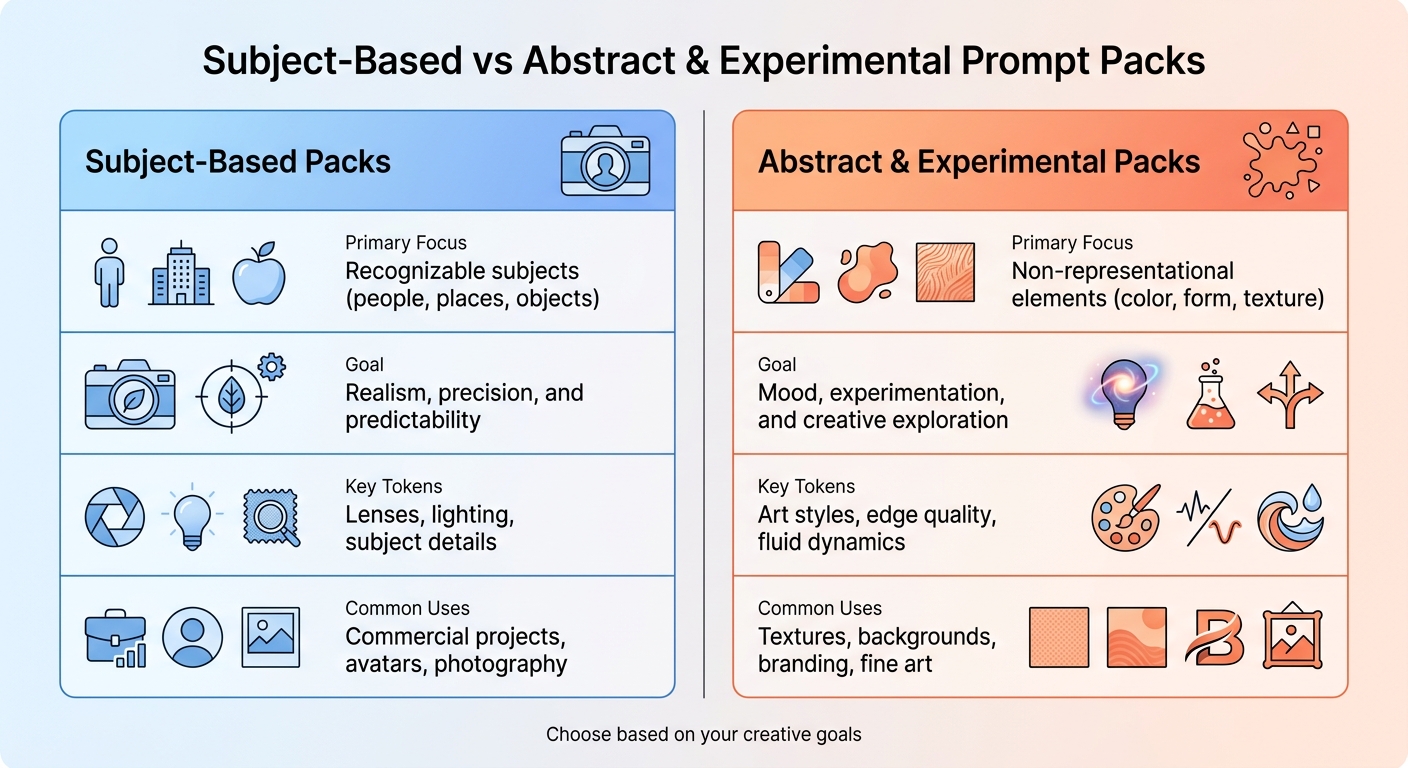
Subject-Based vs Abstract AI Art Prompts Comparison
What Counts as Abstract & Experimental
Abstract and experimental prompt packs center around visual elements like color, texture, form, and composition, rather than depicting specific subjects. Instead of asking for "a portrait of a woman" or "a mountain landscape", these packs guide AI models to create visuals that evoke feelings or sensations through shapes, gradients, and atmospheric effects.
Styles in this category range from color field painting (smooth gradients and luminous hues) to minimalist geometric designs (precise, hard-edged shapes), fluid acrylic pours (organic, flowing patterns), smoke abstracts (soft, ethereal forms), heavy impasto textures (rich, three-dimensional surfaces), and digital glitch art (chaotic pixel patterns and cybernetic distortions). Prompts might include phrases like "overlapping translucent shapes" or "palette knife strokes", focusing on evoking emotions rather than representing specific objects.
While abstract art may simplify or distort recognizable subjects, non-representational art avoids referencing the physical world altogether. Most experimental prompt packs lean into this non-representational style, prioritizing mood and texture over clarity. This emphasis on emotional resonance and visual exploration sets these packs apart from those designed for subject-based outputs.
How They Differ from Subject-Based Packs
Abstract and experimental packs break away from the structured precision of subject-based collections. Where subject-based packs - like those for portraits, landscapes, or commercial work - focus on identifiable subjects and technical accuracy, abstract packs thrive on spontaneity and creative freedom. Subject-based prompts often specify details like lens types (e.g., 85mm), lighting setups (e.g., soft studio), and subject traits to achieve polished, client-ready results. Abstract packs, on the other hand, celebrate experimentation, embracing imperfections and digital quirks over strict realism.
| Feature | Subject-Based Packs | Abstract & Experimental Packs |
|---|---|---|
| Primary Focus | Recognizable subjects (people, places, objects) | Non-representational elements (color, form, texture) |
| Goal | Realism, precision, and predictability | Mood, experimentation, and creative exploration |
| Key Tokens | Lenses, lighting, subject details | Art styles, edge quality, fluid dynamics |
| Common Uses | Commercial projects, avatars, photography | Textures, backgrounds, branding, fine art |
Abstract and experimental prompt packs are perfect for sparking creativity, overcoming artistic blocks, and exploring fresh aesthetics. They encourage AI to push boundaries, creating visuals that defy photorealism and embrace imaginative possibilities like surreal geometries and bold color combinations. These packs are less about delivering polished, literal images and more about unlocking creative potential. Explore abstract & experimental prompt packs here.
sbb-itb-997826f
Why Abstract Experiments Help Break Creative Blocks
Creative blocks often stem from the pressure to create something flawless. Abstract and experimental prompt packs ease that pressure by shifting your focus away from perfection. Instead of obsessing over accuracy or familiar subjects, these prompts invite you to explore color, form, and texture - the elements that evoke emotion before logic kicks in. This approach shifts your mindset from technical precision to emotional discovery, creating a low-pressure space where creativity can flourish.
By removing the need to depict real-world objects, AI models can produce stunning color fields, surreal geometries, and expressive designs that wouldn’t typically emerge in more literal projects. These unexpected visuals often spark fresh ideas that you can carry into your main work. For example, a swirling gradient or glitch effect discovered during an abstract session might inspire the perfect background for a product image or even the foundation of a new brand identity.
Using Abstract Prompts as Warm-Ups
Abstract prompts are also great for warm-up exercises. A quick 10–15 minute session with fluid patterns or bold color fields can reset your creative mindset and often results in surprising textures or overlays that you can save for future use.
These warm-ups also provide a chance to learn. By removing complex subjects, you can focus on how specific tokens influence mood, lighting, and style. For instance, testing “side lighting” on impasto-like textures can reveal how shadows create depth, a technique you can later apply to more detailed projects. This makes abstract prompt packs not just tools for creativity but also for honing your skills.
Once your creative energy is flowing, you can dive deeper into exploring mood and form. For those looking to scale their experimentation, using a multi-category prompt pack can provide thousands of starting points across different styles.
Exploring Mood and Form
Abstract prompts encourage you to step outside your comfort zone and experiment with new visual ideas. Instead of sticking to your usual portrait or landscape styles, try contrasting elements like order versus chaos, warm versus cool tones, or smooth versus textured surfaces to create visual tension. Limiting your palette to three to five colors can help maintain cohesion while still allowing room for creative exploration.
Drawing inspiration from art movements can add structure to your experiments. Look to Abstract Expressionism for its bold gestures, Minimalism for its simplicity, or Color Field painting for its immersive use of color. These references help guide the AI toward results that feel intentional rather than random. This kind of structured experimentation not only pushes creative boundaries but also keeps your work aligned with your larger artistic goals.
Simple Workflows for Exploring Abstract Packs Without Getting Overwhelmed
Abstract experimentation can be a goldmine for sparking creativity, but without structure, it often leads to endless tweaking with no clear direction. Using abstract & experimental prompt packs effectively requires turning freeform exploration into a focused practice. By setting boundaries and applying structured techniques, you can transform chaotic experimentation into productive creative sessions.
Set Time Limits for Exploration Sessions
Dedicate just 10–15 minutes to each exploration session. This approach encourages quick decision-making and prevents overanalyzing. Treat these sessions as warm-ups rather than attempts to create polished work. The goal isn’t to finalize a masterpiece but to uncover ideas - textures, color combinations, or compositions - you can refine later. Prompt packs act as a starting point, helping you sidestep trial-and-error and focus your creative energy.
Use Focused Constraints for Better Results
Once you've set a time limit, add another layer of focus by working within specific constraints. Instead of trying endless combinations, choose one constraint to guide your session. For instance, limit your color palette to three shades like coral, mint, and gold, or explore a single technique such as Bauhaus-inspired geometric patterns or fluid acrylic pours. These constraints reduce decision fatigue and ensure your results feel cohesive.
You can also experiment with model-specific parameters for added structure. In Midjourney, for example, the --chaos parameter adjusts variety, while --stylize influences how artistic the outputs appear. Start with moderate settings and tweak one parameter at a time. This methodical approach helps you build a mental catalog of techniques that work, turning experimentation into a skill you can repeat and refine.
Save and Build on Happy Accidents
When something unexpected catches your eye, save it - along with the exact prompt and settings used. Make sure to record details like the seed number, which allows you to revisit and tweak the same prompt later. This habit transforms random discoveries into reusable assets.
For example, a unique gradient or glitch effect might become the backdrop for a product image, an overlay for a portrait, or even the cornerstone of a brand’s visual style. As Sarah Chen commented on multi-model generation: "This is a game changer! I can generate multiple variations in seconds and compare them side by side. The quality is amazing and it saved me so much time." By documenting these moments, you create a library of visual ideas you can draw from in future projects.
How to start: Set a timer for 15 minutes, choose a specific color palette or technique, generate a batch of outputs, and save anything that inspires you - along with the corresponding prompt and seed. This simple routine can turn abstract exploration into a treasure trove of creative assets.
Turning Experimental Outputs into Textures, Backgrounds, and Final Art
Once you've experimented with abstract outputs, the next step is transforming them into practical design elements. These aren't just creative exercises - they can evolve into essential assets for polished projects. Picture a fluid acrylic pour morphing into an elegant packaging background, a glitch pattern shaping a tech startup's branding, or a marble texture enhancing a website's hero section. The trick is to use these abstract visuals as supporting elements that complement a design goal rather than standing alone. Let’s dive into how these outputs can be integrated into branding or combined with photorealistic imagery for more dynamic results.
Using Abstract Outputs in Branding and Design
Abstract textures and patterns are often the backbone of commercial designs. They can set the tone for a brand or add subtle depth to a project. For instance:
- Smooth gradients and atmospheric noise textures create understated yet effective backgrounds for apps and websites [2].
- Generative particle flows and data-inspired aesthetics bring a sleek, futuristic vibe to tech branding [1][2].
- Heavy impasto and macro textures, especially with side lighting, add a sense of tactile realism and depth [1].
To maintain a cohesive look, limit your color palette to three to five shades - such as ochre, burnt sienna, or coral - ensuring the visuals feel deliberate and aligned with your brand identity [1]. As Cemhan Biricik explains:
"Naming specific art movements, techniques, and color relationships produces far more interesting results than vague requests" [1].
Standalone vs. Hybrid Use Cases
Abstract outputs are versatile and can shine in both standalone and hybrid applications.
- Standalone Use: These outputs can stand on their own when the focus is purely on visual impact. Think gallery prints, wallpapers, or meditative backgrounds where the interplay of color and form is the star [1][2].
- Hybrid Use: Abstract textures can also be layered with literal imagery to enhance the overall composition. For example, a fluid acrylic texture might create a dramatic backdrop for a product shot, or a digital glitch pattern could overlay a portrait for a cyberpunk-inspired look.
Abstract art is particularly effective for printing, where the emphasis is on texture, color, and form rather than photographic detail [1]. When preparing assets for large-scale prints, always specify high-resolution settings and surfaces like "canvas" or "matte finish" to maximize the visual impact [1].
Keep your top abstract outputs organized as textures and backgrounds, ready to integrate into commercial projects without overshadowing the main subject.
Combining Abstract Packs with Portrait, Product, and Landscape Packs
Building on the idea of using abstract outputs as textures and overlays, let's dive into how they can be combined with more literal subjects. Layering abstract elements onto portraits, products, or landscapes creates hybrid visuals that bring depth, mood, and a modern twist to your work.
Creating Hybrid Looks with Abstract and Literal Prompts
The secret to creating successful hybrid visuals lies in having a clear structure. Start by defining the core elements - your subject, lighting, and camera settings. Then, enhance the scene with abstract modifiers. For instance, you could begin with a detailed portrait prompt and add elements like "heavy impasto texture with side lighting" or "aurora gradient background." This approach keeps your subject recognizable while introducing an artistic flair. As Cemhan Biricik explains:
"Abstract art simplifies or distorts recognizable subjects: an abstract landscape still references landscape."
Unexpected combinations can lead to stunning results. For example, prompts like "a dreamlike landscape with trees made of glass reflecting a neon sunset" create visuals that are both imaginative and visually striking. You can also use abstract outputs as a starting point - generate something like a cosmic nebula or gradient study, then layer a product or portrait on top during post-processing. Alternatively, incorporate the abstract design directly into your prompt as a background. This technique works particularly well for branding projects, album covers, and editorial photography, where the atmosphere sets the tone as much as the subject itself.
Once you've crafted your hybrid prompt, the next step is selecting the right AI model to bring your vision to life.
Model Compatibility for Hybrid Outputs
Different AI models handle the mix of abstract and literal elements in unique ways. Midjourney v6.1 is excellent for cinematic portraits and landscapes, offering precise control over textures. FLUX 1.1 Pro and FLUX 2 Pro specialize in creating bold abstract backgrounds that complement rather than overwhelm the main subject. Meanwhile, DALL·E 3 provides flexibility for conceptual and hybrid designs. As Promptomania notes:
"Abstract art is where AI truly has creative freedom. Without the constraints of photorealism, models can generate striking color fields, fluid shapes, impossible geometries, and expressive compositions."
To fine-tune the balance between abstract and literal elements, adjust model-specific settings. In Midjourney, parameters like --stylize, --quality, and --chaos can help control the prominence of abstract features. For Stable Diffusion, using negative prompts can filter out unwanted elements like extra limbs or blur. Experimenting with different wording and settings can reveal how each model handles the balance between abstract and literal aspects.
In practice: Start with the literal subject you need, whether it's a portrait, product, or landscape. Then explore abstract & experimental prompt packs to find textures, colors, or moods that align with your vision. Tools like the AI Art Style Finder can help you discover styles that seamlessly merge abstract and representational elements, ensuring your hybrid visuals feel polished and purposeful rather than random.
Where to Find Abstract & Experimental Prompt Packs on Art Prompt HQ
If you're diving deeper into abstract and experimental AI art, finding the right prompt packs can make all the difference. Art Prompt HQ offers a directory of curated abstract & experimental prompt packs to help streamline your creative process.
Navigating Art Prompt HQ's Filters and Categories
Art Prompt HQ simplifies your search by organizing its directory into filters based on Models, Styles, and Goals. Start by selecting your preferred AI model - whether you're working with Midjourney, Stable Diffusion, DALL-E, or newer video tools like Sora 2 and Veo 3. This ensures that the packs you choose are optimized for the specific features of your tool, such as Midjourney's --stylize parameter or Stable Diffusion's sampler settings.
Next, use the Goals filter to align with your purpose. If you're new to abstract art, the "Learn prompting" filter is a great starting point, offering packs that explain how to manipulate lighting, composition, and mood. For more advanced or professional needs, the "Commercial" or "Master Systems" filters will guide you toward packs tailored for consistent, high-quality outputs.
To refine your search further, the AI Art Style Finder can help you pinpoint specific abstract styles like Color Field Painting, Expressionism, or Digital Glitch. This tool ensures you're not just browsing generic "abstract" themes but finding packs that align with your artistic vision and goals.
Suggested Packs for Different Skill Levels
Beginners should focus on packs under the "Learn prompting" category. These are designed to teach the fundamentals, showing how various tokens impact aspects like texture, color blending, and visual patterns. They're perfect for building a foundational understanding of abstract prompt creation.
Advanced creators will benefit from exploring "Master Systems" or commercial prompt packs. These packs are geared toward delivering polished, scalable results for projects like branding, marketing campaigns, or social media content. They cater to creators who need dependable tools for high-volume, professional workflows.
Pro Tip: Customize your search by filtering for the right model and goal. For instance, Sora 2 and Veo 3 are excellent for video-based projects, while the "Commercial" filter is ideal for generating textured designs. Continue exploring by browsing abstract AI art prompt packs or checking out AI art prompt guides for real-world applications and inspiration.
FAQs
How do I pick an abstract prompt pack for my AI model?
When selecting an abstract prompt pack, think about how its style, mood, and techniques align with your artistic vision. Decide on the type of abstract art you’re aiming for - whether it’s geometric patterns, fluid shapes, or generative designs. Pay attention to packs that highlight key elements like color palettes, textures, and emotional tones. It’s also important to ensure the pack is compatible with your AI model, such as Midjourney or DALL·E, and includes clear, detailed prompts to help you achieve consistent and purposeful results.
What’s the fastest way to use abstract prompts as a warm-up?
The fastest way to use abstract prompts as a warm-up is by dedicating a brief, focused session of 10 to 15 minutes. Keep it simple by working within clear boundaries, such as a specific color palette, mood, or artistic technique. This method allows you to explore ideas quickly without getting bogged down. Prompts centered on geometric shapes or color fields can be particularly effective for generating textures or backgrounds to build on for future creative work.
How do I turn abstract outputs into usable design assets?
You can repurpose abstract outputs as backgrounds, textures, overlays, or even as style guides for your creative work. These images can provide patterns or textures that elevate branding efforts, poster designs, or digital artwork. A straightforward approach is to generate images with targeted textures or color schemes, saving standout results during dedicated sessions. Later, you can merge these abstract elements with more concrete prompts - like portraits or landscapes - to craft distinctive hybrid designs.