If you’re looking to create a polished AI art portfolio, using editable prompt packs can save you time and help you achieve consistent results. Instead of relying on random prompts, these curated packs guide you in producing visuals with a unified style, making your work stand out to clients and collaborators. Whether you're aiming for cinematic portraits or product photography, or even themed creative genres, this guide walks you through building a professional portfolio step-by-step.
Let’s explore how to use prompt packs effectively, from initial concepts to creating a series and presenting your work with transparency and professionalism.
Why Series and Projects Beat Single Images in Portfolios
The Problem with Random Outputs
A portfolio packed with unrelated, standalone images can leave viewers confused about the creator’s strengths. While a single eye-catching image might grab attention, it could just be a one-off success. In contrast, a series of 3–10 related pieces showcases consistent skills and a deliberate approach. Digital creator Drew Deltz explains it best: "The goal: when someone scrolls your work, it feels intentional, not random." By grouping work into concepts like a "Cinematic Portrait Series" or "E-Commerce Product Shots", you demonstrate a unified vision with consistent color, lighting, and mood - qualities that brands and agencies value. This cohesion helps tell a story, making your portfolio feel polished and purposeful. [3]
How Story and Purpose Strengthen Your Work
Portfolios that follow a theme or tell a mini-story resonate more deeply with viewers. A well-crafted series might explore variations in lighting, emotion, or other elements, using prompt packs to ensure consistency across the narrative. Adding context to your work - such as labeling it "AI-generated editorial portraits using golden-hour lighting for lifestyle brands" - makes it clear what you bring to the table. Drew Deltz emphasizes, "viral portfolios are usually suspiciously focused" on a specific niche rather than attempting to cover every possible style. Spending 2–4 weeks creating 12–24 images within a single, focused theme - whether it’s hyper-realistic product shots, cinematic character studies, or fantasy landscapes - can help establish a strong professional identity that collaborators and clients can trust. [3]
sbb-itb-997826f
Picking Your Focus and the Right Prompt Packs
Deciding What Your Portfolio Should Show
Before diving into prompt packs, it’s worth asking yourself: what purpose will my portfolio serve? Are you aiming for a full-time design role, building a freelance client base, or growing your personal brand? The answer shapes everything. For example, in April 2025, visual artist Emily used Google's DeepDream to breathe new life into her traditional forest paintings. She set a clear goal: to infuse her work with fresh ideas. By transforming a serene forest scene into abstract patterns of vibrant colors and shapes through AI, she then recreated those patterns with acrylic paints. This blend of AI and traditional methods allowed her to explore new creative dimensions while staying true to her artistic identity [7]. Emily’s approach highlights the importance of aligning your goals with prompt packs that support your vision.
The most effective portfolios stick to a single focus for about 2–4 weeks. Some popular starting points include Portrait AI (for influencer-style photos, editorial headshots, or corporate portraits), Product Photography (ideal for showcasing luxury items like cosmetics, gadgets, or jewelry), and Cinematic Scenes (frames that feel like they’re straight out of a film) [3]. If you’re targeting tech companies, you might lean toward UX/UI with neo-brutalist illustrations. On the other hand, brands and agencies often value commercial visuals, such as product photography or character-driven storytelling, for their practical appeal.
Here’s a useful tip: feed your résumé into tools like ChatGPT or Claude, along with style-related adjectives like "minimal", "vibrant", or "cinematic", to craft a one-sentence positioning statement [2]. This statement becomes your guiding principle when choosing prompt packs. Once your focus is clear, you can zero in on packs that consistently support your creative goals. For those targeting commercial sectors, using a professional prompt pack can streamline the creation of brand-ready assets.
Finding Prompt Packs That Match Your Vision
After narrowing down your focus, look for prompt packs that maintain consistency in subject, style, details, and quality tags [3]. The best packs allow for flexibility - letting you swap placeholders like [product type] or [age] - while preserving the overall aesthetic. For instance, if you’re working on a portrait series, check whether the pack includes photography terms such as "f1.8", "shallow depth of field", or "editorial style" to ensure professional-looking results [3].
Steer clear of overly broad collections that attempt to cover every possible scenario. A quick way to test a pack’s reliability is to generate five variations of a single idea - experimenting with different lighting, angles, or emotions - and see if the results remain cohesive. For portfolios centered on environments, landscape or fantasy/sci-fi packs should deliver consistent mood and color themes across subjects. If a pack forces you to rewrite prompts from scratch every time, it’s not scalable for creating a series.
The right pack acts like a creative collaborator - it gives you a framework to work within while leaving room for your personal touch. Each output should carry a sense of intentionality and a recognizable style.
From Exploration to Finished Series: A Practical Workflow
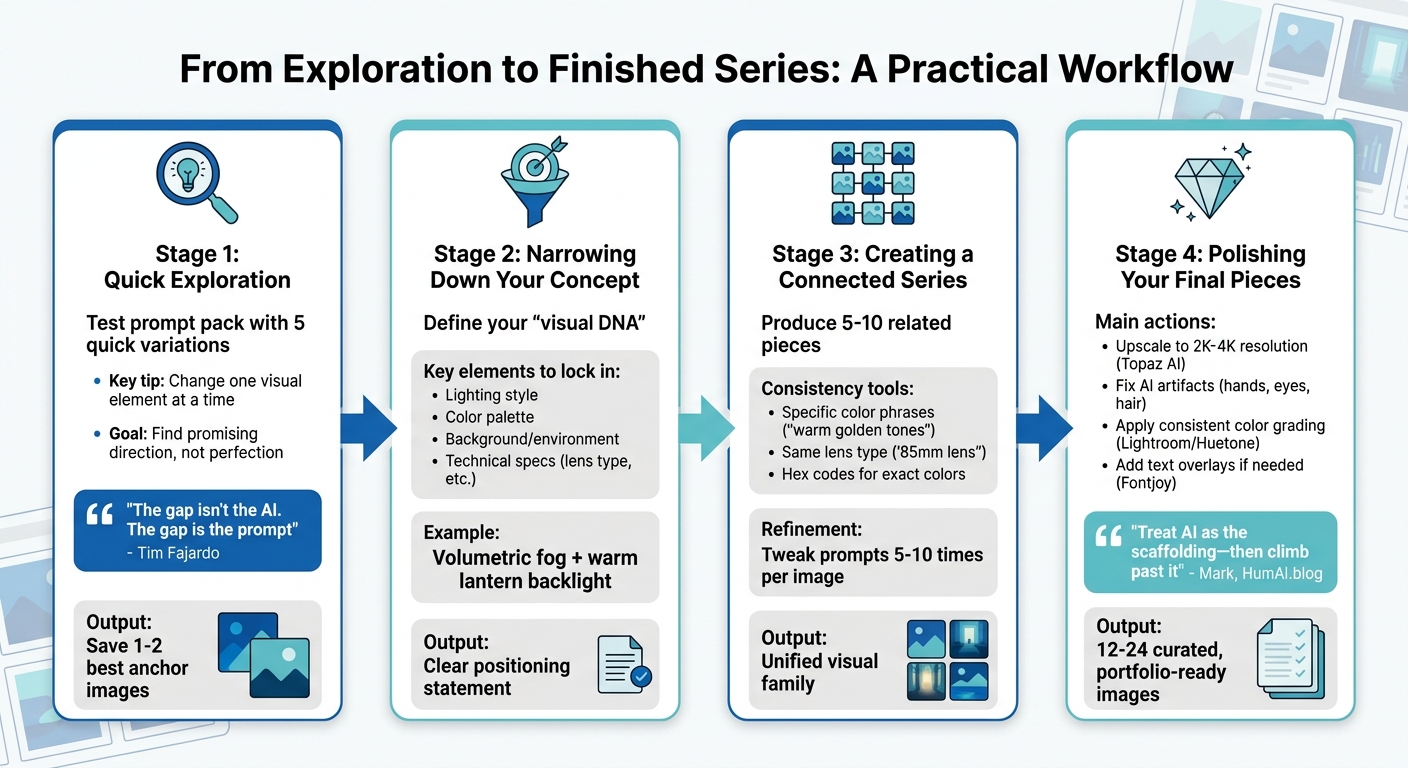
4-Stage Workflow for Building an AI Art Portfolio Series
Stage 1: Quick Exploration
Start by testing your prompt pack with five quick variations of a single concept, changing just one visual element at a time. This lets you see what the pack excels at and where it remains consistent[3]. Save only the best one or two outputs that can serve as anchors for your series. As professional prompt engineer Tim Fajardo explains, "The gap isn't the AI. The gap is the prompt"[7]. Your focus here is to find a promising direction, not perfection.
Resist the urge to overload your first prompt with 20 random adjectives. Instead, begin with a simple core prompt and add one or two descriptive elements gradually[3]. For example, start with "editorial fashion portrait, 85mm lens", then layer in "warm golden tones, shallow depth of field" on the next try. This method avoids "prompt chaos" and keeps your process focused. During this stage, tools like Midjourney or Adobe Firefly can help you quickly generate foundational imagery[2]. Once you have your initial outputs, look for recurring visual elements to narrow your concept.
Stage 2: Narrowing Down Your Concept
After identifying strong initial outputs, define the visual DNA of your series. This means pinpointing specific elements - like lighting, color palette, or style - that will be consistent throughout. For instance, if your standout images feature "volumetric fog" and "warm lantern backlight", those should become your constants[3]. Keep the lighting and background style uniform while varying subjects or scene details to maintain cohesion.
Refine your positioning statement using your strongest outputs and descriptive style terms (e.g., "cinematic", "minimal", or "vibrant") in an LLM like ChatGPT or Claude[2]. For example, "A cinematic portrait series exploring solitude through warm, fog-lit environments" provides a clear framework for future prompts. At this stage, you establish the guiding rules that will make your series feel deliberate and cohesive.
Stage 3: Creating a Connected Series
With your visual DNA set, use your prompt pack to produce 5–10 related pieces. Professional portfolios often include 3–10 images that tell a story or share a unified aesthetic[3]. To maintain consistency, rely on specific phrases like "warm golden tones", "cool teal and orange", or even precise hex codes across all your prompts[3]. For a character-driven series, stick to the same lens type (e.g., "85mm lens" for portraits or "anamorphic lens" for cinematic shots) for technical uniformity[3].
Batch processing tools like Canva's Magic Media can save time by allowing you to run multiple prompts simultaneously, ensuring thumbnails share similar color and composition cues[2]. Professionals don’t achieve great results by typing perfect prompts on the first attempt - they refine each prompt five to ten times, tweaking one variable at a time[4]. This approach ensures every piece contributes to a unified narrative, making your portfolio feel cohesive. Even if the subjects vary, each piece should clearly belong to the same visual family.
Stage 4: Polishing Your Final Pieces
To elevate raw AI outputs to portfolio quality, begin by upscaling your favorite images to 2K–4K resolution using tools like Topaz AI. This step upgrades them from "screenshot" quality to professional-grade assets[3]. Address common AI flaws, such as distorted hands, blurry eyes, or awkward hairlines, for a polished look. Then, apply consistent color grading across the series using tools like Adobe Lightroom or Huetone to unify the overall aesthetic[3].
Post-processing is where your personal style comes into play. If adding text overlays, tools like Fontjoy can help with typography pairings, while consistent filters can reinforce the series' mood[2]. As Mark from HumAI.blog points out, "Automation isn't artistry. Treat AI as the scaffolding - then climb past it to inject perspective, taste, and lived experience"[5]. Your final series should feel intentional and curated, not like a random collection of AI outputs. Organize your best 12–24 images by concept (e.g., "Portrait Series – Cinematic People Shots") to make your portfolio easy to explore.
Writing a Case Study for Your Series
A case study adds depth to your series by explaining the thought process behind each image. It transforms your collection into a compelling story about your creative decisions. Clients, employers, and collaborators appreciate understanding the reasoning behind your work - not just the final results. The goal is to showcase your role as a visual director while being open about incorporating AI and prompt packs.
How to Structure Your Case Study
Organize your case study using four key sections: Problem, Approach, Execution, and Results. Begin by outlining your creative objective. For instance, "Develop a cinematic portrait series that captures the theme of solitude for editorial purposes." Then, dive into your approach - describe the visual direction you pursued, the specific portrait prompt pack you selected, and why it aligned with your vision.
In the execution phase, detail your iterative process. As prompt engineer Tim Fajardo explains:
"Your first prompt is a draft, not a final output. Professionals don't get great images by typing perfect prompts - they get them by refining prompts five to ten times." [4]
Conclude with the results by showcasing a curated series of 12–24 images. Share insights into the strengths of the prompt pack or what you discovered about your creative workflow. This structured approach connects your artistic process to a polished, professional presentation.
Showing Process Without Hiding AI Use
Being transparent about your process enhances credibility, but it doesn’t mean you need to share every step or prompt variation. Instead, focus on your core framework - elements like Subject, Style, Lighting, Composition, and Quality modifiers. For example, describe your work as "AI-generated portrait series using cinematic lighting and editorial-style prompts" to set clear expectations. Briefly mention your Human-in-the-Loop workflow, such as upscaling images to 4K, correcting AI artifacts, and applying consistent color grading.
"Automation isn't artistry. Treat AI as the scaffolding - then climb past it to inject perspective, taste, and lived experience." [2]
Explain the reasoning behind your choices - why you opted for specific lens types (e.g., "85mm lens" for portraits), why you leaned into warm tones, and how you narrowed down your final selection from a larger batch. This approach positions you as a creative director who uses AI as one of many tools, rather than someone relying solely on automation. A professional portfolio should reflect intentional curation and technical expertise, setting your work apart from trending AI art prompts and generic outputs.
Presenting AI Work Professionally and Honestly
How you present your work plays a major role in how clients perceive you - either as a skilled visual director or someone who simply relies on AI tools. A professional portfolio doesn’t hide the use of AI; instead, it highlights how AI serves as one part of your creative process. By showcasing thoughtful, curated designs, you can turn automated outputs into a portfolio that reflects your artistic vision. Here are some tips for structuring your portfolio and explaining your workflow to elevate your work.
Portfolio Layouts That Show Intent
Organizing your portfolio thoughtfully can make a world of difference. Group your images into series pages with 3–10 related pieces rather than scattering individual images randomly. Each series should have a cohesive aesthetic. For instance, a "Cinematic Portrait Series" might feature warm golden tones and 85mm lens framing, while a "Product Photography Series" could focus on cool teal backgrounds and studio lighting. You can also create an AI Stillness cinematic landscape series to showcase tranquil, high-end environmental work.
Enhance your portfolio with short captions that explain the purpose behind each series. Instead of leaving viewers to guess, provide notes like "AI-generated editorial portraits using cinematic lighting for magazine layout concepts" or "Product shots for e-commerce." This positions your work as purposeful and professional. As Drew Deltz explains:
"The goal: when someone scrolls your work, it feels intentional, not random" [3]
Additionally, include details about your post-processing steps, such as upscaling or correcting artifacts. This helps demonstrate your involvement in refining the final product. Host your portfolio on platforms like Behance, Dribbble, or a dedicated website, rather than relying on Discord screenshots or raw image links [3]. These strategies naturally invite transparent discussions about your use of AI, as outlined below.
| Layout Element | Purpose | Professional Impact |
|---|---|---|
| Series Pages | Groups 3–10 related images | Shows your ability to maintain a consistent "look and feel" |
| Light Context/Captions | Explains the "why" and "how" | Builds credibility by linking work to specific use cases |
| Process Shots | Highlights upscaling or prompt iterations | Proves intentionality and effort behind your work |
| Niche Sections | Categorizes by industry (e.g., E-commerce) | Helps clients see how your work applies to their needs |
Answering Questions About AI Use
When discussing your AI workflow, focus on your role as a visual director. Describe your process as visual concepting or rapid prototyping, emphasizing how you use portfolio-ready prompt packs to create mockups or enhance social content efficiently without incurring full production costs. This positions you as someone who directs the creative vision, with AI as a tool - much like a camera.
Be specific about the AI models you use, such as Midjourney, DALL·E 3, or photorealistic Stable Diffusion prompts, and describe your prompts in professional photography terms. For example, you might say: "I specified 85mm lens, shallow depth of field, and volumetric lighting to achieve the cinematic look." This demonstrates your understanding of visual principles and underscores the intentional choices behind your work.
It’s also important to address the refinement process. Explain that your final images result from 5–10 prompt iterations, not a single attempt. As Tim Fajardo notes:
"Professionals don't get great images by typing perfect prompts - they get them by refining prompts five to ten times" [4]
This transparency highlights the creative judgment and effort involved in your process, setting your work apart from casual experimentation. By pairing this openness with evidence of your creative decisions, technical polish, and consistent style, you build trust and establish yourself as a professional in the field.
Finding Portfolio-Ready Prompt Packs on Art Prompt HQ
Creating a polished portfolio often hinges on having the right tools to structure your work effectively. Art Prompt HQ simplifies this process by offering curated prompt packs tailored for portfolio-building, particularly for those focused on series rather than standalone pieces. These packs are organized by model (Midjourney, DALL·E 3, Stable Diffusion), style, and project type, making it easier to find exactly what you need.
Browsing Packs by Category
Art Prompt HQ categorizes its packs to align with specific portfolio goals. For character design, explore options like portraits and characters, which focus on expressions and unique styles. If your work leans toward environmental or fantasy themes, check out landscapes and fantasy & sci-fi packs. For commercial projects, turn to resources like the commercial AI art prompts category.
Filters for model, style, and project type make it easy to refine your search, saving you from sifting through random marketplaces or Discord threads. As Christie C. aptly puts it:
"The right word can turn algorithms into applause" [5]
A well-designed prompt pack delivers those carefully chosen words, already tested and ready to use.
Checking if a Pack Supports Series Work
To create a cohesive series, choose packs that incorporate variable placeholders such as [OBJECT], [ANIMAL], or [LOCATION]. These placeholders allow you to maintain consistent lighting, style, and environment across multiple images while swapping out subjects. This approach ensures a unified look for your portfolio [5][6]. For instance, a pack structured around [Style] + [Subject] + [Lighting] + [Environment] enables you to produce 5–10 images with a consistent visual language [6].
Look for descriptions that highlight features like "unified composition cues", "consistent color palettes", or "repeatable prompt templates" [2][3]. These details indicate that the pack is designed for series work, not just random outputs. Be cautious of packs priced under $10 that claim to offer thousands of prompts; such packs often inflate their numbers by recycling styles with minor tweaks, as Regina Paul explains:
"Creators use the same art style with similar environments or subjects over and over in the prompts. This bulks up the number prompts and makes it look like you're getting more than you actually are. It's deceptive" [1]
For client-ready results, prioritize packs with tags like "8K" or "photorealistic" [3][4]. By focusing on these criteria, you can select prompt packs that effectively support a cohesive portfolio series. A well-chosen pack from the portfolio-ready prompt packs section can help you create 3–10 related images that tell a compelling visual story.
Conclusion: Building a Portfolio That Gets Noticed
An impressive AI art portfolio focuses on intentional collections rather than random images. It’s about crafting cohesive series that demonstrate your ability to maintain a consistent style, lighting, and narrative across multiple works. The key difference between amateur and professional portfolios lies in curation: showcase your best pieces, organize them into clear themes like "stylized portrait series" or "Product Photography for Indie Brands," and refine your outputs to eliminate artifacts and achieve a polished, professional finish. This structured approach effectively communicates your creative vision.
Consistency is crucial. Every image in your portfolio should contribute to a unified narrative. Portfolios that jump from anime to photorealistic landscapes can come across as scattered, signaling a lack of focus. Instead, commit to a specific niche - whether it’s editorial illustrations, UX/UI mockups, or hyper-realistic product imagery. A clear direction not only helps you stand out but also reinforces your expertise. Leveraging curated portfolio‑ready prompt packs can help solidify your visual identity.
Don’t forget to add your personal touch. AI-generated images rarely achieve a professional look without some post-processing. Use upscaling tools to fix imperfections, apply consistent color grading throughout your series - whether that means warm golden tones or muted pastels - and include short case studies that explain your creative process. Share details about your prompt iterations and refinements, and be open about the AI tools you’ve used. Transparency fosters trust, showing clients and employers your artistic judgment and decision-making, not just the raw output of an algorithm.
FAQs
How many images should a portfolio series include?
A portfolio series usually works best with 3 to 10 images. This range strikes a balance, letting you highlight your skills and creativity without overwhelming your audience. It also ensures you can show both variety and a clear sense of direction in your work.
What makes a prompt pack good for consistent series work?
A well-designed prompt pack for creating consistent series work offers a carefully organized collection of prompts aimed at specific styles, themes, or creative objectives. By focusing on precise language and clear technical details, these packs help artists generate dependable, high-quality visuals, ensuring their work feels cohesive and refined.
What should I disclose about AI use in a case study?
Transparency is key when using AI tools in your creative process. Make it clear that AI played a role and explain how prompt packs specifically contributed to your work. Sharing this insight not only builds trust but also helps your audience appreciate the thought behind your creative choices. Highlight how AI supported your vision while emphasizing your personal input in crafting the final result.