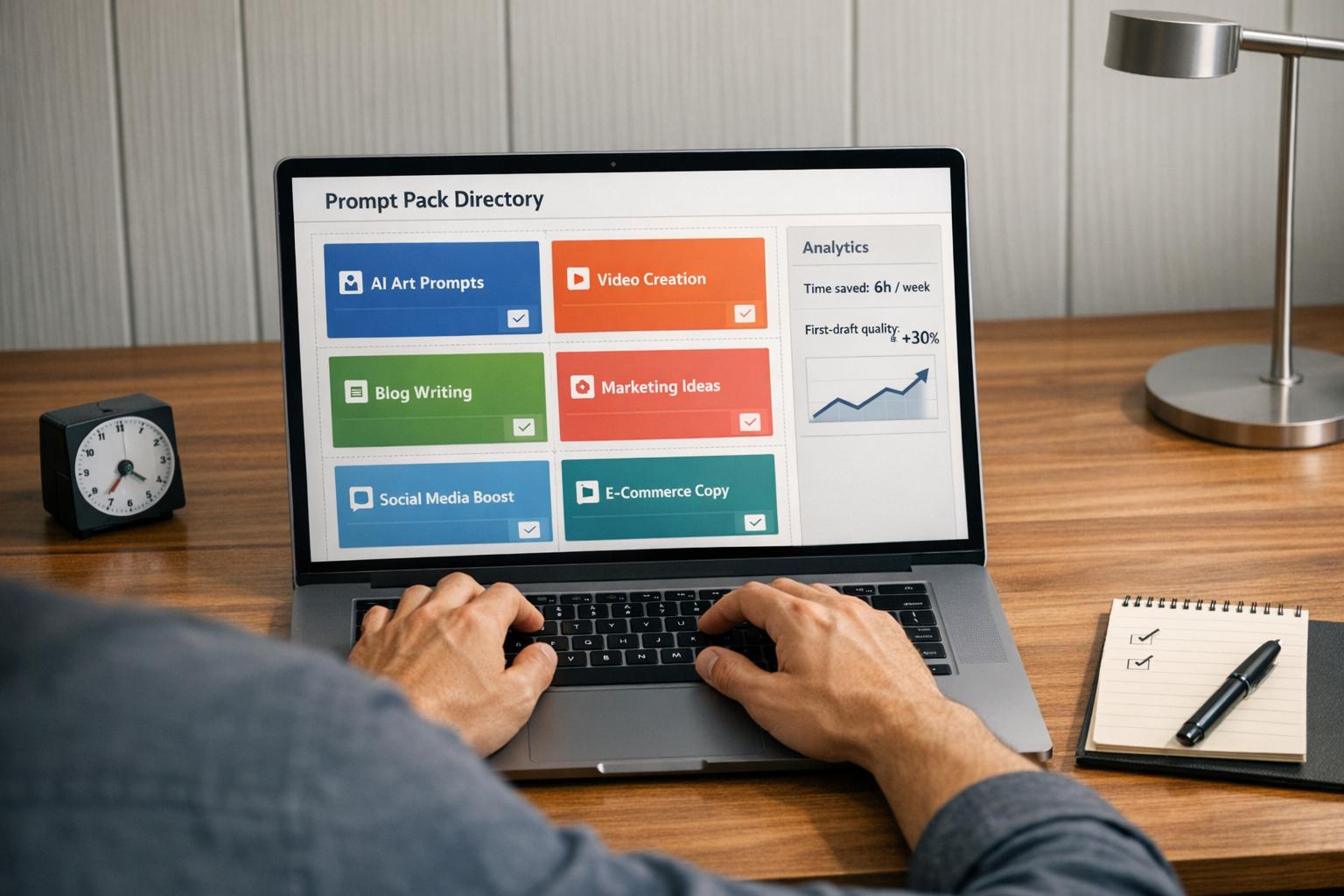
Struggling with inconsistent AI outputs or wasting time reinventing prompts for every project? Prompt packs solve this by offering pre-tested templates tailored for specific models, styles, and tasks. They streamline workflows, ensure consistent results, and reduce trial-and-error by giving teams a shared starting point for AI-generated content. Whether you're creating social media visuals, product images, or campaign assets, prompt packs provide a reliable framework to boost efficiency and quality across your team.
This guide explains how to use prompt packs effectively, build a centralized library, and measure their impact on your workflow.
Why Teams Need Shared Prompt Systems, Not One-Off Prompts
Relying on individual team members to create prompts often leads to inconsistent brand visuals. For instance, one person’s idea of "clean and minimal" might clash with another’s interpretation of "bright and airy." This mismatch - sometimes called prompt entropy - can make a brand’s visuals look disjointed, as though they come from entirely different companies[2].
The Cognitive Load Problem with One-Off Prompts
Starting prompts from scratch can be mentally draining. Creators have to juggle multiple factors like brand guidelines, aspect ratios, preferred models, and excluded elements. This often leads to endless trial-and-error sessions[1][4], where more time is spent tweaking outputs to look acceptable rather than building on a reliable foundation.
The problem is amplified across teams. One person might perfect a prompt for a product image, only for someone else to unknowingly recreate the same work[5]. A senior developer shared that adopting standardized prompt systems saved them 2–3 hours daily[6]. This kind of efficiency can easily benefit creative and marketing teams, too.
Shared prompt packs solve this issue by centralizing editable prompt templates that have already been tested and proven.
Prompt Packs as a Common Language Across Teams
Shared prompt packs encode a brand’s visual standards - covering everything from preferred AI models and style anchors to negative prompts and output settings. This gives every team member a consistent foundation to work from. It also makes collaboration smoother. Whether it’s a strategist planning a campaign, a designer generating assets, or a social media manager resizing content for Instagram, everyone can rely on the same framework. Marcus Williams, Content Operations Manager at Northstar Media, highlights this advantage:
"Our content team reused the same core prompts across campaigns, but Docs made approvals messy. Templates and version history gave us one approved source of truth."[3]
Another critical aspect is model routing. Different AI models produce distinct visual styles - Flux 2, for example, creates sharper, more photorealistic images, while Midjourney leans toward stylized, editorial looks. Without clear guidelines on which model to use for specific content types, even identical text descriptions can produce mismatched visuals[2]. A shared prompt pack that specifies the right model alongside the text ensures consistency across outputs.
sbb-itb-997826f
Turning Prompt Packs into Internal Standards and Playbooks
Once your team understands the inefficiency of relying on one-off prompts, the next logical step is to treat prompts as reusable assets. This shift - from random use to creating a structured system - transforms a prompt pack into a reliable internal standard. Standardization helps streamline collaboration, reduce mental effort, and maintain consistent results across projects.
Defining Use Cases for Your Prompt Packs
Start by pinpointing tasks that your team performs repeatedly, such as creating product hero images, social media carousel graphics, YouTube thumbnails, or paid ad visuals. Each of these tasks represents a unique use case that warrants its own dedicated prompt pack.
Organize your packs by content type and platform. For example, a pack tailored for Instagram lifestyle imagery will have entirely different needs compared to one designed for LinkedIn visuals or YouTube thumbnails. Combining these into a single generic library only leads to confusion, undermining the very efficiency you're trying to achieve. For teams working on commercial visuals, Art Prompt HQ's commercial and brand prompt categories can serve as a helpful resource to identify which outputs require their own specialized packs.
It's also essential to assign a designated AI model for each use case. This practice eliminates guesswork and ensures consistent results across all teams. A simple reference table, like the one below, can make these assignments clear and easy to follow:
| Content Type | Primary Model | Aspect Ratio |
|---|---|---|
| Product Hero (white bg) | Flux 2 | 1:1 |
| Lifestyle / Social | Midjourney | 4:5 |
| Social Video (feed) | Kling 3.0 | 9:16 |
| Typography / Text | Ideogram v3 | 1:1 |
| Editorial / Abstract | Midjourney | 3:2 |
Once these use cases are clearly defined, the next step is to create actionable playbooks that make these templates accessible to everyone on the team.
Building Playbooks for Team-Wide Adoption
A prompt pack is only as effective as the context provided for its use. This is where a playbook comes in - it serves as a quick-reference guide that ensures every team member knows how to use the pack. A well-designed playbook answers four key questions: What is this pack for? What inputs are required? What does a successful output look like? And what should you do if the results miss the mark?
The best playbooks rely on variable-based templates rather than static prompts. Instead of presenting a fixed line of text, they include placeholders like {{client_name}}, {{product_type}}, {{brand_tone}} to guide team members on how to customize the prompt for specific needs. Sarah Chen, Operations Lead at BrightPeak Studio, highlighted how this approach transformed her team's workflow:
"We manage 8 client prompt libraries. Before this, our team duplicated prompts across Notion pages. Now every client has its own workspace and we can roll back bad edits in seconds." [3]
To ensure consistency, each playbook entry should include a "Never Do" list - a collection of negative prompts that outline off-brand aesthetics to avoid. For instance, this might include instructions like "never high-contrast lighting" or "never corporate stock photo style." Pair these guidelines with visual style references so subjective terms like "warm" or "minimal" are grounded in concrete examples, leaving no room for misinterpretation.
The ultimate goal is to create a library where anyone on the team - regardless of prior AI experience - can open a playbook, fill in the variables, and confidently generate on-brand results without needing additional guidance.
Workflow Patterns for Using Prompt Packs Across a Team
Prompt packs bring standardization to creative workflows, but the real power comes from using them effectively across a team. By establishing thoughtful patterns, teams can ensure everyone has access to the right prompts at the right time.
Building and Managing a Central Prompt Library
A centralized prompt library eliminates the chaos of searching through scattered files or platforms. Instead, team members can quickly find what they need by filtering prompts based on content type, model, or project. This approach not only saves time but also ensures consistent outputs across the team.
However, a useful library is more than just a collection of prompts. Each entry should include essential details like the prompt text, target AI model, aspect ratio, negative prompts, quality ratings, and style reference images. This structured approach - often called a prompt schema - turns a simple list into a robust, searchable system. For example, a "Ready to Use" filter can highlight only highly rated prompts, ensuring no one accidentally uses outdated or incomplete versions.
"The library is the asset - it compounds with every production session and every team member's contribution." [2]
Here’s an example of a prompt schema:
| Field | Type | Purpose |
|---|---|---|
| Prompt Name | Title | Descriptive label (e.g., "Product Hero – Summer") |
| Model | Select | Flux 2 / Midjourney / Kling 3.0 / etc. |
| Prompt Text | Text | Full prompt, ready to copy-paste with variables |
| Quality Rating | Select | Star rating (1–5) based on output consistency |
| Style Reference | Files | Attached images to anchor visual identity |
Source: Cliprise Shared Prompt Library Schema [2]
This centralized system not only streamlines prompt access but also lays the groundwork for version control and collaborative usage.
Versioning and Tracking Prompt Changes
Once a library is in place, keeping track of updates and changes becomes critical, especially as AI models evolve. A prompt that worked flawlessly earlier in the year might deliver different results after a model update. Without a system to track changes, it’s hard to pinpoint why performance drops - whether it’s due to the model, a prompt edit, or both.
Version tracking solves this by logging every update along with details like who made the change and why. This allows teams to compare versions side by side and identify where issues arise. Rollback options provide an additional safety net, letting teams revert to earlier versions if needed.
Elena Rodriguez, an Automation Consultant at Flowlane, shared her experience:
"When an automation started producing worse output, we traced it back to a prompt change immediately. That alone justified moving out of Docs." [3]
To maintain a lean and effective library, consider flagging prompts as deprecated if they haven’t been reviewed in 12 months or were designed for models more than two generations old. [5] This prevents reliance on outdated prompts that may no longer deliver reliable results.
Cross-Role Collaboration with Shared Prompts
Shared prompt packs also enhance collaboration across different roles within a team. They provide a clear starting point - something that traditional briefs and style guides often fail to achieve. For example, a strategist can define the logic behind a prompt, a designer can execute it using tools like Midjourney or Flux 2, and a social manager can adapt it for platform-specific content without unnecessary back-and-forth.
Using templates with placeholders like {{target_audience}} or {{tone}} allows team members to customize outputs while keeping the core structure intact. This ensures consistency, even when multiple roles adapt the same prompt.
Here’s how shared prompt packs can be used across roles:
| Role | Primary Use Case | Key Benefit |
|---|---|---|
| Designer | Visual style references, model routing (e.g., Flux 2, Midjourney) | Ensures consistent visual assets |
| Strategist | Brand messaging frameworks, campaign briefs | Speeds up ideation aligned with brand voice |
| Social Manager | Platform-specific templates (e.g., 9:16 for Stories, 4:5 for feed) | Enables fast, scalable content production |
Onboarding New Team Members with Prompt Packs
Prompt packs do more than streamline workflows - they make onboarding smoother by ensuring consistent visual and output quality from the start.
Introducing New Hires to the Prompt Library
When bringing new team members on board, the goal isn’t to teach them how to create prompts from scratch. Instead, the focus is on quickly aligning them with your team’s visual standards.
A shared prompt library acts as a practical guide. New hires can run pre-approved prompts from the library to see examples that match your brand’s style. This eliminates guesswork and sets clear expectations. The rule is simple: every session begins with an existing library prompt, not a blank slate. This ensures that new team members are immediately working within the established framework.
A structured onboarding session lasting three hours can be highly effective. The first hour focuses on brand immersion, including reviewing the brand system document, studying style references, and discussing the team’s "never do" list. The second hour involves guided practice, where a mentor and the new hire work through five to six library prompts together, discussing what works and why. In the final hour, the new hire independently generates five to eight assets, followed by a joint review to address any gaps in understanding or execution.[2]
Using Example Outputs to Set Quality Expectations
Example outputs play a critical role in setting expectations during onboarding. They show new hires not only what to type but also what results to aim for - and what the team considers acceptable.
One effective exercise is the style reference test. After reviewing the prompt library, ask the new hire to describe the brand’s visual identity in their own words, without referring to the documentation. Comparing their description to the official brief can quickly highlight any misunderstandings or misalignments.[2]
Rejected outputs can be just as educational as approved ones. By maintaining a small archive of "what not to do" examples alongside successful outputs, new hires gain a clearer understanding of the team’s quality standards. When combined with built-in negative prompts and contextual notes in the library, this approach paints a comprehensive picture of the expected quality without requiring lengthy explanations. It also reduces the mental effort involved in one-off prompting.
Teams that adopt this structured onboarding process often see measurable improvements. For example, marketing agencies using standardized AI prompt libraries report up to a 3× increase in content production, while businesses leveraging high-quality prompt packs have seen content efficiency improve by 40–60%.[4] A well-documented prompt library not only accelerates the onboarding process but also raises the overall quality of work across the team.
Measuring the Impact: Time, Consistency, and Quality
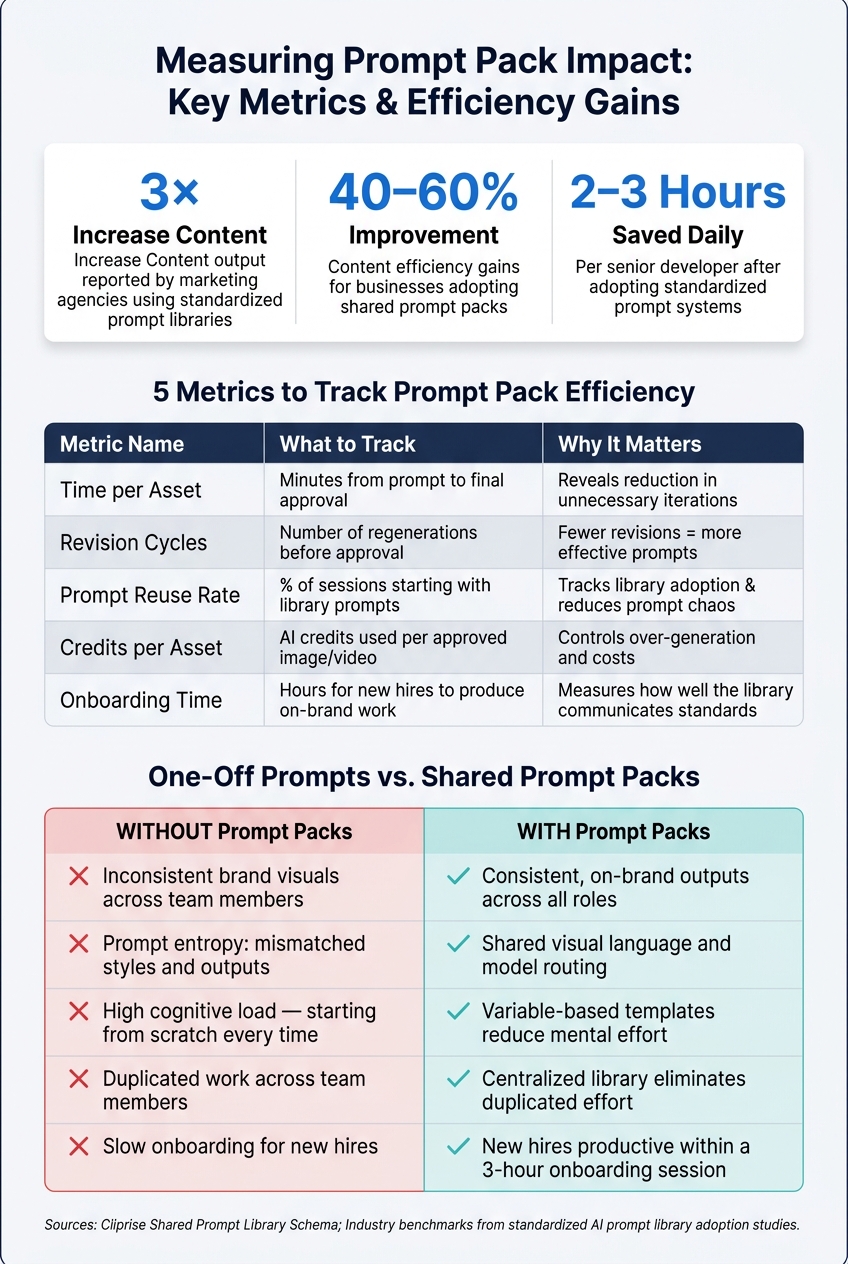
Prompt Pack Workflow: Roles, Metrics & Efficiency Gains
Faster workflows are great, but they need to be backed by real data. To justify your investment, track measurable metrics that demonstrate efficiency improvements. A simple spreadsheet can help turn gut feelings into solid evidence.
Key Metrics to Track Efficiency Gains
When measuring efficiency, focus on four main areas: speed, quality, consistency, and cost. Start by choosing two or three metrics that address your team's biggest challenges.
| Metric | What to Track | Why It Matters |
|---|---|---|
| Time per asset | Minutes from prompt to final approval | Reveals whether you're cutting down on unnecessary iterations |
| Revision cycles | Number of regenerations before approval | Fewer revisions mean more effective prompts |
| Prompt reuse rate | Percentage of sessions starting with library prompts | Tracks how well your team adopts the prompt library and reduces "prompt chaos" |
| Credits per asset | AI credits used per approved image or video | Helps manage over-generation and control costs |
| Onboarding time | Hours it takes for new hires to produce on-brand work | Measures how effectively the library communicates standards |
Use a shared spreadsheet to log data, including columns for the date, team member, project, content type, and generation count. For example, a team generating 100 images and 20 videos weekly, using about 360 credits, can use weekly logs to spot inefficiencies and adjust workflows. [2]
Teams using high-quality prompt packs often report content efficiency improvements of 40–60%. Marketing agencies, in particular, have seen up to a threefold increase in content production after implementing standardized prompt libraries. [4] While these results aren't guaranteed, they provide a realistic goal to aim for.
These metrics highlight how a shared prompt library benefits creative, marketing, and production teams alike.
Running Before-and-After Comparisons
Once you’ve set up these metrics, a short pilot test can help you compare traditional one-off prompts to standardized prompt packs. Using a Midjourney prompts pack can serve as a baseline for these tests. Divide a small project between two groups: one writes prompts from scratch, while the other uses prompts from the library. Track key metrics like time per asset, revision cycles, and how many outputs pass a “client-ready” check without edits. [4] These comparisons often illustrate how standardized prompts reduce workload and improve consistency.
Weekly quality reviews are another valuable tool. Dedicate 30–45 minutes to evaluate the week’s output as a team. Ask two core questions: Does this look consistent with our brand? and Would we show this to a client without changes? [2] Flag any assets that fail either question as outliers. Over time, a declining outlier rate indicates your prompt library is improving overall quality.
Version control can also be a lifesaver. If the quality of your output drops, compare the current prompt with the last approved version. This side-by-side review often pinpoints the exact issue causing the regression.
Where to Find Prompt Packs That Fit Your Team's Needs
To streamline your team's workflow, it's essential to find prompt packs that align with your specific needs and operational standards. Start by identifying gaps in your current processes using your metrics, and then look for packs designed to address those areas. Keep in mind that not all packs will match your team's tools, desired output types, or quality benchmarks. Careful evaluation is key before adding a multi-category prompt pack to your library.
How to Evaluate a Prompt Pack Before Adopting It
First, check for model compatibility. A pack designed for Midjourney v6 won’t produce consistent results in tools like Flux 2 or DALL·E. Using the wrong pack can lead to visual inconsistencies - the very issue you’re likely trying to avoid. High-quality packs specify the models they were tested on and often include a routing guide. For instance, a well-documented pack might direct product hero shots to Flux 2 (1:1), lifestyle imagery to Midjourney (4:5), and typographic designs to Ideogram v3. [2]
Next, look for parameterized variables like {{client_name}} or {{subject}}. These variables allow for easy customization without altering the pack’s core logic, making the pack scalable across different clients and projects. The best packs also serve as educational tools, showing how specific tokens affect aspects like lighting, composition, and mood. This enables your team to tweak prompts confidently instead of relying on trial and error. [1][3]
Art Prompt HQ simplifies the search process by categorizing packs based on model, style, and use case. Teams focused on brand visuals or commercial projects can explore the commercial AI art prompts section. For concept art or portfolio work, options like portfolio packs or fantasy and sci-fi collections are available. Meanwhile, teams creating social media content or short-form videos can find suitable packs in the viral shorts prompts category.
Keeping an Internal Shortlist of Approved Packs
Once you've evaluated and chosen the right packs, create a dynamic approval system to keep your library updated. Approved packs should be added to a shortlist - a living document that evolves over time. For each pack, track details like the model version it was tested on, a quality rating, the date of its last validation, and its current status (e.g., In Testing, Approved, or Deprecated). [7] This ensures your team avoids using outdated packs after model updates.
"We manage 8 client prompt libraries. Before this, our team duplicated prompts across Notion pages. Now every client has its own workspace, and we can roll back bad edits in seconds." - Sarah Chen, Operations Lead, BrightPeak Studio [3]
Assign a functional lead for each pack category. This person is responsible for re-validating packs when new model versions are released and flagging any that no longer meet quality standards. [7] By maintaining the shortlist as an evolving resource, your team can streamline onboarding and launch campaigns more efficiently. Every pack you vet and annotate becomes a valuable asset for future projects.
Conclusion: Getting More from AI Work with Prompt Packs
Transitioning to shared prompt packs can transform how teams approach AI-assisted workflows. By drawing from a well-organized, vetted library, teams eliminate inconsistencies, shorten revision cycles, and help new hires get up to speed faster. With documented standards in place, the challenges of blank-page syndrome, misaligned visuals, and complex onboarding become far easier to manage.
Marketing agencies have reported up to a 3× increase in content output, while businesses experience efficiency improvements ranging from 40–60% when adopting shared prompt packs [4]. These aren't small improvements - they represent the kind of operational changes that make investing in a structured prompt management system worthwhile.
"Our content team reused the same core prompts across campaigns, but Docs made approvals messy. Templates and version history gave us one approved source of truth." [3]
Whether you're part of a small in-house team or managing creative work for multiple clients, the principles remain the same: curated packs, a well-maintained library, and a clear process for keeping everything up to date. Take the first step toward streamlining your team's workflow by exploring curated AI prompt packs and building a system you can rely on.
FAQs
How do we decide which prompts should become a prompt pack?
To streamline your team's processes, start by pinpointing the tasks you handle most frequently. These might include designing thumbnails, crafting social media posts, producing product images, or developing concept art. Pay special attention to workflows that involve a lot of variation or require repeated trial-and-error adjustments.
Once you've identified these tasks, document the essential elements: the key inputs needed, the expected outcomes, and the standards for success. If you find that certain prompts reliably produce professional-grade results and can be applied across multiple projects, campaigns, or clients, consider organizing them into a dedicated pack. This approach can save time and ensure consistency in your creative output.
Who should manage updates and approvals for our prompt library?
The team lead or the assigned creative operations manager should handle updates and approvals to uphold quality and maintain uniformity. While team members are encouraged to propose and experiment with prompts, the approval process should stay centralized. This approach ensures that the core library contains only thoroughly reviewed prompts, while a separate review section is used to collect edits and refinements before finalizing them.
How can we prove that prompt packs improve speed and quality?
To boost both speed and consistency, focus on tracking critical metrics such as time spent per asset, number of revision cycles, rate of asset reuse, and overall campaign turnaround time. Leverage tools like version control, detailed prompt logs, and evaluation rubrics to keep quality on track. Conduct regular reviews of outputs and update your asset library frequently to uphold standards and pinpoint opportunities for improvement.