When using AI tools like Midjourney or Stable Diffusion, keeping character designs consistent can be a real challenge. Features like eye color, scars, or hairstyles often change unexpectedly between generations. This happens because these models don’t “remember” previous outputs - they recreate images from scratch every time. That’s where portrait and character prompt packs come in. These packs help lock in key traits like face shape, skin tone, and style, ensuring your characters stay recognizable across poses, scenes, and even different tools.
Why Consistency Is So Hard with AI Characters
The Problem with Variability in AI Models
AI image generators like Midjourney, Stable Diffusion, and DALL·E face a fundamental challenge: they don’t retain memory of previous outputs. Every image is generated from scratch, relying on statistical patterns rather than recalling past results. As Prompting Systems explains:
The core issue is that diffusion models are probabilistic. They denoise random static into an image based on statistical likelihoods, not memory [4].
This means when you describe a "young woman with short dark hair", the AI interprets it broadly, filling in details like facial features, eye color, and skin tone differently each time. Over multiple generations, these small variations add up - by the fifth image, the character may look entirely different. This "identity drift" happens because the model lacks a stable reference for the character’s features [2][6].
Even the order of words in a prompt can drastically affect the outcome. For instance, moving "green eyes" from the start to the end of a prompt can weaken its influence [4]. In scenes with multiple characters, this issue becomes even more pronounced, as the AI might blend traits between characters due to the placement of descriptors [4][6]. This highlights the importance of using structured tools like Midjourney prompt packs to establish consistent identity anchors.
Ultimately, the variability inherent in these models means that reusing the same prompts doesn’t fully solve the consistency problem.
Why Prompt Reuse Alone Isn't Enough
Copying and pasting the same prompt over and over won’t ensure consistent results. Without additional tools like reference images, seed locks, or trained LoRAs, the probabilistic nature of diffusion models guarantees some level of variation each time [4]. Even identical prompts can yield noticeably different outputs.
Adding more precise details to a prompt can improve consistency by as much as 40% [4], but vague descriptors like "attractive person" or "casual outfit" leave too much room for interpretation. Ilia Ilinskii from Rephrase emphasizes:
Consistency is not just about repeating the same adjectives. It's about reducing ambiguity [2].
Structured character prompt packs offer a practical solution. These packs separate fixed identity traits - like facial features or hairstyle - from variable elements, such as poses or backgrounds. This approach gives the AI a stable framework to work from, reducing the chances of identity drift [1][2]. By isolating fixed traits from changeable details, prompt packs create a more reliable foundation for consistent character design.
sbb-itb-997826f
What's Inside a Good Portrait or Character Prompt Pack
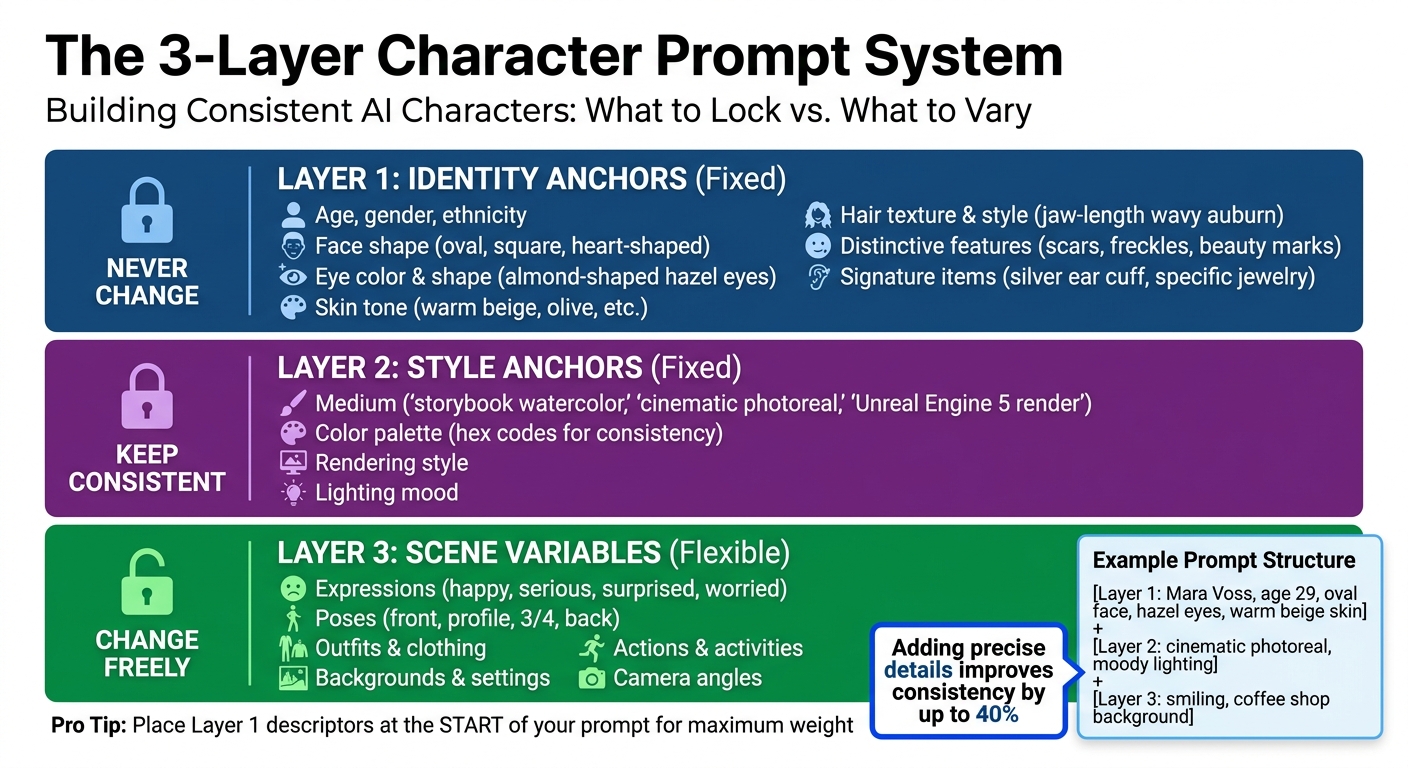
3-Layer Character Prompt System for AI Art Consistency
Creating consistent character visuals starts with carefully structuring the key details that define a character’s identity. Generic prompts often lead to inconsistent results, but well-designed character prompt packs use Identity Anchors to create a unique, repeatable character profile. These anchors ensure that every output aligns with the intended design, forming the backbone of the techniques covered in later sections.
Core Character Identity Anchors
Every character begins with fixed traits like age, gender, face shape, eye color and shape, skin tone, hair texture and style, and distinctive features such as scars or freckles [1][2]. These traits act as the "spine" of the prompt. For instance, instead of a vague description like "young woman", a detailed prompt might specify: "Mara Voss, age 29, oval face, almond-shaped hazel eyes, warm beige skin tone, jaw-length wavy auburn hair, small beauty mark above left eyebrow."
To further solidify the character’s identity, signature items - such as a silver ear cuff or a charcoal trench coat - are often included. These details prevent the AI from making unexpected changes, like adding different accessories or altering proportions between images. Ilia Ilinskii from Rephrase explains it well:
Consistency is not just about repeating the same adjectives. It's about reducing ambiguity [2].
Style, Medium, and Rendering Specifications
Maintaining a consistent visual style is crucial to avoid unwanted variations. This involves locking in the medium, such as "storybook watercolor", "cinematic photoreal", or "Unreal Engine 5 render", and using identical descriptions across all prompts [1][4]. To further ensure consistency, color palettes are often defined with hex codes, allowing lighting and mood adjustments without altering key elements like skin tone or hair color.
A well-structured prompt uses three layers: fixed Identity Anchors, locked Style Anchors, and flexible Scene Variables [1]. This layered approach ensures the AI knows what must remain constant and what can be adjusted, laying the groundwork for creating diverse scene variations.
Variations for Expressions, Poses, and Outfits
For projects like comics, branding campaigns, or webtoons, it’s essential to depict the same character in various emotional states, actions, and settings [1][6]. High-quality character prompt packs include specific prompts designed for different expressions and poses.
To further enhance usability, these packs often contain multi-angle views - front, profile, 3/4, and back - giving the AI enough data to maintain consistency in facial landmarks and bone structure across different perspectives [1][4][6]. Negative prompts act as guardrails, explicitly instructing the AI to avoid changes like altering hair color, adding unwanted accessories, or introducing anatomical distortions [4]. These tools work together to create a versatile, yet consistent, framework for character design.
Techniques for Keeping Faces and Styles Consistent Across Models
When working with AI models like Midjourney, Stable Diffusion, and DALL·E, maintaining character consistency across generations requires more than just a strong prompt pack. Even the best character prompt packs need to be paired with effective techniques to ensure your characters remain recognizable. The challenge lies in how differently each model interprets prompts, making a combination of strategies essential for consistent results.
Reusing Core Descriptors and Keywords
One key approach is to establish and stick to a "Character DNA" block - a fixed set of descriptors that define your character’s essential traits [4] [5]. For instance, if your character has "deep green, almond-shaped eyes with thick dark lashes", avoid switching to terms like "emerald eyes" or "bright green eyes." Consistency in wording reduces ambiguity and helps the AI retain key features.
Placing defining traits at the start of your prompt gives them more weight. Research suggests this technique can lead to about 60–70% visual similarity across generations [3]. Adding anatomical precision - such as "cleft chin" instead of "strong jawline" - can further improve consistency by up to 40% [4]. While themed prompt packs provide a solid framework, these refinements ensure your character’s identity remains intact, even as you vary scene or style elements.
Using Reference Images and Seed Management
Reference images are another powerful tool for maintaining consistency. These images act as visual anchors, reinforcing key features like facial structure. For instance, Midjourney’s --cref parameter achieves around 85–92% consistency in facial features [3]. Similarly, Stable Diffusion’s Img2Img and ControlNet tools allow you to use reference images as structural guides [4]. Uploading 2–3 images of the same character from different angles can yield the best results [6].
Seed management is equally important for reproducible results. Every AI-generated image starts with a unique seed, and reusing the same seed with similar prompts helps lock in the randomness. In Midjourney, you can retrieve a seed by reacting to an image with the envelope emoji (✉️). For those looking to master these advanced settings, a Midjourney prompt bundle can provide deeper insights into manipulating style codes. For Stable Diffusion, using Img2Img with a denoising strength between 0.3 and 0.5 helps preserve facial identity [4]. DALL·E 3, on the other hand, uses a "Gen ID" and conversation memory to maintain about 70–80% consistency within a single session [3]. Keep in mind, though, that altering the prompt text can change how the model interprets a seed’s noise pattern [5].
Avoiding Style Drift with Negative Prompts
Negative prompts act as guardrails, explicitly telling the AI what to avoid. This prevents "concept bleeding", where background elements or unrelated subjects interfere with your character’s design. For example, if your character has short black hair and no jewelry, include phrases like "changing hair color, different outfit, jewelry, glasses" in your negative prompt.
Negative prompts are also effective at reducing structural errors. Adding terms like "extra limbs, fused fingers, bad anatomy, deformed iris" can help maintain anatomical accuracy, cutting down errors by 60–70% [4]. If you’re aiming for a photorealistic style, exclude terms like "watercolor, illustration, 3D render" to avoid unwanted artistic shifts.
A good practice is to create a "Master Identity Prompt" that combines your character’s core description with a standardized negative prompt block. Reuse this prompt across all generations for consistent results. As noted in the Alan Turing Institute's 2024 report:
Negative prompts reduce anatomical errors by 60-70%. When generating consistent characters, your negative prompt acts as a guardrail against mutation [4].
Choosing the Right Pack for Your Project Type
Selecting the right prompt pack is a game-changer for ensuring your project aligns with its goals. A pack tailored for comic panels, for example, won't necessarily work for designing a brand mascot. Similarly, a thumbnail-focused pack might lack the multi-angle views needed for creating a VTuber. Matching the pack to your project type can save you time and frustration.
For Comics and Webtoons
Sequential art demands consistency - readers will notice even subtle changes in a character's appearance [6]. Look for packs that include Character Turnarounds (front, side, back, and three-quarter views) to ensure your character looks the same from every angle [6]. Expression Sheets are another key feature, offering a range of emotions like happiness, seriousness, surprise, and worry, all while keeping facial features consistent [1].
Start by building a Character Bible that outlines your Master Identity Prompt, color codes, and defining features [6]. If your comic uses different tones or styles, such as flashbacks rendered differently, ensure the pack supports combining character references with separate style references. Begin with a neutral, front-facing image to anchor all subsequent designs [6].
These packs not only streamline your creative process but also pave the way for specialized branding and social media content.
For Branding and Marketing
Consistency in character design is vital for brand identity. A pack that includes both identity and style anchors ensures your mascot remains recognizable. As Cemhan Biricik from zsky.ai explains:
A brand mascot that changes appearance with every social media post is worthless [5].
For branding, choose packs that go beyond facial details to include consistent body proportions, build, and signature clothing or accessories [6]. Identity Anchors - features like face shape, eye characteristics, hair texture, skin tone, and unique marks - should remain fixed [1].
Equally important are Style Anchors, which define the medium and rendering details (e.g., "cinematic photoreal", "3D cartoon", or "Unreal Engine 5 render") to maintain a cohesive look [4]. Multi-angle character sheets (front, profile, and three-quarter views) are essential for ensuring the mascot is recognizable from all perspectives [6].
For mascots used over long periods, consider developing a character-specific LoRA to achieve maximum consistency. In the meantime, regularly check generated images for key markers like face shape, hair, and accessories. If any drift occurs, adjust the prompt structure accordingly [2].
While branding packs prioritize full-body consistency, social media packs place emphasis on dynamic poses and expressions.
For Social Media, VTubers, and Thumbnails
Social media content, YouTube thumbnails, and VTuber models thrive on expressive and pose variety. Look for packs that include Expression Sets (e.g., happy, serious, surprised, worried) to convey emotion and build audience recognition [6]. For VTubers and avatars, choose packs with Character Sheets that offer front, side, three-quarter, and back views to maintain consistency across angles [1].
To keep posts fresh while retaining the character's identity, consider Outfit Variation Packs. These allow changes in clothing and accessories while locking in core physical traits [6]. Use a 3-layer approach: fix Identity Anchors (face, hair) and Style Anchors (medium, lighting), while varying only Scene Variables like background or action [1]. When creating new thumbnails or posts, tweak one variable at a time to reduce the risk of facial inconsistencies [6].
For avatars, tools like Midjourney’s --cw can help maintain character reference weights between 70–100% for strict consistency, or 50–70% when experimenting with new styles [6]. DALL-E 3, with its conversational memory, typically retains 70–80% consistency within a session, though this may drop in subsequent sessions [3].
The takeaway: Tailor the pack to your needs - comics benefit from turnarounds, branding demands full-body consistency, and social media thrives on variety and expression.
Building a Simple Character Bible from Your Favorite Pack
Once you've chosen a character prompt pack and generated some strong base images, it's time to create a character bible. This is essentially a living document that captures your character's visual identity in detail, ensuring consistency across all your images. As Griffin Chesnik, an ML engineer, puts it:
Character bibles serve as consistency anchors that maintain character integrity throughout the narrative - preventing one of the most common and jarring inconsistencies in AI-generated content [7].
This process helps eliminate guesswork, solidify your descriptive language, and make your instructions clear for every image generation.
Document Key Traits and Descriptors
Start by recording the essential traits that define your character. These include details like age, ethnicity, facial features, hair type, and wardrobe. Don’t forget to include body proportions and style preferences to maintain continuity [6][4].
A terminology guide can help avoid confusion. For example, stick with terms like "hazel eyes" instead of alternating with "golden-brown", or use "honey blonde" rather than "yellow." Studies show that increasing the precision of your descriptions can improve consistency by as much as 40% [4].
Save Successful Seeds and Prompt Variations
Once you've nailed down your character's core traits, make sure to document the technical settings that produced the best results. Save successful seeds, model versions, and any specific parameters, such as Midjourney's character weight (--cw) or denoising strength. Tools like Notion, Obsidian, or Figma are great for organizing this information [6][3].
Structure your character bible into three main layers: Identity (fixed traits like facial structure), Style (aesthetic elements like lighting and medium), and Scene (backgrounds and actions). Create a "Character DNA" block - a fixed set of tokens you can paste at the start of every prompt to ensure the model prioritizes key traits. Be sure to document any non-negotiable features, such as a scar or a signature accessory [4][2]. As Ilia Ilinskii from Rephrase explains:
Consistency is not just about repeating the same adjectives. It's about reducing ambiguity [2].
Organize Example Outputs for Easy Reference
Develop a visual character sheet that includes multiple angles - front, side, three-quarter, and back views - along with at least four core expressions (neutral, happy, serious, and surprised) [1][3]. For each successful image, note the exact hex codes for features like hair, eyes, skin tone, and clothing. Be sure to date your reference sheets to track any changes as your character evolves [6][3].
To prevent "identity drift", maintain a continuity log. This log tracks gradual changes in features like face shape, hair texture, or signature clothing over time. If you notice any drift, you can tweak your prompts or revert to a previously saved seed [2].
Workflow Strategy: From Pack to Consistent Output
Once your character bible is established, the next step is creating a workflow that ensures consistency across all outputs. The aim is to move from a single, well-crafted image to a full set of cohesive visuals without starting over each time. Erick from QuestStudio explains it best:
Character consistency is not luck. It is a system: lock identity, lock style, plug in scenes, change one variable at a time, and save what works [1].
This structured method connects your character bible to the generation process, turning character prompt packs into practical tools for consistent results.
Start with a High-Quality Anchor Image
Begin by generating a master image - a simple, centered portrait with a plain background and a neutral expression. This image serves as the reference for all future creations [1][3]. Build a character sheet that includes multiple angles - front, side, back, and three-quarter views - and at least four core expressions: neutral, happy, serious, and surprised. These anchors provide the AI with clear, stable visual cues [1][3].
At this stage, lock in your character’s defining features, such as facial structure and expressions, and pair them with style anchors - whether that’s "cinematic photoreal", "storybook watercolor", or "Unreal Engine 5 render." Keeping these style choices consistent across all prompts is key to maintaining visual alignment [4][1]. Research indicates that detailed descriptions can boost character consistency by up to 40% [4].
Iterate with Fixed Prompts and Style Descriptors
When refining, use fixed prompts and apply the 3-layer system for every input. Layer 1 includes identity anchors (unchanging), Layer 2 covers style anchors (unchanging), and Layer 3 introduces scene variables (flexible). Always place character-defining tokens at the start of the prompt, as their position influences how the model prioritizes features [4].
Adhere to the "one variable" rule during iterations: adjust only one element at a time, such as lighting, pose, or background [6][2]. For image-to-image workflows, use specific denoising strengths to maintain consistency. For pose adjustments, aim for a range of 0.35 to 0.55; for outfit changes, use 0.50 to 0.65; and for entirely new scenes, try 0.60 to 0.75. Stick with the same seed across generations and save successful seeds with your outputs [6].
Manage and Organize Your Outputs
Organize your best outputs in a dedicated folder with all relevant details. Include the master reference image, exact prompt text, hex codes for hair, eyes, skin tone, and clothing, as well as tool settings like seeds and character weights [6][2]. Save your primary character reference prompt as a text file alongside the master image for easy access in future sessions [6].
After every generation, compare outputs to your character bible, checking for consistency in facial features, hair, accessories, and signature clothing [2]. If you notice any drift, revert to your anchor image and tweak one variable at a time to pinpoint the issue [1]. Keeping a continuity log helps track subtle changes and prevents identity drift from derailing your project.
Where to Find Portrait & Character Prompt Packs on Art Prompt HQ
Once you've set up your character bible and workflow, the next step is finding reliable prompt packs. Art Prompt HQ categorizes its resources to help creators maintain consistent character designs. These categories cater to various creative needs, whether you're working on a single face or developing a full character sheet for storytelling. These packs align with earlier strategies like reusing core descriptors, managing seeds, and locking in style anchors to ensure your AI-generated characters remain consistent.
Explore Portrait Prompt Packs
If your project focuses on facial consistency, portrait prompt packs are a great choice. These packs are designed to emphasize facial features like bone structure, eye color, skin tone, and other defining traits. They rely on Identity Anchors - such as age, face shape, hairstyle, and unique details like freckles or scars - to create a solid base portrait. This makes them ideal for projects like avatars, professional headshots, digital twins, or any work where the face takes center stage.
Explore Character Prompt Packs
For creators working on full-body designs, character prompt packs offer a more comprehensive approach. These packs cover broader details like outfits, body proportions, and multi-angle views (front, profile, and three-quarter). Many include Character Sheets with various angles and expressions - smiling, serious, or surprised - to ensure your character stays consistent across different scenes or actions. They're perfect for comics, webtoons, children's books, brand mascots, and VTuber designs.
Discover Multi-Model Packs
If your creative process involves multiple AI tools, multi-model packs are tailored for cross-platform consistency. These packs use semantic anchors - traits that translate well across different models - and include specific adjustments for tools like Midjourney, Flux, and Stable Diffusion. This ensures that a character created in one model, like Nano Banana 2, remains recognizable when transitioned to another, such as Midjourney v7. These packs simplify the challenge of maintaining character identity when switching between platforms.
Choosing the right pack - whether for facial focus, full-body designs, or multi-platform workflows - can save time and help maintain character stability from start to finish. Browse curated prompt packs to find collections tailored to your needs, or learn more about AI art prompts to enhance your understanding of prompt engineering for long-term creative projects.
FAQs
What’s the difference between portrait prompt packs and character prompt packs?
Portrait prompt packs are designed to generate consistent and detailed faces by highlighting specific aspects such as facial features, expressions, lighting, and character details. On the other hand, character prompt packs expand on this by incorporating additional elements like backstories, personality traits, outfit variations, and overall style. This ensures that the character's identity stays cohesive across different images.
How can I keep the same face consistent across Midjourney, Stable Diffusion, and DALL·E?
To achieve consistent faces across different AI tools, focus on crafting detailed prompts that include specific facial traits and style descriptors. Reusing seed values, core descriptors, and reference images (when the tool allows) can significantly improve reliability. For tools like Stable Diffusion, you can take it a step further by using advanced techniques such as image-to-image workflows and embedding models. Another helpful strategy is to document successful prompts and their variations, creating a "character bible" that ensures consistent reproduction throughout your projects. While perfect consistency may be challenging to achieve, these methods can deliver results that are consistent enough for most creative needs.
What should I save in a character bible to prevent identity drift?
To maintain consistency and avoid identity drift in your character designs, document key descriptors that define their traits and appearance. This includes details like facial features, hairstyles, clothing, accessories, and distinctive markers such as scars or tattoos. Alongside these, save the specific prompts, seed values, and any reference images or style locks that reliably recreate the character. A carefully compiled reference sheet with all these elements helps ensure your character remains consistent across various images and scenes.