AI Prompt Pack Checklist: 12 Things to Look For Before You Buy
published on 30 March 2026
AI prompt packs can save you hours of trial and error by providing pre-tested prompts tailored to specific models like Midjourney, DALL·E, or Stable Diffusion. But not all packs are worth your time or money. This checklist highlights 12 must-have features to help you choose packs that deliver consistent, professional results - whether you're creating visuals for social media, client projects, or personal portfolios. From model compatibility to licensing clarity, these criteria ensure you invest in tools that work seamlessly with your workflow. Here's what to look for before you buy. If you're looking for a shortcut, you can also explore a complete AI prompt system that covers multiple models and categories.
Why You Need a Checklist Before Buying Prompt Packs
The Problem with Low-Quality Prompt Packs
The market for AI prompt packs is flooded with products that often lack proper testing, leading to wasted time and money. Many of these packs are created by simply using tools like ChatGPT to churn out a list of prompts, which are then compiled into spreadsheets and sold [6]. This approach typically results in single-line prompts that rely on "aesthetic guesswork" rather than providing consistent and reliable visual guidelines [2].
The impact of these low-quality packs goes beyond financial loss. They force creators into frustrating trial-and-error cycles, producing messy outputs, visual artifacts, and inconsistent styles. As Andy Crestodina, Co-founder of Orbit Media Studios, aptly observed:
AI makes terrible recommendations until you train it on the target persona [4].
Additionally, many packs that boast extensive collections often turn out to be filled with repetitive variations that barely differ in subject or setting [6]. Compatibility issues with specific models further complicate things, leaving users with outputs that feel more like "lucky accidents" than dependable, on-brand visuals [2]. This is why having a detailed checklist is essential.
How a Checklist Helps You Choose Better
A checklist acts as a guide to help you evaluate and select prompt packs wisely, addressing the challenges posed by low-quality options. With a checklist, you can confirm that a pack includes critical features such as model-specific instructions, negative prompts, real-world output examples, and clear licensing details. These elements distinguish professional-grade tools from hastily assembled products.
Time savings is another major benefit. Well-structured and tested prompt packs, complete with troubleshooting notes, version updates, and workflow integration details, can save you anywhere from 2 to 10 hours per week [1]. This is especially valuable for creators working on specific projects, such as photorealistic photography prompt packs for client shoots or DALL·E-based icon and UI packs for branding campaigns.
A checklist also helps you tap into the vast potential of AI prompts that often goes unused. Professionals miss out on 80% to 90% of opportunities simply because they lack the knowledge to integrate prompts effectively into their workflows [1]. By exploring curated AI prompt packs, you can quickly identify the ones that deliver consistent, client-ready results - eliminating the need to start from scratch every time.
sbb-itb-997826f
Checklist Items 1-3: Model Compatibility, Version Clarity, and Tool Focus
1. Supported Model(s) Clearly Stated
When evaluating a prompt pack, model compatibility is a must-check. A reliable pack will clearly state which AI models it supports, such as Midjourney, Stable Diffusion, DALL·E, or newer video tools like Sora, Veo, and Runway. Look for specifics, like model-specific syntax - Midjourney uses --ar and --stylize, while Stable Diffusion and DALL·E rely on descriptive language or token weights. If these details aren’t listed, or if the pack doesn’t show the actual prompt structure, consider it a warning sign. For peace of mind, verify these details when browsing through curated AI prompt packs.
2. Version and Update Timeline
Version targeting is another critical factor. AI models evolve, and prompt performance can shift with each update. Packs designed for older versions might not take advantage of newer capabilities, leading to inconsistent results. Top-tier packs are labeled as "Tested & Proven" for specific model versions, ensuring reliable outputs [7][3]. Frequent updates are also key - AI providers often tweak their models, so professional packs typically include an update policy or subscription service to keep prompts aligned with the latest changes. Nate from EverythingAI emphasizes this point:
"If you think AI education is one-and-done, you're going to wake up in 2026 wondering why you're left behind while others are 10x more productive." [1]
Look for packs that explicitly support the latest versions, such as Sora 2 or Veo 3, and check if the creator offers regular updates, whether weekly or monthly.
3. Single-Model vs. Multi-Model Clarity
Model scope is another area to consider. Some packs are tailored for a single model, while others are designed to work across multiple platforms. Single-model packs are highly optimized and produce consistent, polished results within one ecosystem - perfect for specialists using tools like Midjourney or DALL·E-specific packs for UI and icon design. On the other hand, multi-model packs are great for creators juggling different types of media, such as marketers who need to create social media thumbnails, viral videos, and editorial photography. To be effective, multi-model packs should be well-organized by model, style, and intent.
For focused, high-stakes work, single-model packs are your best bet. If you're managing diverse content across platforms, a multi-model pack can provide the flexibility you need. Up next, we’ll dive into how style, intent, and practical applications shape a prompt pack's value.
Checklist Items 4-6: Style, Intent, and Realistic Use Cases
After covering compatibility and technical details, the next set of criteria zeroes in on style, intent, and how well a pack delivers practical results.
4. Explicit Style and Aesthetic Definition
When it comes to style, clarity is key. The best prompt packs act as detailed "blueprints" for achieving specific aesthetics. Instead of vague terms, they use precise descriptors like "Neo-Ghibli,""Retro-Futurism," or "85mm lens with soft diffused studio lighting." This level of detail helps eliminate guesswork and leads to consistent, polished results. As Dev Anglingdarma from Kittl puts it:
A structured prompt defines lighting, style, mood, perspective, texture, and composition - the same decisions a designer makes manually[9].
Look for packs that define these technical aspects clearly, rather than relying on generic or overly broad descriptors.
5. Documented Use Cases and Applications
Good documentation can make or break a prompt pack's usefulness. Packs should be organized by specific purposes - whether for branding, portraits, product photography, or social media campaigns. This structure ensures you know exactly what kind of results to expect. Packs aimed at commercial projects often emphasize repeatable, on-brand outcomes, while those for creative work may encourage more experimentation. Be cautious of vague labels like "10 prompts for social media," which may signal a lack of depth or focus.
6. Real Output Examples or Gallery
Seeing is believing. High-quality packs often include galleries or screenshots of real outputs to showcase their potential. These examples provide a clear sense of the pack's strengths, as well as its limitations. Many professional packs also document known edge cases or challenges. For example, Sarah Toma from Anntoine highlights an important consideration:
If your products include a lot of text (like labels or packaging), be aware that AI-generated images might render that text incorrectly or garbled. Focus on the visual vibe over legible wording
When evaluating a pack, prioritize those that include real-world examples and clearly outline any limitations, so you know exactly what you're working with.
Checklist Items 7-9: Instructions, Negative Prompts, and Troubleshooting Guidance
After ensuring compatibility and style, the next step is identifying what separates a basic pack from a professional one: clear instructions, negative prompts, and troubleshooting notes. These details can make the difference between a smooth workflow and hours spent fixing errors.
7. Clear Prompt Structure and Formatting
Great prompt packs act like blueprints, showing how specific tokens influence elements like lighting, composition, and mood. This clarity allows you to adjust subjects without starting from scratch [2]. Look for packs that outline these tokens and include customizable placeholders (e.g., [TARGET AUDIENCE]) to simplify edits [7]. Some creators even organize prompts by complexity - Simple, Advanced, and Complex - so you can choose the right depth for your project [10]. Packs that focus on clarity make it easier to understand where and how to incorporate your own inputs. Once this is in place, check for negative prompts to refine outputs further.
8. Negative Prompts and Avoidance Settings
Negative prompts are a must for eliminating common AI mistakes, such as extra limbs, blur, unwanted text, logos, or watermarks [2]. High-quality packs provide detailed negative prompt strings along with parameter suggestions (like --ar 4:5 or --stylize 200) to achieve stable, polished results [2]. This is especially important in commercial projects, where inconsistent outputs can lead to client dissatisfaction or refunds [3]. Without tailored negative prompts, even experienced teams can miss out on AI's full potential [1]. Packs that include these prompts ensure your results are clean and professional.
9. Troubleshooting Notes and Edge Case Documentation
Top-tier packs don’t claim to be flawless - they include troubleshooting notes to help you navigate tricky scenarios. Look for packs that address common errors and provide practical advice for managing unexpected results [5]. Whether you’re working with DALL·E‑focused icon or UI packs or photography-driven packs, prioritize those with troubleshooting tips over ones that only showcase polished examples. This guidance is key to integrating the pack seamlessly into your workflow and avoiding unnecessary frustration.
Checklist Items 10-12: Licensing, Updates, and Workflow Integration
The final pieces of the evaluation framework focus on three key areas: legal clarity, ongoing updates, and how well a pack fits into your creative process. These factors help distinguish professional-quality prompt packs from casual collections and determine their long-term usefulness.
10. License and Usage Rights Clarity
License and Usage Rights: Before purchasing, confirm the pack provides clear commercial use rights and specifies any restrictions, such as non-exclusive or limited-exclusive terms. Check whether sublicensing is permitted and ensure it includes royalty-free terms to avoid unexpected fees [2][11]. Clear licensing not only protects you legally but also ensures your work is ready for professional use. Once you're confident in the licensing terms, it's equally important to evaluate the pack's update policy and support system.
11. Update Policy and Creator Support
Update Policy and Creator Support: Look for packs with a defined update policy to stay compatible with evolving AI models like Sora 2 or Veo 3. Packs that offer post-purchase support or access to a community forum can be invaluable [2]. Some creators treat their packs as learning tools, offering insights into how specific tokens influence elements like lighting, composition, or mood, making it easier to adapt as models improve [2]. Packs advertised as "Master Systems" or "commercial prompt packs" often prioritize consistency and regular updates over one-time results [2]. After confirming licensing and updates, the final step is ensuring the pack integrates smoothly into your workflow.
12. Workflow Repeatability and Integration
Workflow Repeatability and Integration: A well-structured pack should seamlessly fit into your current workflow. Look for packs that include templates or clear, step-by-step instructions. Ideally, they should be organized by model, style, and intent, allowing you to tweak elements like subject, lighting, or camera angles without reworking the entire prompt [2]. Packs that offer detailed guides or templates can save you significant time - up to 10 hours per week [1][3].
When browsing the curated selection on Art Prompt HQ, focus on packs that ensure consistent visual styles (like Neo-Ghibli or Retro-Futurism) and include negative prompt strings to reduce unwanted artifacts [2]. If you're exploring ways to monetize your creations, check out the AI art prompts monetization guide to understand how repeatable systems can lead to reliable income. Workflow-friendly packs transform AI art from a time-consuming task into an efficient production tool.
How Art Prompt HQ Helps You Shortlist Better Packs Faster
Sorting through countless options across different marketplaces can be a time-consuming task, especially when trying to evaluate every pack against a detailed 12-point checklist. Art Prompt HQ simplifies this process by offering filters and tags that align with those criteria. This allows you to quickly narrow down packs by model (such as Midjourney, Stable Diffusion, DALL·E, Sora 2, or Veo 3), style (like Portraits, Photography, 3D, Fantasy/Sci-Fi), and goal (Commercial, Portfolio, Viral shorts, or Learning prompting).
For instance, if you're searching for DALL·E-specific icon or UI packs, the directory highlights options tailored to that model and use case. Similarly, if you’re working on a photography or portrait-focused project, you can identify packs that include features like negative prompt settings and troubleshooting tips. The platform also showcases "Master Systems" and multi-category prompt packs designed for consistent, on-brand outputs, addressing checklist points 10, 11, and 12 with ease.
This structured categorization makes the process far more efficient.
"Art Prompt HQ is your shortcut to professional AI art prompts... organized by model, style, and goal so you can skip trial‑and‑error and go straight to predictable, client‑ready results."
While the directory doesn’t promise every pack will meet all 12 checklist points, it provides the tools to evaluate them quickly. Features like the AI Negative Prompt Generator and AI Art Style Finder let you test ideas before committing to a purchase. This mirrors the checklist-driven approach, ensuring you make informed decisions. For those looking to monetize their work, the AI art prompts monetization guide offers practical advice on integrating prompt packs into professional workflows.
Quick Reference: Save This Checklist
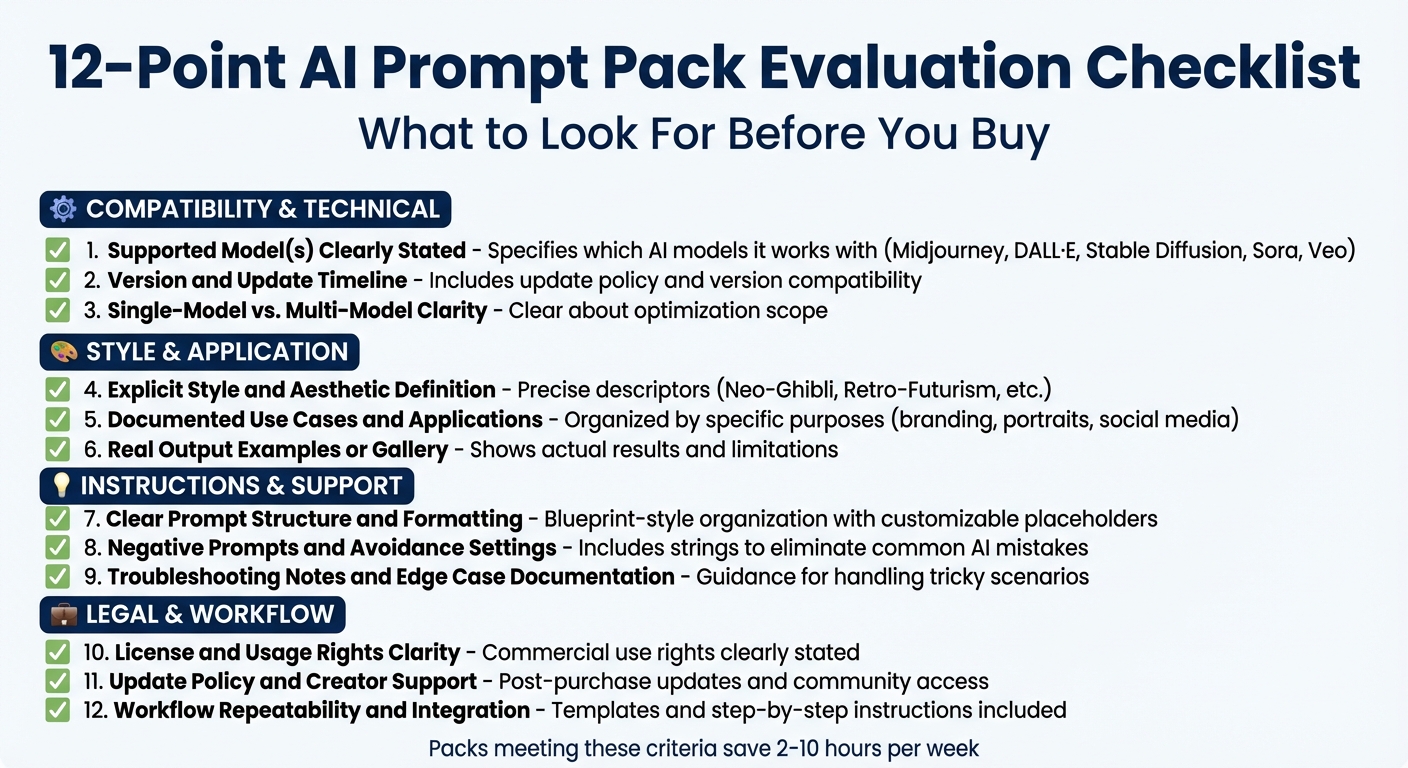
12-Point AI Prompt Pack Evaluation Checklist
Before buying an AI prompt pack, make sure it checks off these 12 points. Bookmark this page or take a screenshot so you can consistently evaluate every pack - whether you're looking for Midjourney portrait tools, DALL·E product photography prompts, or Sora 2 video templates.
Here’s what to look for:
1. Supported Model(s) Clearly Stated
Does the pack specify which models and versions it works with (e.g., Midjourney v6, Stable Diffusion XL, DALL·E 3, Sora 2, Veo 3)?
2. Version and Update Timeline
Will updates be provided as models evolve, or is it a one-time download?
3. Single-Model vs. Multi-Model Clarity
Is the pack designed for a single model with high optimization, or does it offer flexibility across multiple models?
4. Explicit Style and Aesthetic Definition
Does it clearly define the visual style or theme (e.g., Neo-Ghibli, Retro-Futurism, editorial photography)?
5. Documented Use Cases and Applications
Is it tailored for specific professional goals like marketing, client work, or viral video content?
6. Real Output Examples or Gallery
Does the pack showcase tested, consistent results rather than random one-off outputs?
7. Clear Prompt Structure and Formatting
Are the prompts organized in a reliable format (Context → Instructions → Examples → Output Format)?
8. Negative Prompts and Avoidance Settings
Does it include negative prompts to help avoid common issues or artifacts?
9. Troubleshooting Notes and Edge Case Documentation
Does it provide guidance for handling tricky scenarios or ambiguous inputs?
10. License and Usage Rights Clarity
Are the prompts cleared for commercial use?
11. Update Policy and Creator Support
Does your purchase include future updates or access to community support?
12. Workflow Repeatability and Integration
Can the pack be easily integrated into your existing workflow for consistent, professional results?
A pack that meets these criteria will fit smoothly into your process and deliver reliable, high-quality outputs. As Dan Cleary, Co-Founder of PromptHub, explains:
Success with LLMs is a continuous process - things change quickly and you should regularly revisit your criteria, test cases, and evals [12].
The same applies to visual AI tools. Using a structured checklist transforms subjective decisions into objective evaluations, helping you build a dependable library of prompt packs. Refer to this guide whenever you assess a pack, and browse curated AI prompt packs to find options that align with these standards.
FAQs
How do I know a prompt pack fits my exact model version?
To ensure a prompt pack aligns with your model version, verify that it explicitly mentions compatibility with your AI model and version. Pay attention to details about whether it’s designed specifically for that platform, as models like GPT-4.1 or Midjourney often need prompts that are fine-tuned for optimal performance.
What licensing terms should I confirm before commercial use?
Before diving into commercial use of AI prompt packs, it’s crucial to check the license terms carefully. Make sure the license explicitly grants permission for commercial use, allows the outputs to be used commercially, and outlines any limits on reselling or redistributing the prompts. Taking the time to review these details can help you steer clear of legal complications.
What’s the fastest way to spot low-quality prompt packs?
The fastest way to spot low-quality prompt packs is by checking for key elements like clear model compatibility, thorough instructions, negative prompts, and real examples. Packs that seem unclear, inconsistent, or fail to target specific use cases usually fall short and are unlikely to produce dependable results.