If you’ve ever struggled to find an AI prompt you’ve already created, you’re not alone. A prompt search system solves this by organizing prompts with metadata, making them easy to locate and reuse. Instead of wasting time recreating prompts, you can build a system that indexes your best work by categories like model, use case, and style. This guide explains how to turn scattered prompts into a multi-category prompt pack, improving speed and efficiency for creators and teams.
Here’s how to get started.
What a Prompt Search System Actually Is
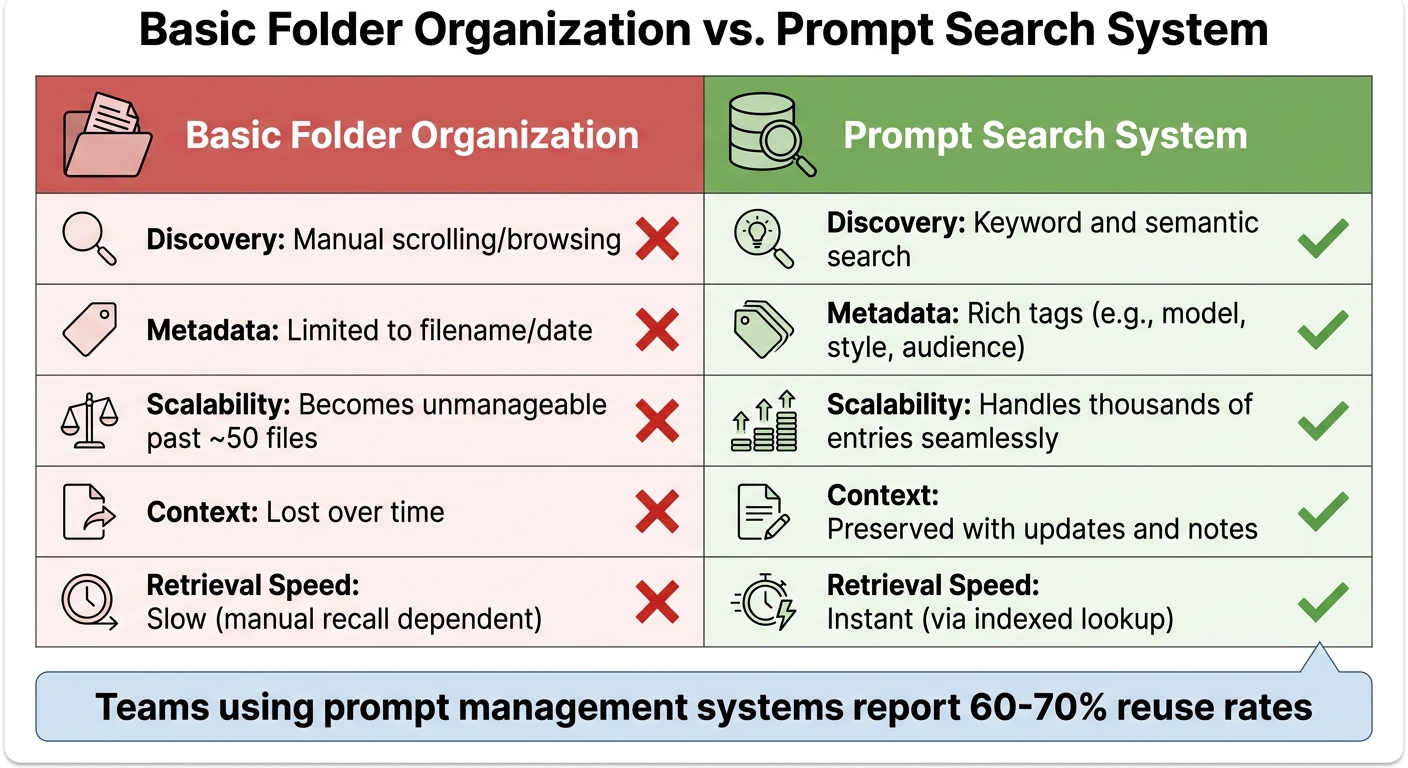
Basic Folder Organization vs Prompt Search System Comparison
A prompt search system transforms prompts into reusable assets by organizing them with metadata and version tracking [3]. Unlike a simple folder full of text files, it operates on three essential layers: storage (the database where prompts are kept), tagging (a structured metadata system), and versioning (tracking how prompts evolve over time) [3].
Instead of relying on manual scrolling through files, these systems use tools like an inverted index or a vector database to enable fast and intuitive searches, whether you're looking for a specific keyword or exploring semantically related prompts [3][5]. For example, Art Prompt HQ categorizes its packs by model, style, and use case. This means a creator searching for "commercial product photography" can quickly narrow down options without sifting through countless nested folders.
| Feature | Basic Folder Organization | Prompt Search System |
|---|---|---|
| Discovery | Manual scrolling/browsing | Keyword and semantic search |
| Metadata | Limited to filename/date | Rich tags (e.g., model, style, audience) |
| Scalability | Becomes unmanageable past ~50 files | Handles thousands of entries seamlessly |
| Context | Lost over time | Preserved with updates and notes |
| Retrieval Speed | Slow (manual recall dependent) | Instant (via indexed lookup) |
Core Features of a Prompt Search System
An effective prompt search system is built around metadata tagging, full-text search, filters, and result ranking. Metadata organizes prompts by categories like model (e.g., GPT-4, Claude), purpose (e.g., marketing, coding), and quality (e.g., tested, draft) [3]. Full-text search leverages techniques such as TF-IDF or BERT to ensure relevance [5], while ranking prioritizes results based on factors like popularity, frequency of use, or similarity scores [4][5].
A typical schema might include five fields: Name, Prompt Text, Model, Output Example, and Last-Tested-Date [3]. This setup ensures that when someone searches for "Midjourney portrait", they only see prompts that are tested and compatible with the latest version of the model, avoiding outdated drafts. For a smooth user experience, the system needs to deliver results in under 100 milliseconds [4].
These features are the backbone of why creators find prompt search systems indispensable.
Why Creators Need Prompt Search Systems
With the features described above, even a library of just 50 reusable prompts can save creators countless hours by cutting down on redundant refinement efforts. Teams that use prompt management systems report reuse rates of 60–70% [1], which means most new projects begin with proven templates instead of starting from scratch.
"A prompt library fixes this. Not a folder of random text files - a structured, searchable system that turns your best prompts into reusable assets." – SurePrompts Team [3]
Such systems capture the fine-tuning you do today, ensuring those improvements become time-saving tools for future projects [3]. This capability highlights the importance of designing a robust metadata schema to maximize discoverability and efficiency.
sbb-itb-997826f
Designing Your Prompt and Prompt Pack Schema
To create a solid foundation, start with a five-field schema: Name, Prompt Text, Model, Output Example, and Last-Tested-Date [3]. This setup covers all the essentials - what the prompt does, which AI engine it’s designed for, proof of its effectiveness, and when it was last verified. For example, a Midjourney prompt pack might list "Cinematic Portrait v6.1" as the Name, include the full prompt text with parameters under Prompt Text, specify "Midjourney v6.1" as the Model, provide a sample output image, and note "April 2026" as the Last-Tested-Date. This approach ensures users can quickly assess compatibility and relevance.
To make prompts easier to find, add tagging categories that allow for multiple search paths. Use 3–5 tags per prompt, drawing from a controlled list, to highlight key attributes like use case (e.g., commercial, portfolio, viral shorts), model (e.g., GPT-4, Claude, Stable Diffusion, DALL·E), style (photography, abstract, 3D), quality (draft, tested, production-ready), and audience (technical, customer-facing). For instance, a prompt tagged as midjourney, commercial, product-photography, and tested becomes highly discoverable for a creator planning a product launch, while an untagged prompt might remain overlooked in a generic folder.
Required Metadata Fields
Incorporate core fields to establish identity and technical compatibility: Name, Description, Author, Model, Version, and Date. These fields answer essential questions like, "What is this?" and "Will it work for my setup?" Beyond these basics, add categorization fields such as Use Case, Style, and Difficulty to enable filtering. For prompt packs, you might also include Pack Size (number of prompts), Format (e.g., text file, PDF, Notion template), and Price if the pack is part of a marketplace. Lastly, use quality-control fields like Status (draft, tested, production), Success Metrics (e.g., conversion rates or output quality scores), and Usage Notes to indicate reliability. This structured approach supports precise indexing and ranking in a prompt search system.
Balancing Simplicity and Comprehensiveness
While detailed metadata is valuable, it’s essential to keep the system user-friendly for scalability.
"If your organizational system requires 15 tags and 3 levels of nesting, you won't maintain it. Simpler systems with consistent habits beat complex systems with sporadic use." – SurePrompts Team
At a minimum, require only a prompt text and title to keep the submission process straightforward. Make additional metadata optional to avoid overwhelming contributors. Apply 3–5 controlled tags when saving, as users are unlikely to revisit later for tagging. Define a controlled vocabulary upfront - limit it to around 20 tags across five categories - to prevent clutter (e.g., having both marketing and promo for the same concept). For low-stakes prompts, stick to basic fields like Name, Model, and Use Case. For high-stakes prompts, include fields like Review Status and Success Metrics. A simple, easy-to-maintain system is more likely to stay relevant, while an overly complex one risks becoming obsolete.
Indexing and Ranking: How Users Actually Find Things
Once your schema is in place, the next step is ensuring that prompts are easy to locate. A well-organized library is only helpful if users can quickly pinpoint what they need. Whether someone remembers a specific name or is searching by use case, the process should be seamless. Indexing sets the boundaries for search, while ranking determines the order of the results.
Accurate and detailed metadata, as discussed earlier, is the backbone of effective indexing.
Keyword Indexing vs. Semantic Search
Keyword indexing relies on matching exact terms from titles, descriptions, or prompt text. Its strength lies in its speed and predictability for precise queries. For instance, searching for "Cinematic Portrait v6.1" will directly bring up the corresponding prompt pack.
Semantic indexing, on the other hand, interprets user intent and context rather than focusing solely on text matches. It uses structured metadata and semantic tags (e.g., purpose, environment, or technology) to provide relevant results even when the exact keywords aren't present. For example, a search for "product photography for e-commerce" might return packs tagged with commercial, product-photography, and midjourney, even if those exact words aren't in the title. While semantic search can handle synonyms and contextual queries well, it requires consistent tagging and a controlled vocabulary to avoid issues like tag drift - where inconsistent terms like auth and authentication fragment results.
Both approaches have their advantages. A hybrid system often works best, combining keyword search for speed, metadata filters for precision, and browsing options for broader discovery. Start with keyword indexing across titles and descriptions, then enhance it with metadata filters for model, use case, and style. Introduce semantic or vector search as your library expands and keyword searches begin yielding too many irrelevant results.
Ranking for Relevance and Popularity
Ranking algorithms blend keyword matches, metadata relevance, and popularity signals to determine the order of results. Titles and tags are given more weight than body text, ensuring that the most relevant options appear first. Consistent metadata - such as model, style, and use case - further improves ranking accuracy.
In addition to keyword relevance, prioritize prompts flagged as "reviewed", "approved", or "production-ready" over those marked as "draft" or "experimental." Usage-based popularity is another key factor - track how often a prompt is copied or executed. For example, prompts used more than 30 times are likely reliable and effective. Recent updates should also influence rankings; a Stable Diffusion prompt pack tested in April 2026 should rank higher than one last updated in 2023, even if both match the search query.
"A library with 2,000 snippets is useless if search returns a wall of weak matches. Engineers need relevance signals: language, runtime, framework, purpose, security posture, and maintenance status." – Daniel Mercer, Senior SEO Content Strategist, Codenscripts [2]
A well-designed ranking system ensures users find the most reliable, relevant, and up-to-date prompts within the first few results - eliminating the need to sift through pages of irrelevant matches. By focusing on these ranking principles, you can create a search experience that feels intuitive and effective.
Search UX Basics: Bars, Filters, and Result Cards
A well-crafted interface is the key to turning a functional prompt library into one that users genuinely enjoy. Even with top-notch indexing and ranking, the experience falls short if users can’t quickly sift through results or narrow down thousands of prompts to the few they actually need.
Search Input and Faceted Filters
A search bar should allow full-text queries across titles, descriptions, and prompt content, with fuzzy matching to account for minor typos. But relying solely on keyword input isn’t enough. Faceted filters - dropdowns or checkboxes that enable users to refine results by metadata - are what transform basic searches into powerful tools. For a prompt library, the most helpful filters align with the schema fields previously discussed: AI model (Midjourney, Stable Diffusion, DALL·E), use case (commercial, portfolio, viral shorts), style (cinematic, abstract, photorealistic), and status (tested, production-ready, draft).
To keep these filters effective, it’s crucial to maintain a controlled vocabulary that prevents tag drift. As the SurePrompts team explains, "The 30 seconds you spend on metadata saves minutes of searching later" [3]. With precise filtering in place, users can move seamlessly to the next step: evaluating results through well-designed cards.
Designing Result Cards
Once users have refined their search, result cards play a vital role in helping them quickly assess their options. At a minimum, each card should include the prompt name, compatible model (e.g., GPT-4, Midjourney v6.1, Claude 3.5), primary use case (such as product photography, character design, or blog outlines), and a last-tested date to indicate how current it is. Status labels like "Production", "Tested", or "Experimental" add another layer of trust, making it easier to distinguish reliable packs from those still in development [1][8].
Adding a short preview snippet or output example further enhances usability. For instance, a card for a Midjourney portrait pack might include details like "Cinematic headshot, soft studio lighting, tested April 2026", alongside a thumbnail showcasing the expected result. This structure reflects how Art Prompt HQ categorizes packs by model, style, and use case, providing creators with the context they need to make confident choices - without endless clicking.
When to Add Semantic Search and Recommendations
Keyword search and faceted filters work well for smaller prompt libraries, but as your collection grows, their limitations become apparent. This is where semantic search and recommendation engines come into play, enhancing search capabilities by addressing intent and discovery challenges in larger libraries.
When Semantic Search Becomes Useful
Semantic search is essential when users search based on intent rather than exact phrasing. For instance, someone might look for "product launch visuals", while the actual prompt is tagged as "commercial photography." Keyword search often struggles in these cases, missing prompts due to language variations.
The size of your library is a key indicator for adopting semantic search. Once you surpass 200 prompts, keyword search becomes less reliable, leading to duplicated work as users fail to find existing assets [3][8]. At 2,000 or more entries, keyword search often produces irrelevant results [2]. Semantic search solves this issue by ranking prompts based on conceptual similarities instead of just matching words.
Cross-functional teams particularly benefit from semantic search, as it enables members to discover prompts outside their immediate expertise. With 71% of AI applications reportedly developed in silos [1], semantic search minimizes reliance on informal knowledge sharing.
"If a snippet cannot be found by someone new to the team within one minute, your taxonomy is too vague or your metadata is too thin" [2]
– Daniel Mercer, Senior SEO Content Strategist, Codenscripts
| Feature | Keyword Search | Semantic Search |
|---|---|---|
| Primary Use | Quick recall of known prompts | Discovery of new/related prompts |
| User Input | Exact terms, tags, or IDs | Natural language, intent, or goals |
| Scaling | Becomes "noisy" at 200+ items | Handles large-scale libraries (2,000+) |
| Implementation | Low (local search, ripgrep) | High (vector DB, embeddings) |
A hybrid search approach works best, combining the precision of keyword search with the broader recall of semantic search [7]. This allows users to find exact matches when they know the terms while also uncovering conceptually related prompts during exploration. Many vector search systems now support hybrid search, so you don’t have to choose between the two methods.
Once advanced search is in place, recommendation systems can take discovery further by proactively suggesting related prompts based on metadata and usage patterns.
Implementing Recommendations
Recommendation systems enhance discovery by showcasing related or popular prompts without requiring users to initiate a search. This is particularly helpful for new team members or creators unfamiliar with the full scope of the library. By leveraging shared metadata - such as model, style, or use case - recommendations reduce the need for users to ask colleagues for guidance [2].
Teams with well-organized prompt libraries often achieve reuse rates of 60–70% [1]. For example, if a user opens a Midjourney portrait pack, the system might suggest related packs tagged with terms like "cinematic", "studio lighting", or "character design." Highlighting popular prompts with high reuse rates also helps users quickly identify trusted, production-ready options.
To keep recommendations relevant, combine metadata filters with usage signals. Prioritize prompts marked as "Production" or "Reviewed" and recently tested, while de-emphasizing older or experimental entries. This ensures users encounter high-quality assets first, avoiding outdated or incomplete examples. Teams that implement structured prompt management often report a 50% reduction in debugging time for LLM-related issues [1], with recommendations guiding users toward proven solutions.
Semantic search and recommendations become worthwhile investments once your library exceeds 200 prompts or when users struggle to locate assets they know exist. These tools transform your prompt library into a fully searchable and user-friendly resource.
Practical Rollout Path: From Tagged Library to Searchable Product
Creating a prompt search system doesn't mean starting with every feature at once. A step-by-step approach allows you to focus on the essentials, test the system, and expand based on user needs. By starting small and building gradually, you can refine the core data model and search functionality without overcommitting resources.
Start Small with Basic Keyword Search
The quickest way to begin is by using a minimal schema. Start by indexing 10–20 of the most frequently used and reliable prompts. For each entry, include five key details: Name, Prompt text, Model used (e.g., Midjourney or Stable Diffusion), Output example, and Last-tested-date [3]. This streamlined approach allows for quick tagging and ensures the metadata is sufficient for meaningful searches.
Tag prompts as soon as they're saved, applying a controlled vocabulary to maintain consistency [3]. A simple keyword search paired with folder-based browsing gives users two straightforward ways to locate prompts without needing advanced vector-based systems.
Iterate with User Feedback
Once the system is live, track searches that yield no results to identify missing content where users are looking for prompts that aren't yet available [2]. Monitor which prompts are being copied or exported versus those that are just viewed. This usage data helps you determine which entries are genuinely useful and which might be unnecessary clutter [2].
Set aside time for a 15-minute monthly review to archive unused prompts (those untouched for 90 days) and to refine promising drafts into fully tested entries [3]. Daniel Mercer, Senior SEO Content Strategist at Codenscripts, emphasizes the importance of accessible metadata:
"If a snippet cannot be found by someone new to the team within one minute, your taxonomy is too vague or your metadata is too thin" [2]
Version control is crucial during this phase. Use simple suffixes (e.g., v1, v2) or date-based versions to ensure updates don't disrupt existing workflows [3]. Once your library is well-established, you can consider adding advanced features to address growing search demands.
Scale with Advanced Features
As your library expands or users begin to encounter difficulties in finding prompts, consider enhancing the system with hybrid search capabilities. A two-step process works well: first, use semantic search to generate candidates, then rank results using your existing metadata filters [7]. This approach integrates advanced vector-based search without abandoning the familiar keyword and tag system.
To further improve usability, introduce recommendations based on shared metadata. For example, if a user views a Midjourney portrait pack, suggest related packs tagged with terms like cinematic, studio-lighting, or character-design. Highlighting prompts with high reuse rates can also guide users toward reliable, production-ready options [2]. This mirrors the way Art Prompt HQ organizes content by model, style, and use case.
Teams that adopt structured prompt management with features like these often report a 50% reduction in debugging time and three times faster iteration cycles [1]. However, scaling should always be driven by user needs - only add complexity when simpler methods no longer suffice.
Next Steps: Turning Your Prompt Library into a Searchable Product
Key Takeaways for Building a Prompt Search System
Transforming your prompt library into a searchable product requires focusing on three core elements: structured metadata, effective indexing, and intuitive user experience. This approach ensures your library is not only easy to navigate but also scalable. Start by creating a structured schema that includes critical details like the model, use case, tags, and version history. Pair this with keyword search functionality and faceted filters for improved usability. As your collection expands, consider integrating hybrid search methods - combining semantic vectors with traditional BM25 indexing - and adding recommendations based on shared metadata, such as style or intent [6][7].
Establishing version control and validating prompts before making them widely available is equally important. A clear approval process for key prompts ensures quality and consistency [1]. Teams that adopt these practices often see substantial improvements in efficiency and time management compared to more unstructured approaches [1]. The shift from a scattered collection to a fully searchable product hinges on consistent metadata, feedback loops from users, and ongoing maintenance. These steps build directly on earlier discussions about indexing, ranking, and phased implementation.
Explore Art Prompt HQ for Examples
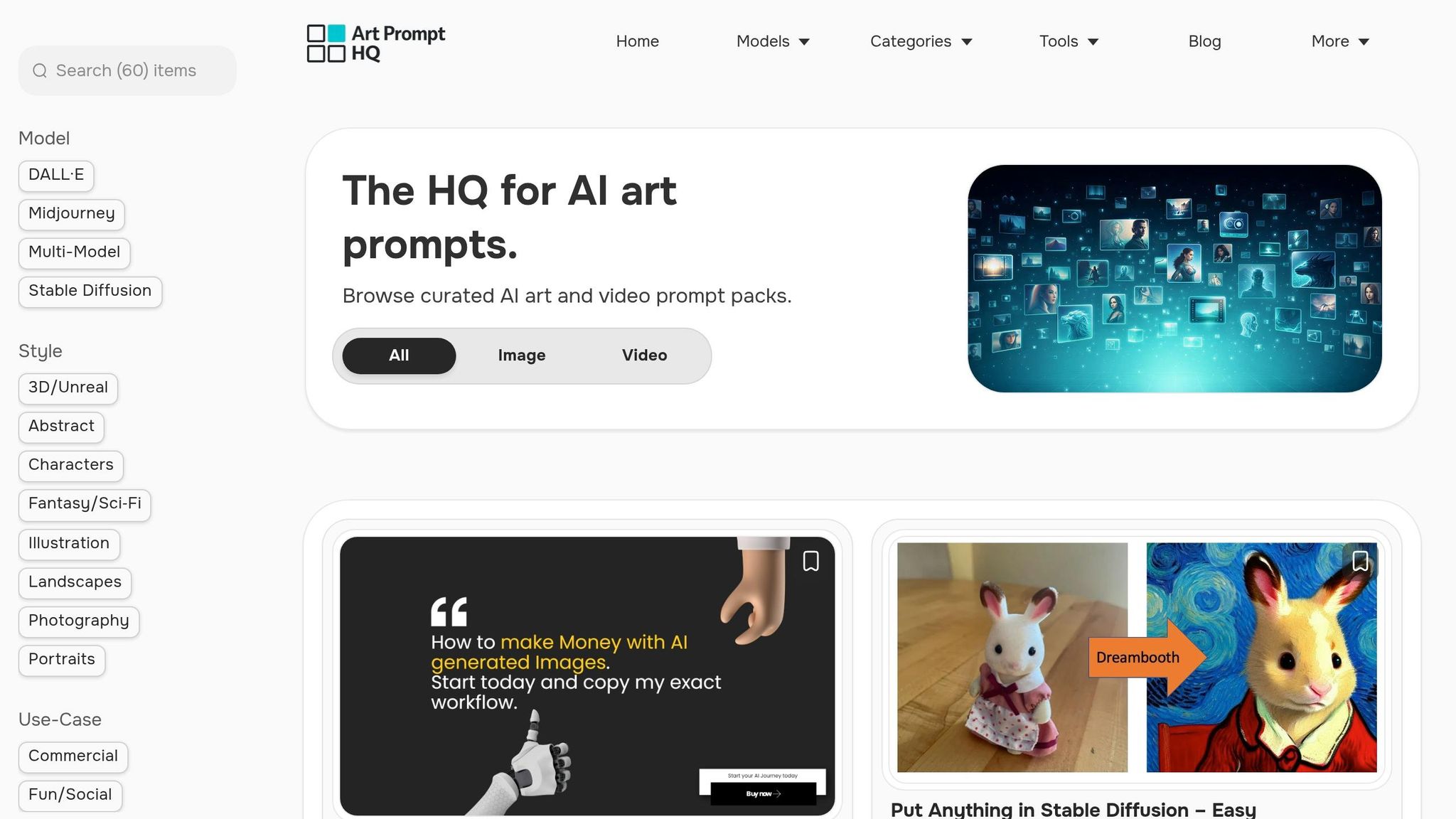
For a closer look at how these principles work in practice, explore examples from Art Prompt HQ. This platform showcases structured discovery, offering curated prompt packs organized by model, style, and use case. You’ll find categories like Midjourney prompts, Stable Diffusion prompts, and best AI art prompts, which highlight how clear organization can enhance usability.
You can also filter prompts by use case - whether it’s for commercial projects, portfolio work, or viral shorts. This tagging and metadata system makes it simple to locate the right pack for your specific needs.
For more insights into prompt design, check out this guide on prompt design principles or browse curated prompt packs to see how creators effectively organize their work. Whether you're working on a personal library or a shared team system, these examples provide a clear roadmap for turning your collection into a functional, searchable tool.
FAQs
What metadata should I require for every prompt?
To keep prompts organized and easy to filter, each one should include important metadata fields. These key fields are:
- Model: Specifies the AI model the prompt is designed for.
- Style: Indicates the artistic or visual style the prompt aligns with.
- Use Case: Describes the specific purpose or application of the prompt.
- Tags: Provides searchable keywords for quick discovery.
- Difficulty Level: Helps users gauge how challenging the prompt may be to use effectively.
Including these details ensures users can locate the right prompts efficiently and tailor them to their needs.
When should I add semantic (vector) search?
When your prompt library expands to the point where keyword search alone struggles to deliver relevant results, consider adding semantic (vector) search. This approach is particularly helpful for processing natural language queries or descriptions that don’t align perfectly with specific tags. Begin with a straightforward keyword search, then incorporate semantic search as an advanced layer. It enhances relevance and improves the user experience by interpreting the meaning and context behind prompts, not just the words used.
How do I rank “best” prompts without burying new ones?
To determine the "best" prompts without sidelining new ones, it's important to balance relevance, popularity, and recency. Ranking signals like user engagement (popularity) and timestamps (recency) can ensure that newer prompts get visibility alongside well-established ones. Offering filters such as “newest,” “most popular,” or “highest-rated” allows users to explore based on their preferences, keeping recent prompts accessible while still highlighting relevant older options.